 ChatGPT
 Perplexity
 Claude
 Grok
GrokUnderstand how a headless CMS works with a custom website, how content moves from the CMS to your frontend, and how developers connect the two.
Analysts expect the headless CMS market to grow from about USD 1.82 billion in 2026 to USD 4.42 billion by 2031, according to a Mordor Intelligence forecast.
Other firms publish different numbers. They also expect growth.
Yet one question comes up first for many teams: how does a headless CMS work with a custom website?
Without an answer, even a small change can wait days. Fixing a single typo can sit in a developer's queue.
This is where a headless CMS comes in.
It lets editors publish on their own. Developers keep full control of the website's code.
In this post, you will see how a headless CMS works, how content moves from the CMS to your website, and how developers connect the two. You will also see a Next.js example.
So, let's get started, shall we?
What is a headless CMS for a blog?
A headless CMS for a blog is a content system that stores your posts and delivers them through an API.
No website is attached to it.
Your writers create, edit, and publish posts inside the CMS.
Your developers build the blog pages with any tool. They pull the posts in through the API.
What does "headless" mean?
The "head" is the frontend. It is the part your visitors see.
A headless CMS removes the head.
It keeps the "body." That is your content and the tools to manage it.
What does a headless CMS store for a blog?
A blog suits this setup well. Every post has the same parts.
A headless CMS stores each part as its own field. Your website can then place each one wherever it wants.
A headless CMS for a blog usually stores:
Posts and their fields
Authors and categories
Images and other media
SEO titles and descriptions
The next section shows how these pieces work together.
How does a headless CMS work? The 30-second answer
A headless CMS works through three main parts:
The CMS. You create and store content here.
The API. It delivers that content as data when your website asks.
The frontend. Your website turns that data into pages.
The basic flow is:
Editor writes a post → CMS stores it → API delivers it → Your website fetches it → Visitor reads it
Think of a restaurant.
The CMS is the kitchen. The API is the waiter. Your website is the dining room.
You can redesign the dining room without touching the kitchen.
You can even open a second dining room, such as a mobile app. It serves the same food.
That is headless CMS explained in short.
How does a headless CMS work with a custom website?
A headless CMS works with a custom website by letting your website's own code fetch content from the CMS API.
You build the pages, the design, and the routes.
The CMS stores the posts.
When a page loads or builds, your code asks the API for the post. It then fills your template with the data.
The CMS never touches your design or your hosting.
Your website never touches the CMS editor.
The API is the only link between them.
The next sections zoom in on each part.
How does a headless CMS separate content management from frontend development?
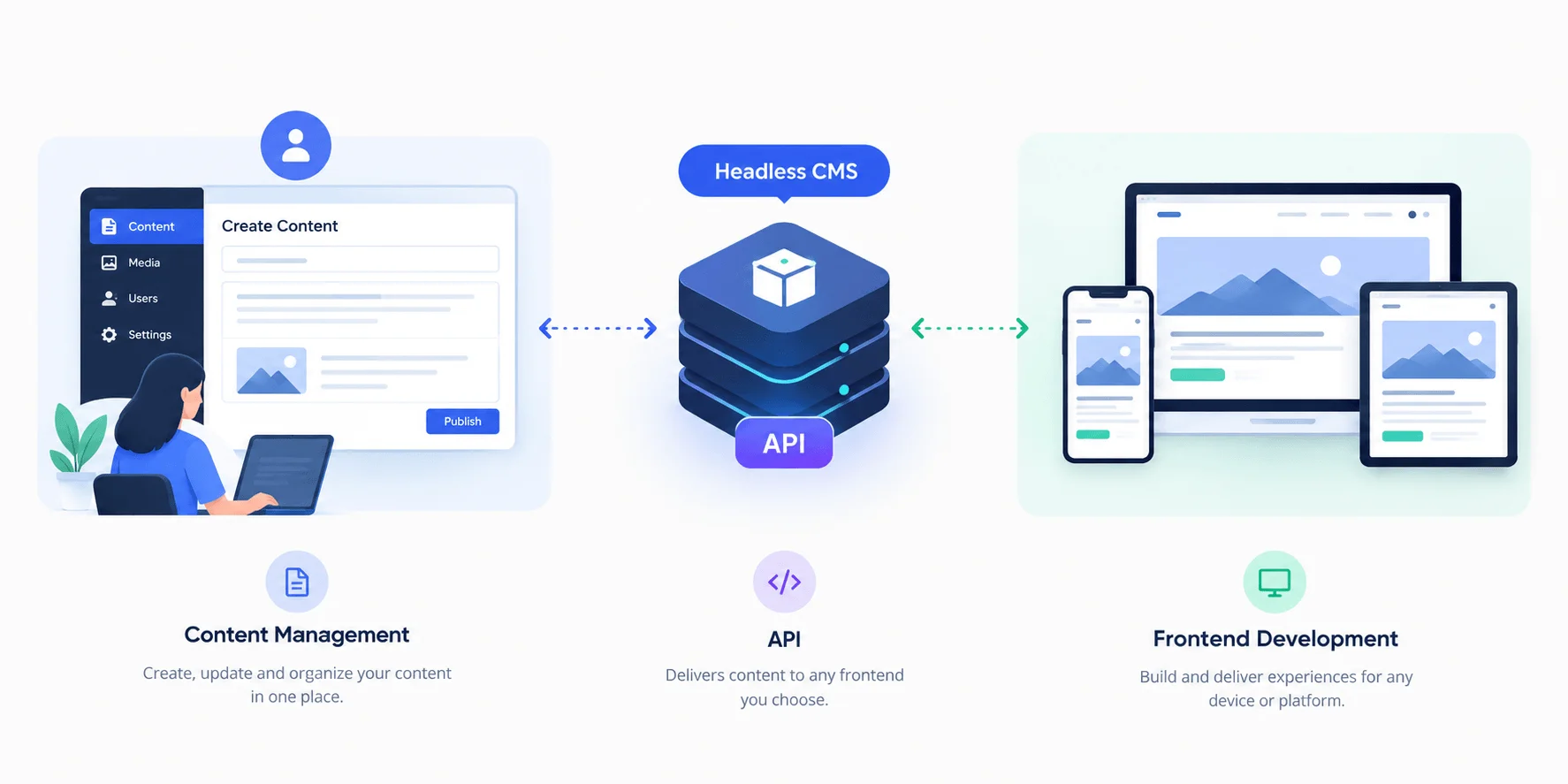
A headless CMS separates the two by storing your content as plain data. No design is attached.
The CMS does not know what your website looks like.
Your frontend decides how to display the data.
Because neither side depends on the other's code, editors and developers can work at the same time.
A traditional CMS mixes content and layout in one system. Change the layout, and you often touch the content setup too.
A headless CMS cuts that link.
Who owns what?
Role | Works in | Owns | No longer waits for |
|---|---|---|---|
Editors | The CMS | Writing, images, SEO fields, review, publishing | A developer to ship a text change |
Developers | Code editor and Git | Design, layout, speed, hosting | Content to be finished before they build |
What is a content model?
The two sides meet at one shared agreement. It is called the content model.
A content model lists the fields every blog post has. For example:
Title
Slug (the URL ending)
Body
Cover image
Author
Publish date
SEO title and description
Editors fill in those fields. Developers read those fields.
Neither side needs to see the other's tools.
That is why a typo fix takes seconds.
The headline is a field in the CMS. An editor changes the field.
The website picks up the new value the next time it fetches that post.
No release needed.
Can marketers publish without changing the frontend?
Yes.
Marketers can write, edit, and publish posts in the CMS without touching the frontend. This works as long as the post uses fields your website already shows.
The frontend reads the content through the API. A new post appears on your site with no code change.
Marketers can handle these tasks on their own:
Write, edit, and publish posts
Update titles, images, and SEO fields
Fix typos and change dates
Developers step in only when you add something new to the site:
A new type of content
A new field, such as "reading time"
A new page layout or design change
A new field needs a small frontend change. Your website must know where to show it.
Once a developer adds it, marketers fill it in like any other field.
How does content get from a CMS to a website? The 5-step headless CMS content flow
Content gets from a headless CMS to a website in five steps.
The first three happen inside the CMS. The last two happen between your website and the CMS API.
Create. An editor writes the post and fills in the fields: title, body, image, author, and more.
Review. Teammates comment, fix, and approve the draft. This is also where you add the meta title and description.
Publish. The editor clicks publish. The CMS marks the post as live and makes it available through its API.
Request. Your website asks the API for the post. It sends a request to a URL, much like a browser does.
Render. The API replies with the post as data. Your frontend turns that data into a finished page.
Steps 1 to 3 are the content team's job.
Steps 4 and 5 are your code's job.
The API sits in the middle and connects them.
When does your website ask for the content?
Your website can ask at three different moments.
Each choice changes how fresh and how fast your pages feel.
Timing | What happens | Best for |
|---|---|---|
At build time | Your site fetches all content when you build it. Pages load very fast. New posts show up after the next build. | Sites that publish a few times a week |
On every visit | Your site fetches content each time someone opens a page. Pages are always current. Your server does more work. | Pages that change often |
On publish | The CMS sends your site a message (a webhook) when you publish. Your site refreshes only the changed page. | Blogs that want speed and fresh content together |
The third option fits a blog well.
Editors get fast updates. Readers get fast pages.
Check that your CMS supports webhooks before you plan around it.
How does a headless CMS deliver content? Meet the API
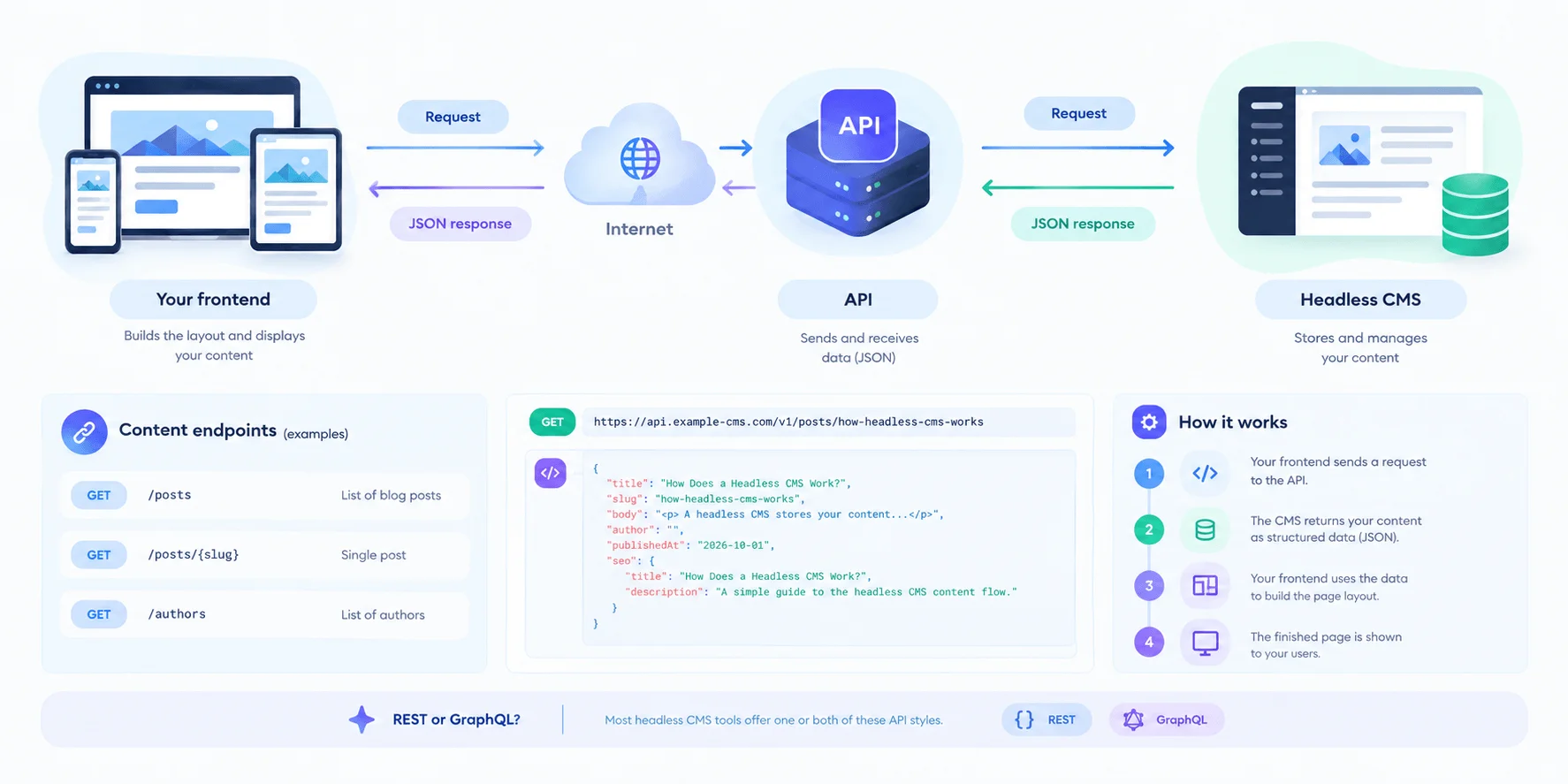
A headless CMS delivers content through an API.
Your website sends a request over the internet. The CMS replies with your content as structured data, usually in a format called JSON.
No page layout comes with it. Your frontend adds the layout.
What is an API, in simple words?
Think of an API as a menu of web addresses.
Each address returns one kind of content.
One address returns a list of blog posts. Another returns a single post. A third returns your authors.
How does a headless CMS work with an API?
Your website sends this request:
GET https://api.example-cms.com/v1/posts/how-headless-cms-works
The CMS replies with data like this:
{
  "title": "How Does a Headless CMS Work?",
  "slug": "how-headless-cms-works",
  "body": "<p>A headless CMS stores your content...</p>",
  "author": "",
  "publishedAt": "2026-10-01",
  "seo": {
    "title": "How Does a Headless CMS Work?",
    "description": "A simple guide to the headless CMS content flow."
  }
}
This is a sample. Your CMS uses its own address and field names. Read its API docs for the real ones.
Your frontend takes that data and drops each field into your page template:
The
titlegoes in the heading.The
bodygoes in the article area.The
seofields go in the page head.
REST or GraphQL: which API style will you use?
Most headless CMS tools offer one or both of these styles.
Style | How you ask | What you get back | Good for |
|---|---|---|---|
REST | You call a different URL for each content type | A full record each time | Simple setups and easy caching |
GraphQL | You call one URL and list the exact fields you want | Only the fields you asked for | Pages that need data from many places |
Both work well for a blog.
If you are new to APIs, start with REST. You can add GraphQL later.
How do you keep your API keys safe?
Public blog content usually needs only a read-only key.
Never put a key that can edit content into your frontend code. Visitors can see frontend code.
Keep write keys on your server, away from the browser.
How do developers connect a headless CMS to a custom website? Your 6-step checklist
Developers connect a headless CMS to a custom website by sending API requests from the website's code. They turn the replies into pages.
Any stack that can send a web request can do this. JavaScript, Python, PHP, and Ruby all work.
The CMS does not care what your website is built with.
Here is how to connect a headless CMS to a custom website, from planning to launch:
Plan your content model. List the fields every blog post needs. Agree on them with your editors before you write code. Changing fields later costs more than planning them now.
Get your API address and key. Open your CMS settings. Copy the API base URL. Create a read-only key. Store the key in an environment variable, such as a
.envfile. Never store it in your code.Write a fetch function. Build one small function that calls the API and returns the data. Every page will use it. One function means one place to fix problems.
Build your pages. Create a blog list page and a single post page. Place each field where it belongs. Send the SEO title and description to the page head.
Decide when your site refreshes. Pick build time, every visit, or on publish. If your CMS offers webhooks, connect one so a publish updates your site.
Test with one real post. Publish a test post. Check the title, image, and URL. Edit it and publish again. Confirm the change shows up.
That is how a headless CMS connects to a website.
Once it works, your editors publish on their own. Your developers go back to building features.
How does a headless CMS work with Next.js?
A headless CMS works with Next.js by letting your pages fetch content from the CMS API on the server. Next.js then renders it as HTML.
You write one fetch function and one page template.
The CMS supplies the content. Next.js supplies the speed.
What does the fetch function look like?
// lib/cms.js
const API_URL = process.env.CMS_API_URL;
const API_KEY = process.env.CMS_API_KEY;

export async function getPost(slug) {
  const res = await fetch(`${API_URL}/posts/${slug}`, {
    headers: { Authorization: `Bearer ${API_KEY}` },
    next: { revalidate: 3600 }, // refresh cached content every hour
  });
  if (!res.ok) return null;
  return res.json();
}
What does the blog post page look like?
// app/blog/[slug]/page.js
import { notFound } from "next/navigation";
import { getPost } from "@/lib/cms";

export async function generateMetadata({ params }) {
  const { slug } = await params;
  const post = await getPost(slug);
  if (!post) return {};
  return { title: post.seo.title, description: post.seo.description };
}

export default async function PostPage({ params }) {
  const { slug } = await params;
  const post = await getPost(slug);
  if (!post) notFound();

  return (
    <article>
      <h1>{post.title}</h1>
      <div dangerouslySetInnerHTML={{ __html: post.body }} />
    </article>
  );
}
This is sample code. Swap in your CMS's real API address and field names.
What does each part do?
The
.envvalues keep your API address and key out of your code. They have noNEXT_PUBLIC_prefix, so Next.js keeps them on the server.getPostrequests one post and returns it as data.generateMetadatasends your SEO title and description to the page head.PostPageturns the data into the page your visitor sees.revalidatetells Next.js how often to fetch fresh content.
Want edits to appear the moment you publish?
Add a webhook route that calls revalidatePath for the changed post.
Your editors then see updates live. They do not wait for the hour to pass.
One safety note: the page above inserts the post body as HTML.
Only do this with content from your own CMS, where your team controls what gets published.
Headless CMS frontend: what can you build on top?
A headless CMS frontend can be any website or app that can call an API.
You pick the tools. The CMS does not limit you.
Popular choices for a headless CMS with a custom website include:
Next.js, for React sites with fast, search-friendly pages
Nuxt, for Vue sites
Astro, for content-heavy sites that ship very little JavaScript
SvelteKit, for Svelte sites
Plain HTML and JavaScript, for small sites with simple needs
Mobile apps, for iOS and Android readers
You can also point several frontends at the same content.
Your blog, your help center, and your app can all read one set of posts.
Editors write once. Every frontend gets the update.
Headless vs traditional CMS: what changes?
A headless CMS gives you more freedom. It also asks for more setup.
Here is the honest comparison:
Traditional CMS | Headless CMS | |
|---|---|---|
Where content lives | Mixed with themes and templates | Separate from the frontend |
Frontend | Built-in themes | Any framework you choose |
How pages are delivered | The CMS builds the pages | An API sends data to your code |
Publishing to many places | Copy and paste | One source, many frontends |
Developer freedom | Limited by the theme system | Full control over design and speed |
Setup effort | Low at the start | Higher at the start, because developers build the frontend |
If you have a developer and a custom website, the extra setup pays off.
If you need a simple blog live today with no developer, a traditional CMS may fit better.
Why use a headless CMS instead of WordPress?
Use a headless CMS instead of WordPress when you want full control over your website's code, design, and speed.
You may also want to publish the same content in more than one place.
By default, WordPress ties your content to its themes and its page system.
A headless CMS does not.
Here are the main reasons teams choose headless:
Free choice of frontend. Build with Next.js, Nuxt, Astro, or any tool your developers know. You do not work inside a theme.
One source, many places. Your blog, your help center, and your app can read the same posts through one API.
Separate editing and public sites. Visitors load your website. Your team edits in the CMS, which lives somewhere else.
A cleaner developer workflow. Your frontend sits in its own code repository. Your team can test and deploy it on its own schedule.
WordPress can also run headless. Its REST API lets a custom frontend fetch posts.
That setup gives you the same freedom. But you still maintain a full WordPress install behind the scenes.
When is WordPress still the better choice?
WordPress is the better choice when you need a blog live today with no developer.
It offers ready-made themes, plugins, and a visual way to build pages.
A headless CMS asks your team to build the frontend first.
If you have no developer, that extra work can outweigh the benefits.
5 mistakes that break a headless CMS setup (and how to fix them)
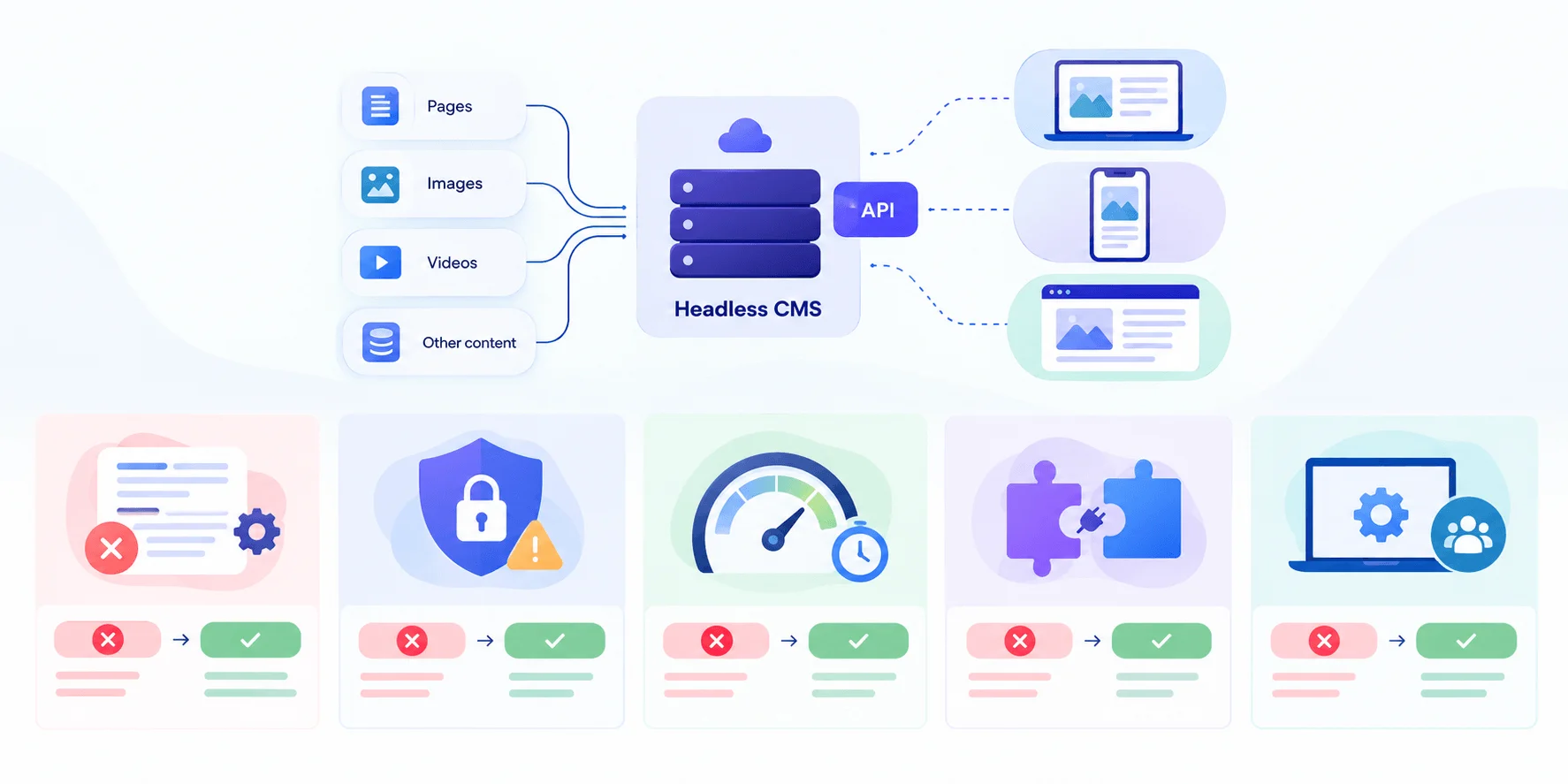
Five mistakes are easy to make. Each one has a quick fix.
Skipping the content model. Developers guess the fields, and editors find out later. Fix: sit down together first and list every field a post needs.
Putting a write key in frontend code. Anyone can read frontend code. Fix: use a read-only key for public content. Keep any write key on your server.
Fetching on every visit with no cache. Your pages slow down and your API gets busy. Fix: cache responses. Refresh them on a timer or when you publish.
Forgetting the SEO tags. The CMS stores your meta title and description, but it does not put them on your pages. Fix: map the SEO fields in your page template on day one.
Having no preview. Editors cannot judge a post they cannot see. Fix: build a preview page that shows drafts on your real site before anyone publishes.
Fix these five, and your editors and developers stay out of each other's way.
Frequently asked questions about how a headless CMS works
How does a headless CMS work in simple words?
A headless CMS stores your content in one place and sends it to your website through an API. Editors write and publish in the CMS. Your website asks the API for the content and shows it to visitors. The CMS has no built-in design, so you can build the frontend with any tool you like.
What is the difference between a headless CMS and a traditional CMS?
A traditional CMS stores content and builds your web pages in one system. A headless CMS stores content only. It sends it to your frontend through an API. The headless approach gives developers full control over design and speed. The traditional approach is quicker to start with.
Can you connect a headless CMS to any custom website?
Yes. Any website that can send a web request can fetch content from a headless CMS API. That includes sites built with Next.js, Nuxt, Astro, plain JavaScript, Python, or PHP. You write code that calls the API and turns the data into pages.
How does a headless CMS deliver content to a website?
A headless CMS delivers content through an API. Your website sends a request to a URL. The CMS replies with the content as JSON data. You can fetch it at build time, on every visit, or when you publish.
Is a headless CMS good for SEO?
It can be, but your frontend must do the work. The CMS stores your meta titles, descriptions, and headings. Your website must print them on each page, create a sitemap, and load fast. You control each of those pieces. That helps once you set them up well.
How does a headless CMS work with Next.js?
Next.js fetches content from the CMS API on the server, then renders it as HTML. You write one function to call the API and one template to display each post. Next.js can cache the result and refresh it on a timer or when you publish.
Is a headless CMS a good fit for a blog?
Yes, when you have a developer and want full control over your site's design and speed. Editors get one place to write and publish. Developers build the frontend with any tool. If you need a simple blog live today with no developer, a traditional CMS may suit you better.
What should you look for in a headless CMS?
Look for a clear API with good docs and a content model that fits your posts. Check for a review and publish workflow your editors can use. Check that it supports webhooks if you want instant updates. Also check how it handles preview, roles, and API keys. These shape daily work for your team.
Final Thoughts
A headless CMS works by storing your content in one place and delivering it through an API to your custom website.
Editors manage the content. Developers build the frontend. The API connects the two.
You saw the full content flow: create, review, publish, request, and render.
You saw how developers connect the CMS in six steps, and how Next.js fetches and shows a post.
You also saw the mistakes to avoid, from exposed keys to missing SEO tags.
Ready to try it yourself? Start small: define your content model, connect one test post to a CMS API, and watch it appear on your site.
Write your content once. Let the API carry it to every frontend you build.
Written by
Team Contioreach
Creates expert content on SEO, AI search, content strategy, and automation to help businesses grow their online visibility.