Content Marketing

Headless CMS explained: The ultimate guide

Most teams assume headless CMS means a full rebuild and a bigger dev team. Here is what a headless CMS actually is, how it works step by step, and when it is genuinely the wrong choice for your stack.

May 16, 2026
18 min read
Headless CMS explained: The ultimate guide

Introduction

Most teams think switching to a headless CMS means ripping out WordPress and hiring three more developers. That misunderstanding has stalled migrations for years — and it's exactly why headless CMS explained clearly, without vendor spin, matters more in 2026 than ever.

A headless CMS is a content management system that stores and delivers content without controlling how or where it appears. Instead of coupling the backend with a fixed frontend template, it sends content through an API to any application that requests it — a website, mobile app, digital signage display, or AI workflow.

By the end of this guide, you'll be able to evaluate whether headless architecture fits your team's actual needs, understand the real tradeoffs developers and marketers face, and spot the situations where going headless is genuinely the wrong call.

The core concept is simpler than the jargon suggests — here's what's actually happening under the hood.

What is a headless CMS?

A headless CMS is a content management system that stores and delivers content without controlling how or where it is displayed. Instead of bundling the backend (where content lives) with a fixed frontend (how it looks), a headless CMS delivers content through an API to any application — website, mobile app, digital signage, or AI tool — that requests it.

Think of it like a commercial kitchen. The kitchen prepares meals — that's the backend where content gets created, organized, and stored. Delivery drivers (APIs) carry those meals to restaurants, food trucks, and catering events.

Each venue has its own layout, its own plates, its own atmosphere. The kitchen never dictates how the dining room looks. It just makes the food and hands it off.

A traditional CMS — also called a monolithic CMS — does the opposite. Systems like WordPress, Drupal, and Joomla bundle the kitchen and the dining room into a single building. Content lives inside theme-specific templates, and pulling it out for a different use case means fighting the architecture the whole way.

Anyone who has tried redesigning a WordPress site knows this pain firsthand. You swap themes and suddenly half your content is trapped in shortcodes, widget areas, and page builders that only work with the old layout. The content was never truly separate from the presentation — it just looked that way on the surface.

Here's where most explanations of headless CMS get sloppy: "headless" does not mean there is no frontend. It means the CMS itself does not provide or dictate the frontend. A headless CMS still needs a presentation layer — a Next.js site, an Astro build, a React Native app — but the development team chooses and builds that layer independently.

The CMS handles content. The frontend handles display. They communicate through APIs and nothing else.

That distinction matters more than it sounds. It means the term "headless" can be genuinely misleading for beginners who hear it and assume they're getting a backend-only tool with no way to actually show content. In reality, the frontend just shifts from "included but rigid" to "your choice but your responsibility." That trade-off is the entire architecture in a sentence.

📌 That trade-off is the entire architecture in a sentence.
Understanding what headless is sets the stage — now let's trace exactly how content moves through the system.

How a headless CMS actually works, step by step

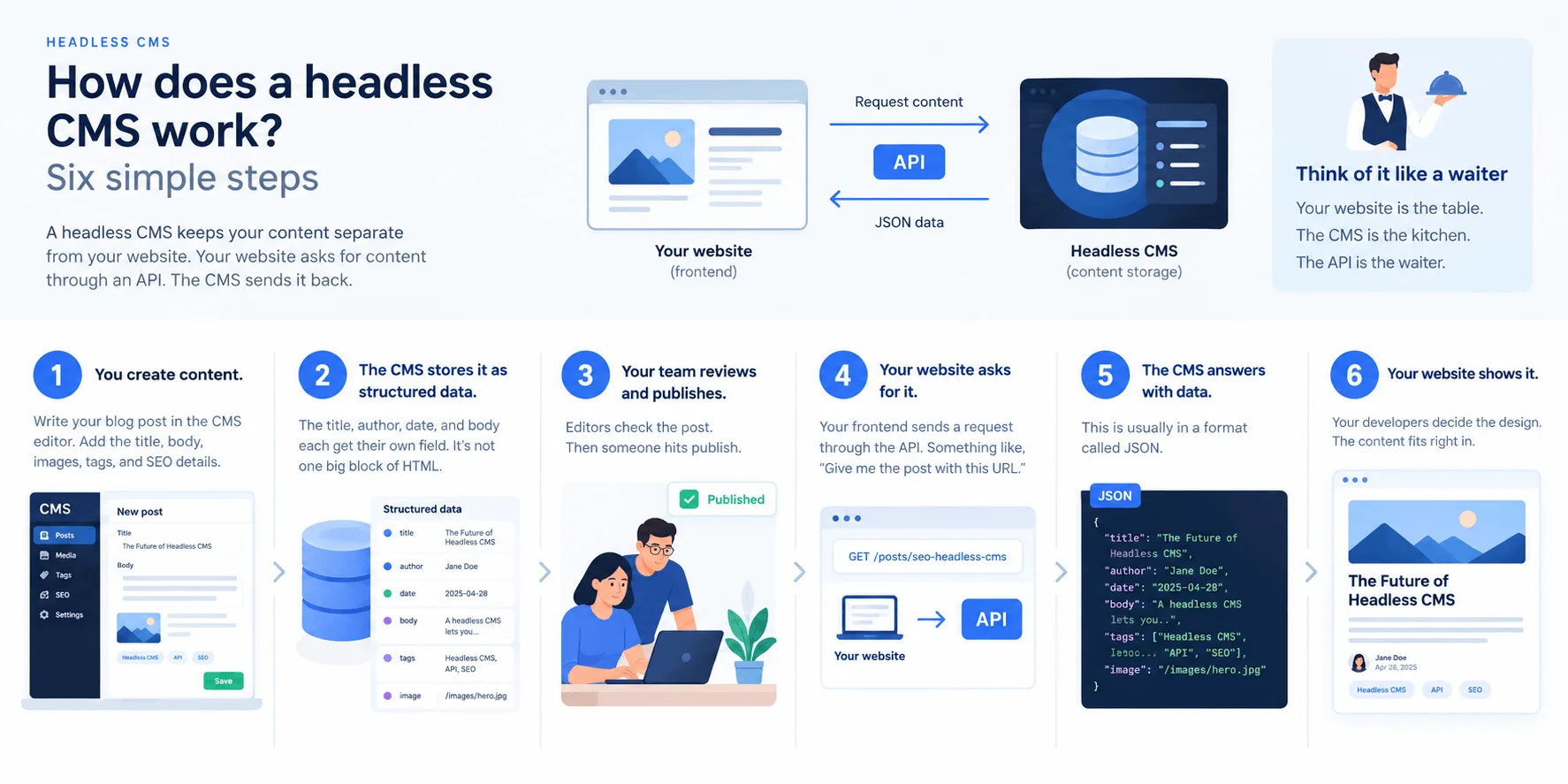
Most explanations of headless CMS architecture hand-wave through the actual mechanics. Here's the five-step flow that every headless system follows, written so a marketing manager can follow it just as well as a developer.

  1. A content creator writes in the backend. They open a web-based editor — think a clean form with fields for title, body text, images, and metadata. No templates, no design decisions. They're writing pure content, not building a page. If you've ever filled out a structured form in Airtable or Notion, the experience feels similar.
  2. The CMS stores content as structured data, not pages. This is the part that trips people up. A traditional CMS saves content as "the About page" or "the March blog post." A headless CMS stores it as structured content types — a "Blog Post" type with defined fields like author, publish date, body, and category. The content has no opinion about where it will appear.
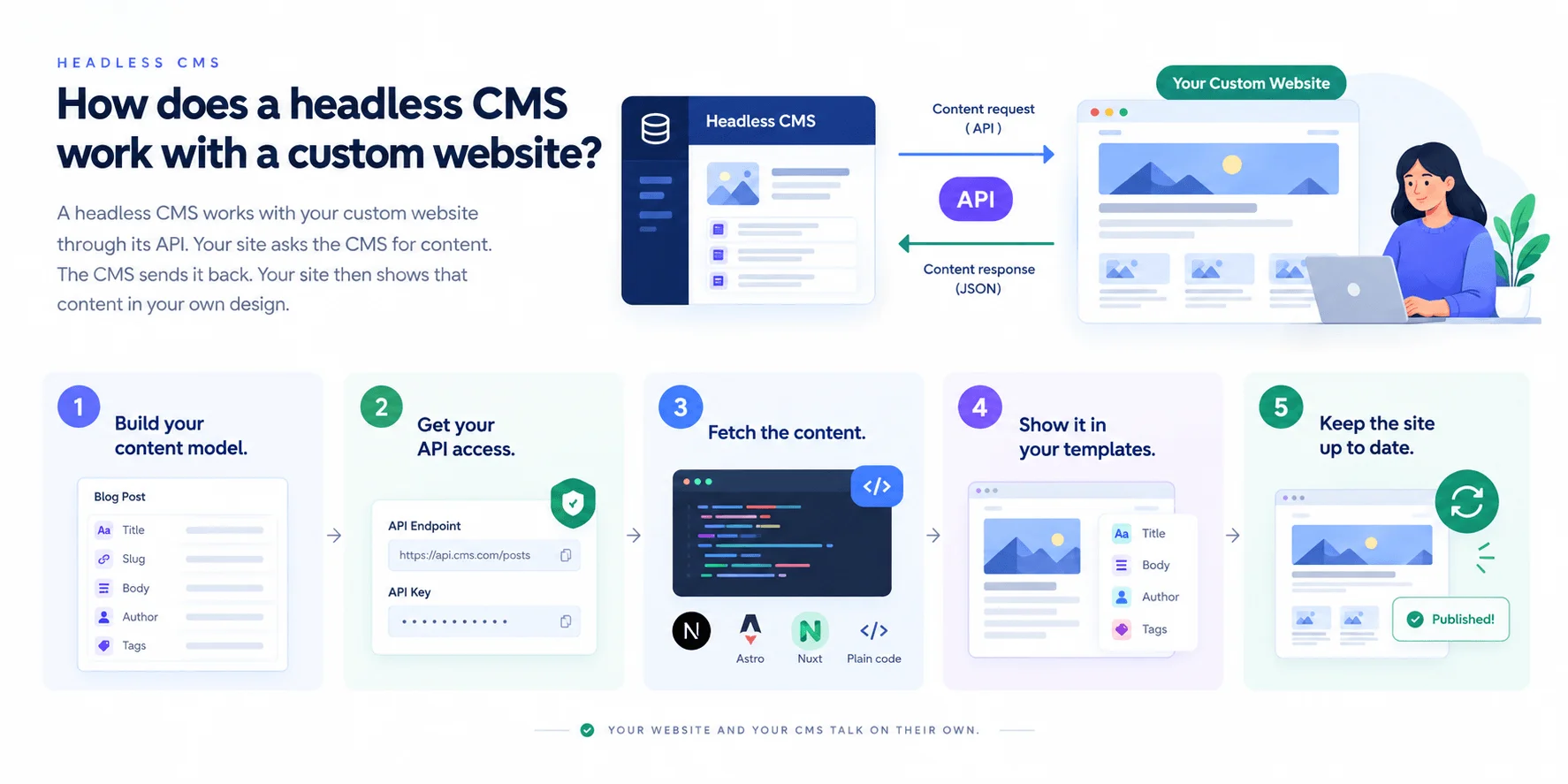
  3. An application requests content through an API. When a website, mobile app, or any other frontend needs content, it sends a request to the CMS's API. Two main API types dominate here: REST, which works like ordering a fixed item off a menu — you get a predefined bundle of data back. GraphQL lets the requesting app build a custom order, asking for only the exact fields it needs and nothing more.
  4. The API delivers raw content data. The response comes back as JSON — a lightweight, machine-readable format that every modern programming language can parse. No HTML, no CSS, no styling. Just structured text and media references.
  5. The frontend renders the final experience. A framework like Next.js, Astro, Nuxt, or SvelteKit receives that JSON and turns it into the visual page, screen, or interface the end user actually sees. The developer controls every pixel of this presentation layer.

Steps 3 through 5 happen independently for every connected channel. A website built in Astro, a React Native mobile app, and a digital kiosk running a custom interface all hit the same API, get the same content, and render it their own way. When someone on the content team fixes a typo in step 1, every channel reflects that change on its next request — no re-publishing, no copy-pasting between systems.

That moment is the real "aha" for most teams. After years of updating the same announcement in three different places, watching one backend edit cascade everywhere simultaneously feels almost too good to be true. But the trade-off is real and worth stating plainly: this multi-step process has more moving parts than a traditional CMS where you click "Publish" and the page goes live.

Someone has to build and maintain each frontend. Someone has to manage the API integration. For a solo blogger, that overhead rarely makes sense.

The API layer is the architectural boundary that makes all of this work — and the source of both the freedom and the complexity. Everything on the CMS side (content storage, user permissions, versioning) stays vendor-managed. Everything on the frontend side stays developer-controlled. Neither side needs to know how the other is built, which is exactly why a team can swap their website from Next.js to Astro without touching a single piece of content in the CMS.

⚠️ For a solo blogger, that overhead rarely makes sense.
With the mechanics clear, the natural question becomes how this compares to the traditional CMS most teams already know.

Headless CMS vs. traditional CMS: what actually changes

WordPress launched in 2003. Drupal hit 1.0 in 2001. Both were built when "digital presence" meant exactly one thing: a website. Traditional CMS platforms coupled content storage directly to presentation templates — an efficient design for a single-channel world, but one that starts breaking the moment you need to push content anywhere beyond that original website.

I saw this play out firsthand with a mid-size e-commerce company running WordPress. They needed a mobile app. Straightforward request, right?

Except their product descriptions, FAQs, and promotional content were all trapped inside WordPress's rendering layer — tangled with PHP templates, shortcodes, and theme-specific formatting. Extracting that content cleanly required a near-complete rebuild. That's the moment most teams realize what "coupled" actually costs.

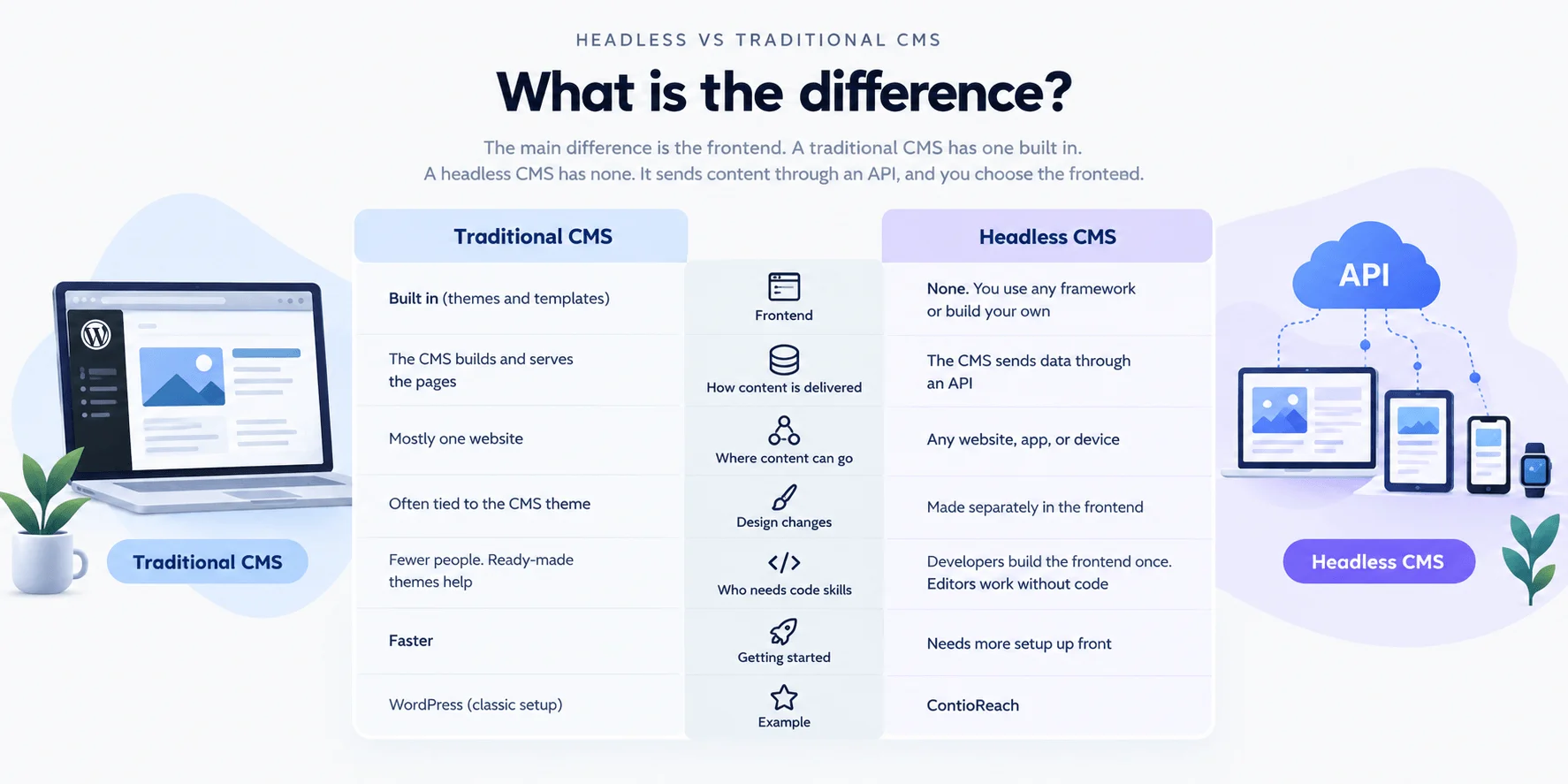
Here's how the two architectures compare across the dimensions that matter most:

DimensionTraditional CMSHeadless CMS
Content storageStored alongside templates and presentation logicStored as structured data, independent of display
Frontend controlLocked to built-in themes/templatesAny framework — React, Next.js, Astro, Swift, etc.
Multi-channel deliveryRequires plugins or workarounds per channelNative via API to any device or platform
Developer flexibilityConstrained by CMS architecture (e.g., PHP for WordPress)Full freedom to choose languages and tooling
Marketer autonomyStrong — WYSIWYG editing, drag-and-drop, live previewVaries — some platforms offer preview; others don't
ScalabilityVertical scaling, plugin bloat under loadAPI-layer caching, CDN-friendly by design
Time-to-launch (simple site)Hours to daysDays to weeks (frontend must be built separately)
Technical complexityLow — one system to manageHigher — requires frontend development resources

The honest reading: for a simple blog or brochure site with no plans beyond a single website, a traditional CMS is often the faster, cheaper, better choice. Headless wins when content needs to reach multiple channels — apps, kiosks, third-party platforms — or when the development team wants frontend independence. WP Engine's 2024 developer survey found that 73% of enterprise development teams had adopted or were actively evaluating headless architecture, which signals where the industry is heading, but adoption rate alone shouldn't drive a decision for a five-page marketing site.

Headless vs. decoupled CMS: a quick distinction

A decoupled CMS retains an optional built-in frontend while also exposing content through an API. Think of it as a hybrid: teams can use the default rendering layer for quick projects and the API for everything else. Drupal operating in decoupled mode is the classic example.

A pure headless CMS ships with no presentation layer at all — every frontend must be built from scratch or connected via API. For most practical decisions, the headless-versus-traditional distinction matters far more than the headless-versus-decoupled nuance, because the real question is whether your content architecture is channel-independent or locked to a single output.

Knowing how the architectures differ is one thing — understanding what that difference feels like for each role is another.

What headless CMS actually means for developers, marketers, and business owners

Most "benefits of headless CMS" lists recite the same three words: speed, flexibility, scalability. That tells nobody anything useful. What actually changes depends entirely on which seat you occupy — and the daily frustrations that come with it.

For developers: framework freedom and multi-channel delivery

Pick Next.js. Pick Astro. Pick SvelteKit or Nuxt.

A headless CMS doesn't care. Because there's no coupled theme layer, the frontend is entirely the engineering team's decision — framework, build tooling, deployment pipeline, all of it. That freedom is real, and after years of fighting WordPress theme hierarchies and Drupal's Twig templating to do anything non-trivial, it feels enormous.

Content models become first-class citizens too. Teams can version-control schema definitions alongside application code in Git, which means a content model change goes through the same pull request and review process as a feature branch. One codebase can feed a marketing site, a React Native app, and an in-store kiosk — all pulling from the same API.

Here's what the cheerful pitch leaves out: framework freedom means framework responsibility. There's no pre-built theme to fall back on. If the frontend team can't build a performant, accessible UI from scratch, headless amplifies that gap instead of hiding it.

The mistake most teams make is assuming headless reduces frontend work. It shifts it — from fighting a CMS's opinions to owning every rendering decision.

For marketers and business owners: faster publishing and less lock-in

Picture a marketing manager who needs a homepage banner updated for a flash sale. In a traditional WordPress setup with a custom theme, that often means filing a ticket, waiting for a developer to touch a template file, then pushing through staging. Three days for a banner change. That scenario isn't hypothetical — it was the norm at a 40-person ecommerce brand whose content team I worked with in 2024.

With a properly built headless frontend, the marketer edits structured content in the CMS — headline, image, CTA link — and the change goes live without a developer touching code. Structured content also means one product description can feed the website, email campaigns, and a mobile app without reformatting each time. That cross-channel repurposing alone can cut content production time in half for teams publishing across three or more channels.

Business owners care about a different angle: vendor lock-in. Traditional platforms tie content to their rendering layer, so switching means migrating both content and presentation. A headless architecture lets a company swap its frontend from Gatsby to Astro — or add an AI chatbot channel — without replacing the CMS or touching stored content. That's not theoretical flexibility; it's insurance against re-platforming costs that routinely hit six figures for mid-market companies.

Now the honest caveat most vendors won't mention: for marketers, pure headless can initially feel like a downgrade. The familiar drag-and-drop visual editor? Gone in most headless setups.

What replaces it — structured fields, preview environments, API-driven rendering — only becomes faster after the frontend team invests in building proper editing tooling. Skip that investment and the content team ends up slower than they were on WordPress. The benefits are real, but they're back-loaded behind setup effort that takes weeks, not hours.

Understanding the benefits by role makes the next question sharper: when should a team actually make the switch — and when should they not?

When to go headless — and when it is the wrong call

Most headless CMS guides are written by vendors selling headless platforms. They will never tell a reader to walk away. This one will.

Here is a pattern that plays out constantly: a small business owner reads about headless architecture, gets excited about "future-proofing," then spends $8,000–$15,000 and three months paying a freelance developer to build a custom Next.js frontend for a five-page brochure site. WordPress with a $50 theme would have launched in a weekend. That money and time never comes back.

Headless architecture makes sense when the problem actually demands it:

  • The team publishes to multiple channels — web, mobile app, in-store kiosk, voice assistant, or AI-powered interfaces
  • Frontend developers want to pick their own framework (React, Astro, Svelte) instead of fighting theme constraints
  • Content needs to be structured once and reused across properties without copy-pasting between systems
  • The business plans to expand to new channels within 12–24 months
  • The project is a content-driven application, not just a website — think product catalogs, documentation hubs, or multi-tenant platforms

Skip headless when:

  • The entire project is a blog or brochure site with one web property
  • No frontend developer exists on the team and there's no budget to hire one
  • A visual page builder is a hard requirement from day one
  • Time-to-launch matters more than architectural flexibility, and the site serves a single channel

The concept most people miss is total cost of ownership. A headless CMS typically costs less in licensing than a WordPress setup loaded with premium plugins. But it shifts expense to frontend development — somebody has to build and maintain the presentation layer.

The break-even point depends on two variables: how many channels the content serves and whether the team already includes developers. A company pushing content to three channels (website, React Native app, AI chatbot) will recoup that frontend investment quickly. A solo founder running one blog will not.

Some readers should genuinely close this guide and install WordPress. That is not a failure — it is the right architectural decision for their situation.

Is headless CMS good for beginners?

Directly: a pure headless CMS with no built-in frontend requires development skills. A non-technical beginner building their first website should start with a traditional CMS — full stop. The mistake is assuming "modern" automatically means "better for me."

But the landscape has shifted since 2023. Platforms like ContioReach now eliminate the manual frontend work for content publishing entirely, delivering AI-generated articles through an API to any tech stack without requiring the user to write code or build templates. Visual editing layers on platforms like Storyblok and Builder.io have also lowered the barrier.

Can someone use a headless CMS without developers in 2026? With the right platform, yes — but only if that platform handles the presentation layer automatically or provides pre-built frontends.

The honest filter: if multi-channel delivery or structured reusable content matters to the project, a beginner-friendly headless platform is worth learning. If the goal is simply "get a website live this week," headless adds complexity without a corresponding payoff.

Frequently Asked Questions

What is the difference between a headless CMS and a traditional CMS?

A traditional CMS couples content storage to a fixed presentation layer — changing the design can trap your content. A headless CMS stores content as structured data and delivers it via API to any frontend. This separation enables multi-channel publishing but requires a separately built presentation layer, adding development overhead.

Do I need a developer to use a headless CMS?

A pure headless CMS requires frontend development skills because no presentation layer is included. However, platforms like ContioReach, Storyblok, and Builder.io have lowered this barrier with pre-built frontends and visual editing tools. In 2026, non-developers can use headless CMS — but only if the platform handles presentation automatically.

Is headless CMS worth it for a small business or simple website?

For a simple blog or single-channel brochure site, headless CMS typically is not worth it. The frontend build cost — often $8,000–$15,000 for a custom setup — outweighs the benefits when a traditional CMS with a $50 theme would launch in a weekend. Headless pays off when content must reach multiple channels.

What is the difference between headless CMS and decoupled CMS?

A decoupled CMS retains an optional built-in frontend alongside API access, letting teams use either depending on the project. A pure headless CMS ships with no presentation layer at all — every frontend must be built or connected via API. For most decisions, headless vs. traditional matters far more than headless vs. decoupled.

How does headless CMS work with AI content workflows?

Headless CMS stores content as clean structured data with defined fields and metadata — exactly the format AI systems need to consume, transform, and redistribute content. Unlike HTML baked into WordPress themes, structured API-accessible content enables automated publishing pipelines, AI-powered internal linking, and better visibility in AI-driven search engines like Google's AI Overviews.

Headless CMS and AI: why structured content is the foundation for modern workflows

Most competitor guides explain headless CMS architecture and stop. They miss the reason this architecture matters now: structured, API-accessible content is the only format AI systems can reliably consume, transform, and redistribute. Template-trapped content — HTML baked into WordPress themes, for instance — forces AI tools to scrape, parse, and guess. Structured content hands them clean data with fields, metadata, and relationships already defined.

That distinction shapes three AI use cases that are already reshaping content operations in 2026:

  1. Automated publishing pipelines. A content team imports a keyword list with search volume and intent data, configures tone and style presets, and the system generates full articles, applies cover images, and publishes via API — no manual formatting, no copy-pasting into a WYSIWYG editor. ContioReach, for example, runs exactly this workflow: keyword to published article in three steps, delivering content to any frontend (Next.js, Astro, or a custom stack) through its API. Teams using this kind of pipeline report 12x faster output compared to traditional write-edit-publish cycles.
  2. AI-powered internal linking. Internal linking at scale is tedious and error-prone when done manually. When an AI model trains on a site's sitemap and structured content fields, it can suggest contextual links with far higher accuracy than a human scanning 500 posts. ContioReach's sitemap-trained linking hits 99% accuracy on link suggestions — a number that surprised me, honestly, until I realized the structured data eliminates most of the ambiguity that trips up linking tools built for traditional CMS platforms.
  3. Generative Engine Optimization (GEO). AI search engines like Google's AI Overviews and Perplexity parse structured content, not rendered HTML. A headless CMS already stores content in the format these systems prefer: clean fields, typed data, explicit relationships. A WordPress page requires an AI to reverse-engineer structure from markup. That's a losing game as AI-driven search grows.

Here's the counterintuitive part: the teams getting the most from AI content automation are not the ones removing humans from the process. They're the ones who use automation to eliminate formatting, scheduling, and linking busywork — then redirect editorial time toward strategy, fact-checking, and voice. AI-generated content still requires oversight. A pipeline that publishes 50 articles a week without a human reviewing accuracy and tone will produce garbage at scale, not growth.

The real shift is architectural. Traditional CMS platforms weren't designed to be read by machines. Headless CMS was — and that design choice, made for multi-channel delivery, turns out to be exactly what AI workflows need.

Share this article:

About the Author

Olivia Bennett

Olivia Bennett

Olivia Bennett is an SEO-focused blog writer specializing in creating high-ranking, reader-friendly content. She helps brands boost visibility, authority, and organic traffic through strategic storytelling and data-driven optimization.

Related Articles

Continue Reading

Discover more insights and strategies to help you scale your content marketing.

What is content marketing? A complete guide
Content Marketing

What is content marketing? A complete guide

Most businesses get content marketing wrong from the start — publishing without strategy, then blaming the channel. You'll learn exactly how to build a system that attracts, nurtures, and converts.

Olivia Bennett

Olivia Bennett

Apr 19
Read Article