
 ChatGPT
 Perplexity
 Claude
 Grok
GrokHeadless CMS architecture splits your content from your website. You write and store content in one place, the CMS. Your website, app, or any other frontend pulls that content through an API, usually REST. This headless architecture gives your team one content hub. It gives your developers freedom to use any frontend. ContioReach is a headless CMS built for blogs, so this guide uses a blog in every example. Read on to see the parts, a diagram, a REST example, and a setup you can copy.
Your Blog Feels Slow Because Your CMS Does Too Much
Most blogs slow down for one reason: one system tries to do every job.
Picture your own team. You publish four posts a week.
One Monday, your developer says, "We want to rebuild the blog in a new framework." You freeze. Your posts live inside the old CMS. The old CMS controls the design, the page code, and the database.
The rebuild means moving everything. Every post. Every image. Every link.
Your developer then asks a better question: "What if the content lived in one place, and the website was separate?"
That question is the idea behind headless architecture. You keep writing. Your developer builds any frontend they like. Neither one blocks the other.
The rest of this guide shows how that works. You will follow one blog post from draft to live page.
What Is Headless CMS Architecture? (In Plain Words)
Headless CMS architecture is a setup where the content system and the website live apart and talk through an API. The CMS stores and manages your content. The frontend shows it to readers.
Think of a restaurant. The kitchen makes the food. The dining room serves it. A waiter carries plates between them.
In a headless architecture, the CMS is your kitchen. Your website is the dining room. The API is the waiter.
The "head" is the part readers see: the pages, the design, the layout. A headless CMS removes that head. It keeps the body: the content, the editor, and the rules for managing both.
Here is how it differs from a traditional CMS:
Traditional CMS | Headless CMS | |
|---|---|---|
Where content lives | Inside the same system as the site | In a separate content hub |
Where design lives | Themes built into the CMS | In your own frontend code |
How content reaches readers | The CMS builds each page | Your frontend asks the API for content |
Who picks the tech | The CMS decides | Your developers decide |
Channels you can serve | Mostly one website | Website, app, newsletter, and more |
The big win: you write content once and use it anywhere.
What Are the Components of a Headless CMS? (Headless CMS Structure Explained)
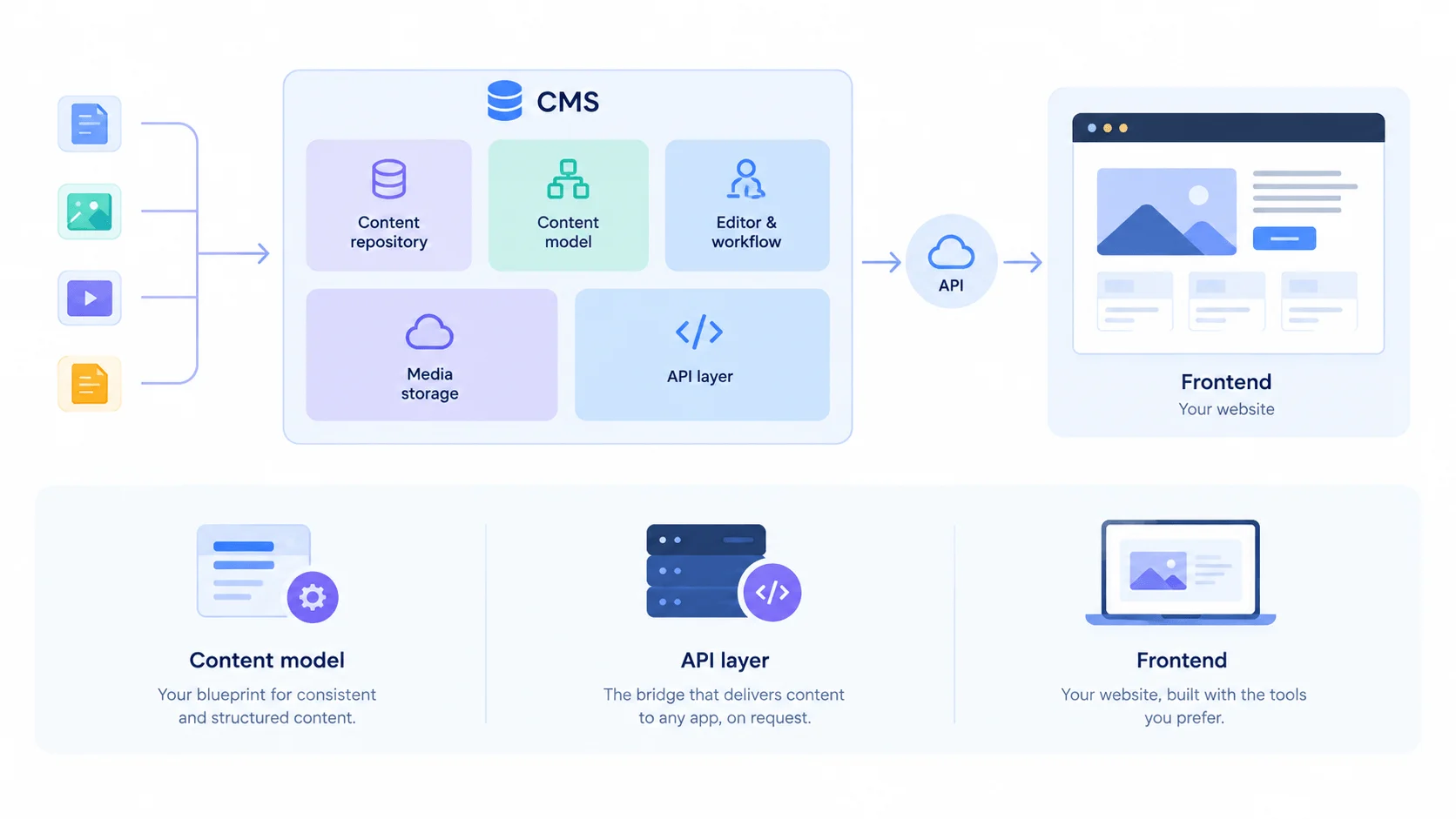
Headless CMS Architecture Infographic (2) (1).webp
The components of a headless CMS are a content repository, a content model, an editor with workflow, an API layer, media storage, and a frontend. This headless CMS structure has six parts. The first five live in the CMS. The sixth is the website you build.
Here is each part, with a blog example:
Component | What it does | Blog example |
|---|---|---|
Content repository | Stores all your content in one place | Every post, author, and category |
Content model | Defines the shape of your content | A "Post" has a title, slug, body, and cover image |
Editor and workflow | Lets your team write, review, and publish | Draft, review, approve, publish |
API layer | Delivers content to any app on request | A REST endpoint that returns posts as JSON |
Media storage | Holds images, video, and files | Cover images and inline screenshots |
Frontend | Shows content to readers | Your Next.js, Astro, or custom blog site |
Let's look at the three parts of this headless CMS structure that people often mix up.
The content model. This is your blueprint. It tells the CMS what a post looks like. Get it right early, and every other part gets easier.
The API layer. This is the bridge. Your frontend never touches the database. It asks the API, and the API answers.
The frontend. This is your website. Developers build it with any tool they like. The CMS does not care.
Headless CMS Architecture Diagram: See the Full Picture
This headless CMS architecture diagram shows the whole flow from left to right. Your team writes in the CMS. The API sends content out. Each frontend pulls what it needs.
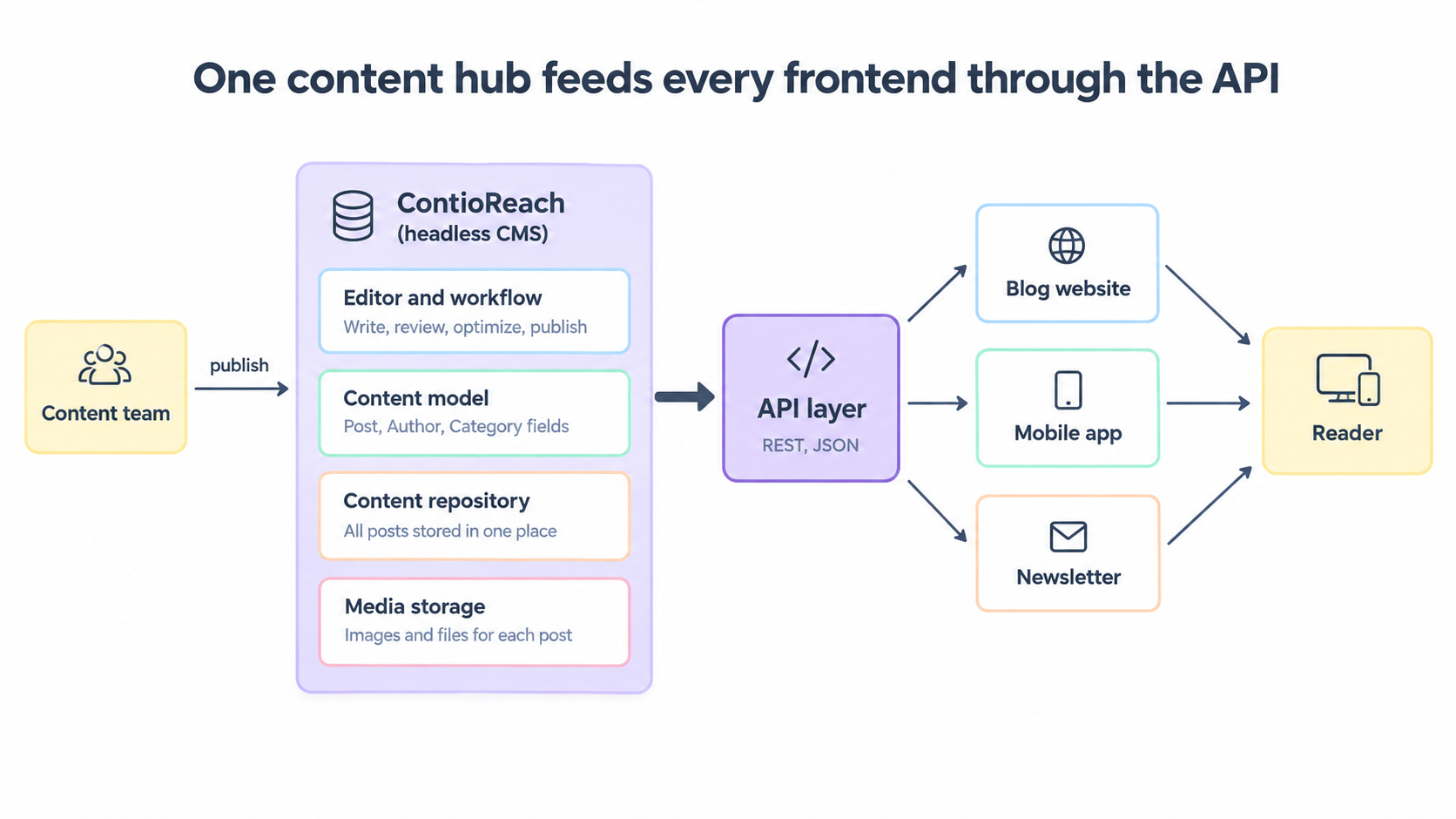
Read it in three steps. Your content team works inside the CMS box. The API layer sits in the middle as the bridge. Your blog, app, and newsletter all read from the same source.
How Does Headless CMS Architecture Work?
Headless CMS architecture works by splitting one job into two. The CMS manages your content. Your frontend shows it. An API carries content from one to the other whenever a page needs it.
How Should a Headless CMS Architecture Work for a Blog?
A headless CMS architecture for a blog should work in five steps: write, review, publish, request, and render. The first three happen in the CMS. The last two happen on your website.
Let's follow one blog post, "5 Ways to Cut Onboarding Time."
You write the post. You open the CMS editor. The content model gives you clear fields: title, slug, body, cover image, author, and category. You fill them in.
Your editor reviews it. The post moves from draft to review to approved. Nobody emails a document back and forth.
You hit publish. The CMS saves the post in the content repository and marks it live.
The frontend asks for it. When a reader opens the page, the website sends a request to the API. The API replies with the post as JSON.
The frontend builds the page. Your site takes the JSON, adds your design, and shows the finished page to the reader.
Your developer touches none of this. Nobody copies text. Nobody pastes code. The page just appears.
One more piece helps: a webhook. A webhook is a message the CMS sends when something changes. Your site hears it and refreshes the page, so readers always see the latest version.
That is how a headless CMS architecture should work for a blog. The CMS owns the content. The frontend owns the look. The API keeps them in sync.
Keep these four rules in mind for your own blog:
Let the CMS own the content. Keep design out of it.
Let the frontend own the look. Keep content out of the code.
Use the API as the only link between them.
Add a webhook, so published edits reach readers fast.
How Does a Headless CMS Connect With a Custom Frontend?
Through its API. Your frontend sends an HTTP request, and the CMS sends back your content as JSON.
That is the whole link. There is no plugin, no theme, and no shared database.
Your frontend needs three things:
The API base URL of your CMS
An API key, if your CMS asks for one
The field names from your content model
Here is a small example. It fetches one blog post by its slug:
// Fetch one post from your CMS API
const response = await fetch(
  "https://api.your-cms.com/v1/posts?slug=cut-onboarding-time"
);

const data = await response.json();
const post = data.items[0];

console.log(post.title);
Swap in your own API URL. Your CMS docs list the exact paths.
Once you have the post object, you can use it in any frontend. React, Vue, Astro, Svelte, or plain HTML all work the same way. They ask for data. They show data.
Headless CMS Architecture With REST API: A Simple Example
Headless CMS architecture with a REST API gives each content type its own URL. You use standard HTTP methods to read content. Posts live at one address. Authors live at another. Categories live at a third.
Headless CMS API Architecture: How the API Layer Works
Headless CMS API architecture is the way the API layer is built to deliver content from the CMS to your frontends. A clean design has three traits: one endpoint for each content type, read-only access for your public site, and replies you can cache.
Here is a typical layout for a blog. The paths below are examples. Check your CMS docs for the real ones.
Request | What it does | Who uses it |
|---|---|---|
| Lists posts, newest first | Your blog home page |
| Returns one post | Your post page |
| Lists categories | Your menu and filters |
| Returns one author | Your author page |
Your public blog only needs GET calls. It reads content and never changes it. Write calls are for the CMS itself and for trusted tools.
The API answers with JSON. Here is a sample reply for one post:
{
  "items": [
    {
      "id": "post_101",
      "title": "5 Ways to Cut Onboarding Time",
      "slug": "cut-onboarding-time",
      "excerpt": "Short, clear steps your new hires can follow.",
      "body": "<p>Your post content goes here.</p>",
      "coverImage": { "url": "https://cdn.example.com/cover.jpg", "alt": "Team at a desk" },
      "author": { "name": "Alex Smith" },
      "category": { "name": "Teams" },
      "publishedAt": "2026-10-05"
    }
  ]
}
Why REST works well for a blog:
It is simple. Every developer already knows it.
It caches well. You can store
GETreplies close to your readers.It works everywhere. Any language can send an HTTP request.
Three habits keep your API calls fast:
Ask for a page of posts, not every post.
Ask only for the fields your page needs.
Request the author and category with the post, so you make one call, not three.
What Does a Modern Headless Blog Architecture Look Like?
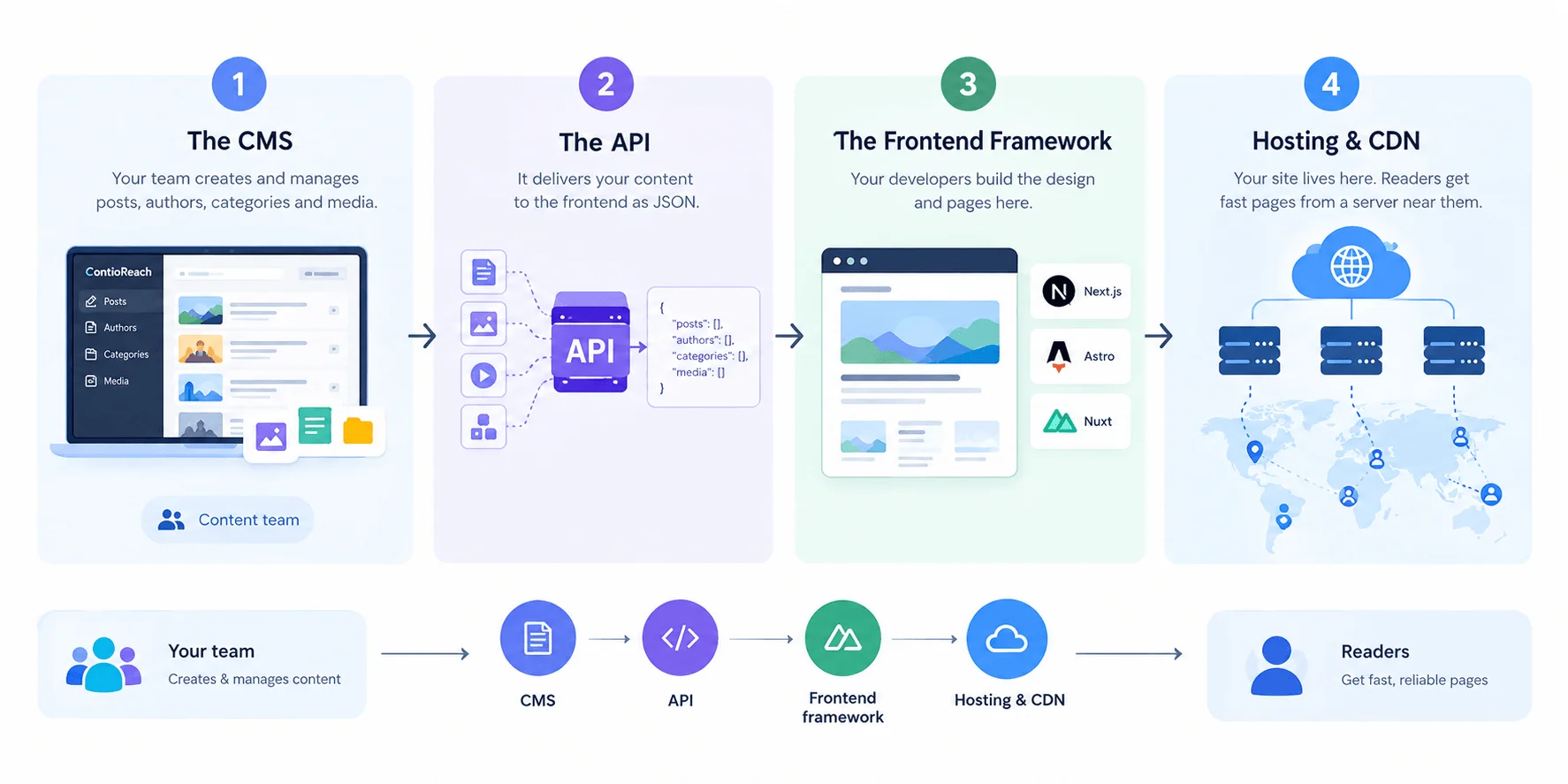
What does a modern headless blog architecture look like? It looks like a four-layer stack: the CMS, the API, a frontend framework, and a host with a CDN. A CDN is a network of servers that stores copies of your pages close to your readers.
Here is the stack, from content to reader:
The CMS. ContioReach holds your posts, authors, categories, and media. Your team works here.
The API. It sends content to your site as JSON.
The frontend framework. Next.js, Astro, and Nuxt are popular picks. Your developers build the design and pages here.
Hosting and CDN. Your site lives here. Readers get fast pages from a server near them.
Say your developer picks Astro. They build the blog pages once. Now every new post fits the same template.
Headless CMS Architecture for Websites: When Do Your Pages Get Built?
Headless CMS architecture for websites comes down to one big choice: when your pages get built. You have four options:
Approach | How it works | Best for |
|---|---|---|
Static generation | Builds every page ahead of time | Fast, low-cost blogs |
Server-side rendering | Builds each page when a reader asks | Pages that must be fresh on every visit |
On-demand rebuild | Rebuilds only the changed page after a webhook | Larger blogs with frequent edits |
Client-side fetch | The browser loads the page, then calls the API | Small extras like related posts |
For most blogs, start with static generation or on-demand rebuild. You get fast pages, and search engines read your full post text right away.
Avoid client-side fetch for the main post body. The page loads empty first, then fills in. That can slow the first view and make it harder for search engines to read your content.
How Should Developers Structure Content for a Headless Blog?
How should developers structure content for a headless blog? Developers should structure content as small, separate content types that link to each other. The core types are Post, Author, and Category. A Tag type is a useful extra.
Here is a starter content model:
Content type | Key fields | Links to |
|---|---|---|
Post | Title, slug, excerpt, body, cover image, publish date, SEO title, meta description | One Author, one Category |
Author | Name, bio, photo, social links | Many Posts |
Category | Name, slug, description | Many Posts |
Tag (optional) | Name, slug | Many Posts |
Picture the problem. At first, your team types the author name into every post by hand. Then an author changes their job title. Every post needs a manual edit.
After you create an Author type, one edit fixes everything.
Follow these five rules:
Link, do not copy. Point each post to an Author and a Category. Change them once, and every post updates.
Store meaning, not looks. Save a heading as a heading. Do not save it as "big blue text." Your frontend decides how it looks.
Add SEO fields to every post. Give each post its own SEO title and meta description.
Make slugs unique. The slug becomes the URL. Two posts with one slug cause trouble.
Name fields once and keep the names. Your frontend code uses them. A renamed field breaks the pages that read it.
Take a few minutes to plan your model before you write posts. It saves hours later.
5 Headless Architecture Mistakes to Avoid
The five most common headless architecture mistakes are weak content models, exposed API keys, missing SEO basics, no draft preview, and stale pages. Each one is easy to prevent.
A weak content model. Teams rush to build pages and skip the plan. Later, they rebuild the model and rewrite the frontend. Plan your content types first.
Private keys in browser code. Anyone can read code that runs in the browser. Keep keys that can change content on your server. Your public blog only needs read access.
Missing SEO basics. A headless site has no theme to add them for you. Your frontend must output title tags, meta descriptions, a sitemap, and structured data.
No draft preview. Editors want to see a post before readers do. Build a preview page that reads draft content, and keep it private.
Stale pages. If your site builds pages ahead of time, it needs a signal to refresh them. Use a webhook, so a published edit shows up fast.
Fix these five, and your headless blog will run smoothly.
Where ContioReach Fits in Your Headless CMS Architecture
ContioReach is the content layer of your headless blog architecture. It is a headless CMS built specifically for blogs, so the parts you just read about come ready to use.
Here is how it maps to the architecture:
One place for your content. You manage posts, authors, and media in one hub. This is your content repository.
An API to any frontend. ContioReach delivers your content through an API. Your blog, app, or any other frontend can read it.
Tools for your content team. Your team can create, review, optimize, and publish in one place. This is your editor and workflow layer.
Your developers keep full control of the frontend. Your writers keep a clear, simple place to work.
Your team can work with this split every week. Your writers publish. Your developers ship features. Neither one waits for the other.
Running a blog for a SaaS product? Read Headless CMS for SaaS Blogs: What to Look For to see what matters when you pick a CMS.
Frequently Asked Questions About Headless CMS Architecture
What is headless CMS architecture?
Headless CMS architecture is a setup where your content system and your website run separately. The CMS stores and manages content. Your frontend reads that content through an API and shows it to readers. This lets writers and developers work without blocking each other, and it lets one content hub feed many channels.
What is the difference between a headless CMS and a traditional CMS?
A traditional CMS stores content and builds your web pages in one system. A headless CMS only stores and delivers content. Your own frontend builds the pages. This gives you more freedom over design and technology, and it lets you reuse the same content across a website, an app, and a newsletter.
Is a headless CMS good for SEO?
Yes, a headless CMS can work well for SEO, but your frontend must do the work a theme usually does. Output title tags, meta descriptions, a sitemap, and structured data. Serve full page HTML instead of an empty page that loads later. Fast pages from a CDN help too.
Do I need a developer to use a headless CMS?
You need a developer to build the frontend, because a headless CMS does not come with a ready-made website. Once the frontend exists, your content team works without code. They write, review, and publish in the CMS, and the site picks up the changes.
Can one headless CMS feed more than one website or app?
Yes. The API serves any client that can send an HTTP request. One content hub can feed your blog, a mobile app, and a newsletter at the same time. You write the post once, and each frontend decides how to show it.
What is ContioReach?
ContioReach is a headless CMS built specifically for blogs. You manage your content in one place and deliver it through an API to any frontend. Your content team gets what it needs to create, review, optimize, and publish. Your developers keep full control of the website.
How does ContioReach deliver content to my website?
ContioReach delivers content through an API. Your website sends a request, and ContioReach returns your posts as structured data. Your frontend turns that data into pages. This works with any frontend, so your developers can choose the framework they like.
Your Content Deserves More Than One Home
Headless CMS architecture keeps your content in one hub and sends it to any frontend through an API. That is the core idea.
Here is what to remember:
A headless CMS has six parts: repository, content model, editor and workflow, API, media storage, and frontend.
Your frontend talks to the CMS through a simple REST API and gets JSON back.
A modern headless blog uses a CMS, an API, a frontend framework, and a CDN.
A clean content model with linked types saves you hours later.
Remember the rebuild from the start? With a headless setup, you can move to a new framework with no content migration. Every post stays right where it is.
Your blog can work the same way.