 ChatGPT
 Perplexity
 Claude
 Grok
GrokA headless CMS for developers stores your content in one place and delivers it through an API. You build the frontend with any tool you like. Your content team writes and publishes without touching your code.
Some people call this a developer headless CMS. The name changes, but the idea stays the same: your code and your content live apart. New to the idea? Start with what a headless CMS is.
Think of it as two parts that no longer depend on each other:
The content side: where your team writes, reviews, and publishes.
The code side: where you build and style the site.
The API connects the two.
How does a headless CMS work for developers?
A headless CMS splits your content from your frontend. The CMS stores and manages the content. An API sends that content to your site, app, or any other channel. You decide how it looks.
A traditional CMS does both jobs at once. It stores the content and also builds the pages. That works until you want a custom design, a new framework, or faster pages. Then the CMS gets in your way.
A headless CMS removes the "head," which is the page layer. What remains is the "body": your content and the API.
Here is the flow:
Your content team writes in the CMS dashboard.
The CMS stores the content in a structured format.
Your frontend asks for the content through the API.
The API returns clean data, and your code renders it.
That is it. You never fight a theme or a template. You write the frontend your way.
See how a headless CMS works with a custom website for a full walkthrough.
What should developers look for in a headless CMS?
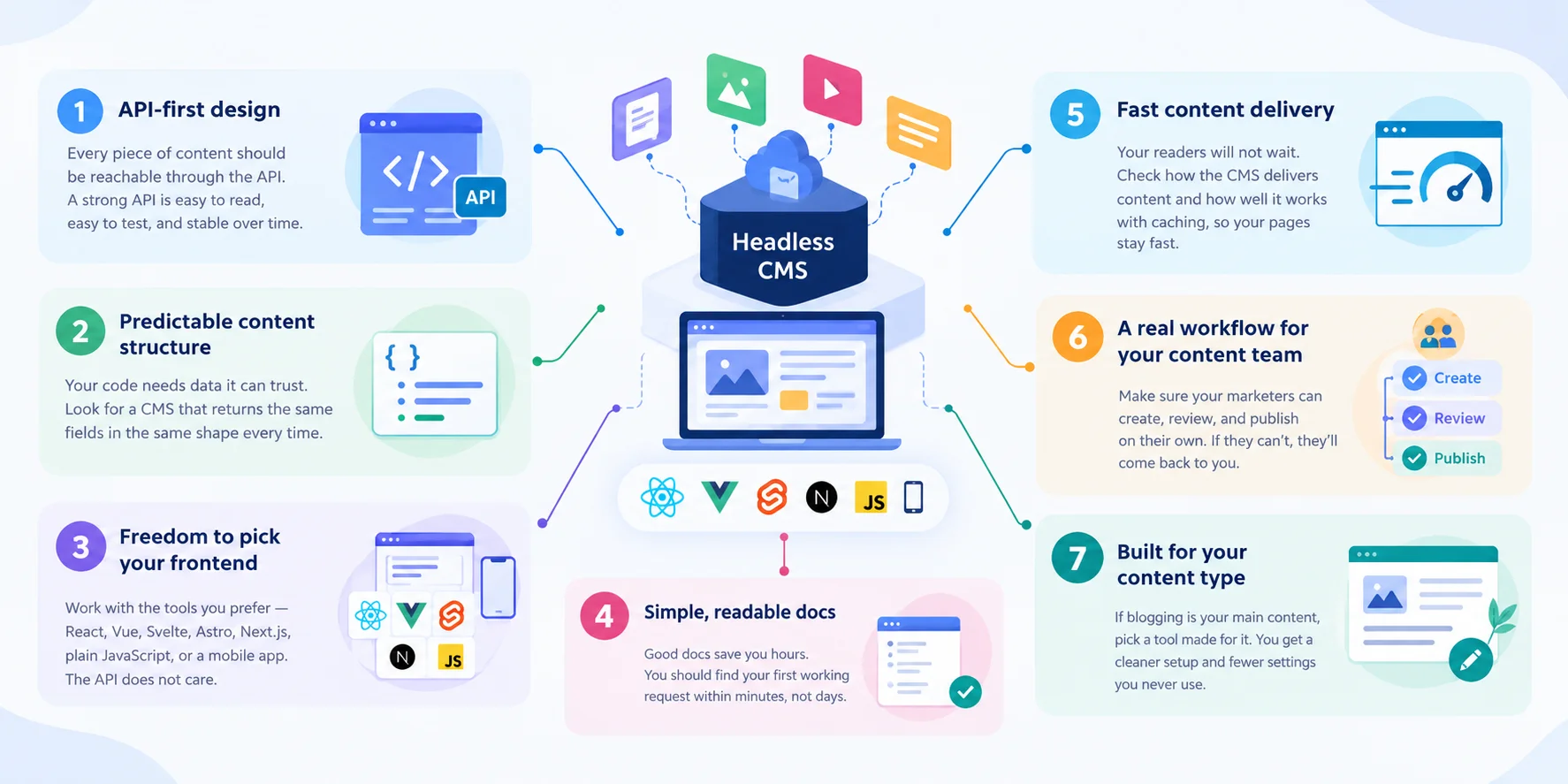
Look for an API-first design, clean and predictable data, easy integration with your frontend, and a workflow your content team can use without you. If a CMS misses any of these, you will end up as the middleman again.
Use this checklist when you compare tools.
1. An API-first CMS
An API-first CMS treats the API as the main product, not an add-on. Every piece of content should be reachable through the API. If you can do something in the dashboard, you should be able to do it through the API too. A strong headless CMS API is easy to read, easy to test, and stable over time.
2. Clear, predictable content structure
Your code needs data it can trust. Look for a CMS that returns the same fields in the same shape every time. Surprises in the response mean extra code and extra bugs. A good content model keeps your data in the same shape.
3. Freedom to pick your frontend
You should not be locked into one framework. A good headless CMS works with React, Vue, Svelte, Astro, Next.js, plain JavaScript, or a mobile app. The API does not care.
4. Simple, readable docs
Good docs save you hours. You should find your first working request within minutes, not days.
5. Fast content delivery
Your readers will not wait. Check how the CMS delivers content and how well it works with caching, so your pages stay fast.
6. A real workflow for your content team
This one gets missed a lot. A developer-friendly CMS is also friendly to non-developers. If your marketers cannot create, review, and publish on their own, they will come back to you. That defeats the purpose.
7. Built for your content type
A CMS that tries to do everything often does blogs poorly. If blogging is your main content, pick a tool made for it. You get a cleaner setup and fewer settings you never use. If you run a SaaS blog, see what to look for in a headless CMS for SaaS blogs.
Which CMS gives developers API access to blog content?
Any API-first headless CMS gives you API access to blog content. ContioReach is a headless CMS built specifically for blogs. You manage your posts in one place and deliver them through an API to any frontend.
Here is what that means for you:
One home for your content. Posts, drafts, and updates all live in one place.
API delivery. Your site or app pulls the content it needs, when it needs it.
Any frontend. Use the stack you already know.
A full team workflow. Your writers create, your editors review, and your team optimizes and publishes.
In short, ContioReach gives you a headless CMS API for your blog content and a developer-friendly CMS experience for your whole team.
Because ContioReach focuses on blogs, you do not dig through settings built for other content types. You get the tools your blog needs and nothing in your way.
What does a headless CMS with a REST API look like?
A headless CMS with a REST API lets you fetch content with a simple HTTP request. You send a request to a URL and get structured data back, usually in JSON. If you have used any web API, you already know the pattern.
Here is a simple example. The URL is a placeholder to show the idea:
// Example only: fetch a list of blog posts from a CMS API
const response = await fetch('https://api.example.com/posts');
const posts = await response.json();

// Render each post on your own frontend
posts.forEach((post) => {
  console.log(post.title);
});
That is the whole idea. You ask. The CMS answers. You show the data any way you like.
The same simple request works whether you build with Next.js, Astro, a mobile app, or a plain HTML page. This is why a headless CMS API is so flexible.
To see how the API fits with the rest of your setup, read our guide to headless CMS architecture.
What makes a CMS easy to integrate with a custom frontend?
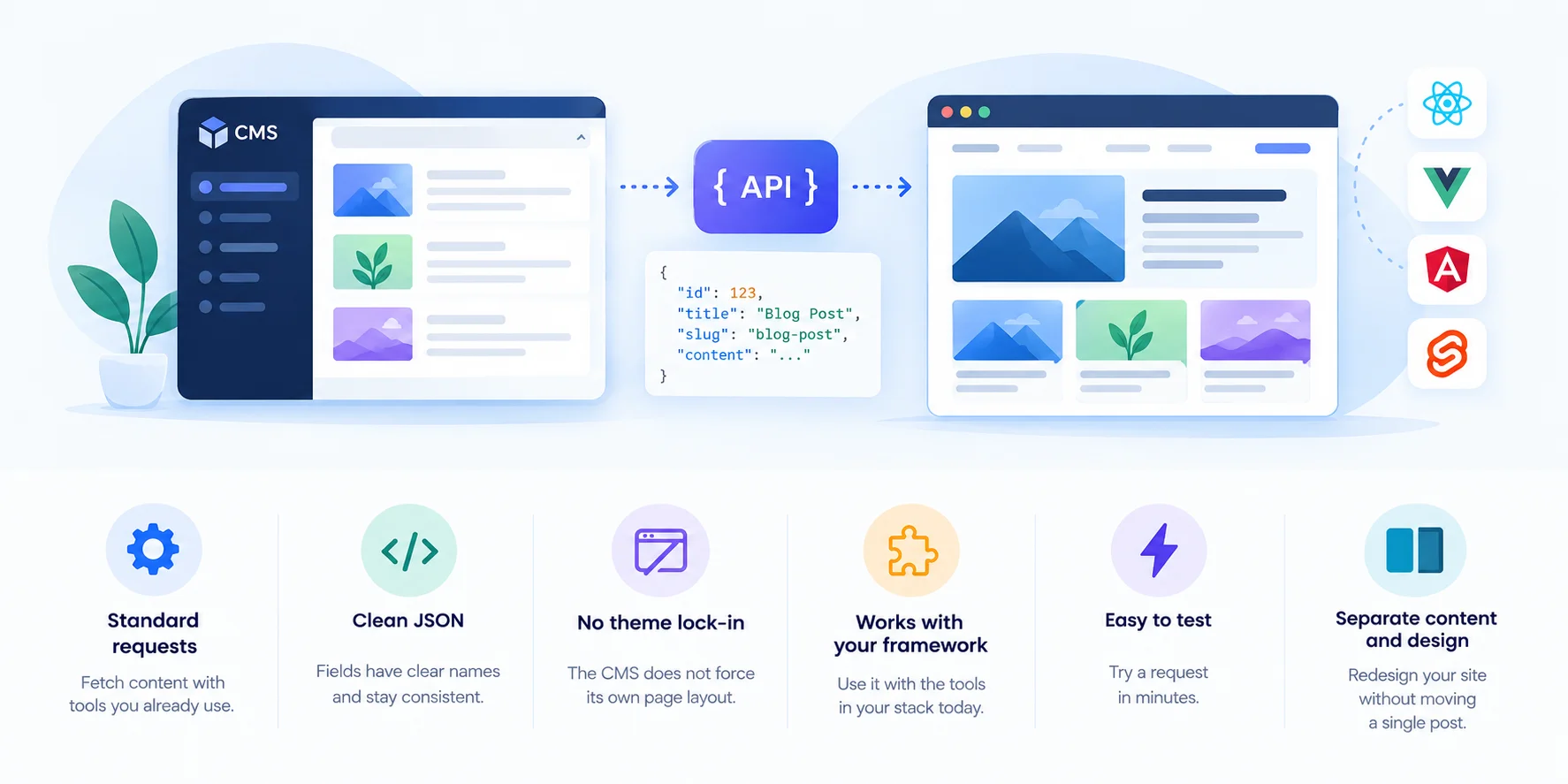
A CMS is easy to integrate when its API is simple, its data is clean, and its docs get you to a working request fast. You should not need a special plugin or a custom theme to show a blog post.
Check for these signs:
Standard requests. You can fetch content with tools you already use.
Clean JSON. Fields have clear names and stay consistent.
No theme lock-in. The CMS does not force its own page layout.
Works with your framework. You can use it with the tools in your stack today.
Easy to test. You can try a request in minutes.
Separate content and design. You can redesign your site without moving a single post.
If you can connect a CMS in an afternoon, that is a good sign. If it takes a week, look elsewhere.
How can developers give marketers control of blog publishing?
Give your marketers a dashboard where they can write, review, and publish on their own, while your code stays untouched. In a headless setup, the content team works in the CMS. Your frontend picks up the changes through the API.
Here is how it plays out in real life.
It is 4:55 PM on a Friday. You are about to close your laptop. Then a message pops up: "There's a typo in the live blog post."
Without a headless CMS, you open the repo. You find the file. You fix one letter. You open a pull request. You wait for a review. You deploy. It is now 6:20 PM.
With a headless CMS, you do nothing. Your marketer opens the CMS. She fixes the typo. She publishes. Your site shows the fix. It takes two minutes, and you go home on time.
That is the real win. You stop being the bottleneck. Your marketer stops waiting.
A good workflow for your content team has four steps:
Create. Writers draft in one place.
Review. Editors check and approve.
Optimize. The team improves each post for search.
Publish. One click sends it live.
ContioReach gives your content team all four steps in one place. Your developers build the frontend once. Your marketers run the blog from there.
Headless CMS vs. traditional CMS: a quick comparison
What you care about | Traditional CMS | Headless CMS |
|---|---|---|
Frontend choice | Limited to the CMS themes | Any framework you like |
Content delivery | Built into the CMS pages | Through an API |
Developer control | Limited | Full |
Redesigns | Often means moving content | Content stays put |
Team workflow | Mixed with site design | Separate from your code |
Reuse across channels | Hard | Easy |
Read the complete headless CMS guide, which covers the full picture of the benefits and use cases.
What is the best headless CMS for developers?
The best headless CMS for developers is the one that fits your content and your team. There is no single winner for everyone. Score each option against the checklist above.
Ask yourself these questions:
Does it offer an API-first CMS design?
Can I connect it to my frontend in one afternoon?
Can my content team publish without me?
Is it built for the kind of content I publish?
Do the docs help me move fast?
If your main content is a blog, a CMS built for blogs is a strong fit. ContioReach was made for that job. You will not pay for features you do not need, and your content team gets a clear workflow.
If you need to manage many content types beyond blogs, such as product catalogs or complex data, check that any CMS you pick supports them.
Give your blog a developer-friendly foundation
You build the frontend. Your team runs the content. The API connects both.
That is what a headless CMS gives you.
Try ContioReach and see how it fits your stack. Manage your blog content in one place and deliver it to any frontend through an API.
Frequently asked questions
What is a headless CMS for developers?
It is a content system that stores your content and delivers it through an API. You build the frontend with any tool. Your content team manages the content without touching your code.
Is a headless CMS good for blogs?
Yes. A headless CMS lets you design your blog any way you want. Your team writes and publishes in the CMS. Your site stays fast and flexible. A CMS built for blogs, like ContioReach, adds the tools a blog needs.
What is the difference between an API-first CMS and a headless CMS?
They are closely related. A headless CMS removes the page layer. An API-first CMS builds the API as its main feature. Most good headless CMS tools are API-first.
Do developers still need to build the frontend?
Yes. That is the point. You build the frontend once with the tools you prefer. After that, your content team handles updates without you.
Can marketers publish without a developer?
Yes, if the CMS has a proper workflow. Your marketers can create, review, optimize, and publish posts in the CMS while your code stays unchanged.
What should I check before I choose a developer-friendly CMS?
Check the API design, the data structure, the docs, your frontend options, and the workflow for your content team. Try a real request before you commit.
Written by

Hira Fayyaz
Hira Fayyaz is a SaaS content strategist and writer specializing in SEO, product-led content, and AI search visibility. She works around SaaS growth and product marketing, developing content strategies that help technology brands build authority and reach high-intent audiences.