 ChatGPT
 Perplexity
 Claude
 Grok
GrokA traditional CMS usually handles two jobs at once: managing content and presenting that content on a website.
A headless CMS separates those jobs.
It manages and stores content in a structured format, while the website, application, or other digital experience controls how that content is displayed. The two systems communicate through APIs.
This approach gives organizations more freedom over how and where content is presented. It can also make it easier to reuse the same content across different websites, applications, and digital channels.
In this guide, we'll explain what a headless CMS is, how it works, how its architecture differs from a traditional CMS, its benefits and limitations, common use cases, and examples of organizations that have adopted the approach.
What Is a Headless CMS?
A headless CMS is a content management system that separates the content management layer from the presentation layer.
The CMS stores and manages content, but it does not determine how that content must appear on a particular website or application.
Instead, the content is made available through an API. A frontend application then retrieves the content and decides how to display it.
Understanding these headless CMS basics makes it easier to see why this architecture differs from a traditional headless content management system.
What does "headless" mean?
The term "headless" refers to removing the "head," meaning the presentation layer, from the CMS.
In a traditional CMS, the backend that manages content is closely connected to the frontend that displays it.
A headless CMS removes that dependency.
The CMS becomes the content backend, while a separate frontend determines how visitors experience that content.
This distinction is important because a headless CMS is not simply a traditional CMS with a different interface. Its architecture is designed around separating content from presentation.
How Does a Headless CMS Work?
At a basic level, a headless CMS works through three main components:
Content is created and stored in the CMS.
The CMS makes that content available through an API.
A frontend application requests the content and renders it for the user.
This same process can be used when connecting a headless CMS to a custom website, where developers control how the content is retrieved and presented.
The CMS stores content as structured data rather than as part of a specific webpage. A content model defines the fields and relationships that make up each type of content. An article, for example, might include a title, body, author, category, publication date, and featured image.
Once content is published, the CMS exposes it through its API. The frontend sends a request for the content it needs, and the API returns the relevant structured data.
The frontend then uses that data to build the page. It controls the layout, styling, navigation, images, and other elements that determine how the content appears to users.
The basic flow is:
Content → Headless CMS → API → Frontend → User
This separation of responsibilities is what makes the architecture headless. The CMS manages the content and publishing process, while the frontend controls the presentation. The same content can therefore be delivered to different frontends without requiring the CMS to control how each experience looks or works.
How does a headless CMS deliver content to a frontend?
A headless CMS typically delivers content through an API.
The frontend sends a request asking for specific content. The CMS processes that request and returns the relevant data.
The frontend then uses that data to build the page.
The API is therefore the connection between the content repository and the experience that uses the content.
Depending on the platform, APIs may use technologies such as REST or GraphQL.
You do not need to use one particular frontend framework to understand the concept. The important point is that the CMS and presentation layer are separate.
How is content structured in a headless CMS?
Content in a headless CMS is usually stored as structured content rather than as complete web pages.
Instead of creating one large page containing everything, a content team might define separate content types such as:
Articles
Authors
Products
Categories
Events
Locations
Images
Videos
An article could contain fields such as title, body, author, publication date, category, image, and related content.
This structure allows the same content to be reused without rebuilding it for every destination.
What Is Headless CMS Architecture?
Headless CMS architecture separates the main content management system from the frontend presentation layer.
The CMS acts as the backend for content. The front end is responsible for the presentation. APIs connect the two.
A simplified architecture looks like this:
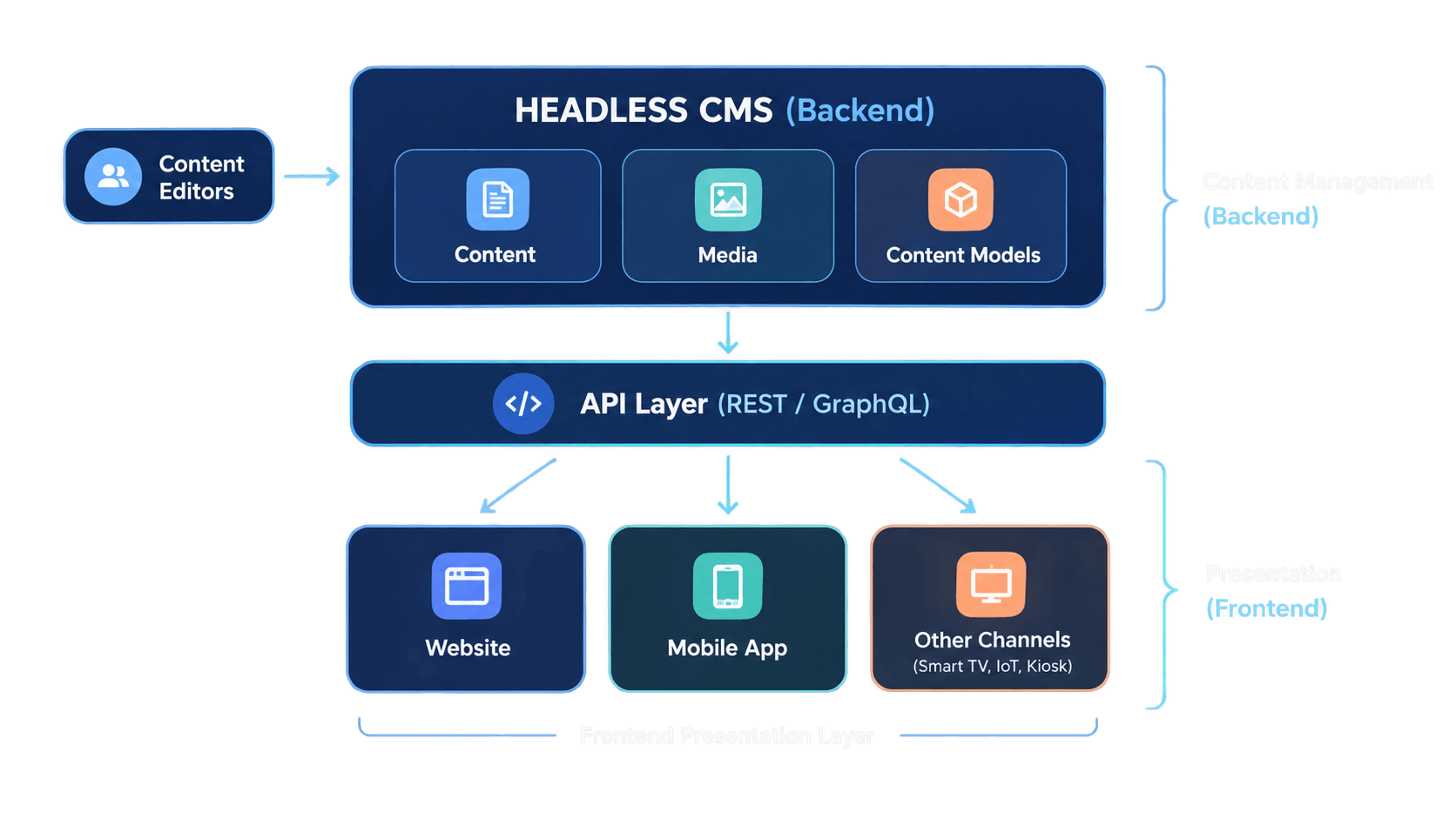
The major difference from a traditional CMS is that the CMS is not responsible for generating the final presentation for a specific website.
What happens between publishing content and rendering a page?
When a piece of content is published, the CMS makes the structured content available.
The frontend requests that content through the API.
The application receives the data and uses its own code to determine how the page should be rendered.
This means the same underlying content can potentially be used by different frontends without recreating it inside each system.
What is the role of the API in a headless CMS?
The API acts as the delivery mechanism between the CMS and the systems that consume its content.
It allows an application to retrieve content without needing to use the CMS's own presentation layer.
This separation is one of the defining characteristics of a headless approach.
REST and GraphQL are two common approaches, and the way they are used affects how developers handle API content delivery across different digital experiences.
Headless CMS vs. Classic CMS
Feature | Classic CMS | API-First CMS |
Content management | Built into the CMS | Built into the CMS |
Frontend | Usually connected to CMS | Separate from CMS |
Content delivery | Usually tied to the CMS | Delivered through APIs |
Frontend flexibility | More constrained by CMS | Greater flexibility |
Content reuse | Possible, but architecture-dependent | Core part of the approach |
Development approach | Often CMS-led | Frontend can be developed independently |
A traditional CMS can be easier to get started with because the content management and website presentation tools are usually provided together.
A headless CMS introduces another layer of separation. That can provide more flexibility, but it can also require more planning and development work.
Neither architecture is automatically appropriate for every website.
The right choice depends on what the organization needs from its content system and digital experiences.
What Is the Difference Between a Headless CMS and a Decoupled CMS?
A headless CMS and a decoupled CMS both separate content management from presentation, but there is an important architectural difference.
A decoupled CMS separates the frontend from the backend while still potentially maintaining a built-in relationship between the CMS and a particular presentation layer.
A headless CMS takes the separation further. It does not provide a required presentation layer.
Decoupled CMS vs. Headless CMS
Feature | Decoupled CMS | Headless CMS |
Backend and frontend separated | Yes | Yes |
CMS controls a required frontend | Potentially | No |
API-based delivery | Usually available | Central to the approach |
Frontend freedom | High | Very high |
Presentation layer | May be provided | Separate |
The terminology can vary between CMS vendors, so individual platforms may describe their architecture differently.
What Are the Benefits of a Headless CMS?
The main benefits of a headless CMS come from separating content from presentation.
Greater frontend flexibility
A headless CMS does not require the organization to use a specific frontend presentation system.
Teams can build the experience separately and choose the technologies that suit their project.
This can be useful when a website has requirements that are difficult to support within a traditional CMS template system.
Content reuse
Because content is stored separately from presentation, it can be reused in different experiences.
For example, a company could maintain an article once and use that content on its website and mobile application.
The exact implementation depends on the CMS and the surrounding technology stack, but the architecture makes this kind of reuse possible.
Multi-channel content delivery
A headless CMS can act as a central source of content for multiple digital experiences.
Instead of maintaining completely separate versions of the same information, organizations can structure content once and deliver it to different channels.
This becomes particularly useful when a business operates websites, applications, digital products, or other interfaces that need access to shared content.
Independent development
The frontend and CMS can be developed and maintained separately.
A frontend team can work on the website experience without redesigning the underlying content system, while content teams can continue managing content within the CMS.
The extent of this independence depends on how the overall system is designed.
Greater control over the digital experience
A traditional CMS often comes with predefined templates and presentation conventions.
A headless CMS leaves presentation to the front end.
That gives organizations more control over how content is turned into a digital experience.
Common Headless CMS Use Cases
A headless content management system can be used in many different types of digital projects.
Websites
Organizations can use a headless CMS as the content backend for websites where the frontend requires more flexibility than a traditional CMS provides.
This can include corporate websites, publishing platforms, media sites, and content-heavy websites.
Mobile applications
A headless CMS can provide structured content to mobile applications through an API.
For example, an application might retrieve articles, product information, help content, or promotional content from the CMS.
Multiple websites
Organizations managing multiple websites can use a central content system to manage shared content.
This can reduce duplication when the same information needs to appear across several digital properties.
Ecommerce
Product descriptions, editorial content, buying guides, brand information, and other content can be managed separately from the ecommerce frontend.
The exact architecture depends on the ecommerce platform and other systems involved.
Multilingual websites
Structured content can also support organizations that publish information in multiple languages.
A CMS can manage localized versions of content while the frontend handles how those versions are presented.
Digital products and applications
Headless CMS platforms are not limited to traditional websites.
They can also provide content to applications and other digital experiences that need structured information from a centralized source.
Real-World Headless CMS Case Studies
The best way to understand the architecture is to look at organizations that have actually adopted it.
Intercom
Intercom evaluated traditional CMS platforms alongside headless approaches while redesigning its web experience.
According to Contentful's case study, the team wanted to give marketing more ability to make changes while avoiding a situation where engineering had to handle every small modification.
Intercom ultimately selected a headless CMS because it offered a combination of content management flexibility and a maintainable system for engineering. Its decision was also influenced by factors including enterprise readiness, modularity, and built-in capabilities.
The example illustrates one of the central reasons organizations consider headless CMS architecture: separating content management from presentation can give different teams more independence.
SAS
SAS adopted a headless CMS as part of a broader digital transformation.
According to Contentful's published case study, SAS moved from a monolithic CMS toward a microservices-oriented platform and selected Contentful as the CMS for its digital estate.
The results reported by SAS were substantial. Its digital team increased its deployment cadence from one release per month to 100 releases per month, according to the case study. The company also used the CMS's API to automate content migration and support expansion into additional channels.
The important lesson is not the specific CMS product. It is how the organization used separation between content and the rest of the digital stack to support a broader technology transformation.
DTM
The German Touring Car Championship, DTM, migrated from a setup involving several CMS platforms to a headless CMS.
According to Hygraph's case study, DTM used the headless CMS to manage textual and media content centrally, while GraphQL APIs delivered that content to its new applications.
The reported results included launching the new experience within two months, a 20% reduction in bounce rate, and an average page performance score above 94.
DTM's example demonstrates another common reason for adopting headless architecture: bringing content from multiple systems into a central content hub while allowing different digital experiences to consume it.
2U
Education technology company 2U provides another example of headless CMS adoption.
2U had initially built its own headless CMS for a specific use case. As the business expanded, the system became difficult to scale across its growing number of partners and products.
According to Hygraph's case study, 2U needed a centralized content hub that could support programmatic content aggregation and GraphQL. The company ultimately moved to a hosted headless CMS rather than continuing to expand its in-house system.
The case study reports that the system supported metadata from more than 500 data sources and served content to more than 300,000 students.
This example shows that headless CMS architecture can be useful beyond conventional websites. In 2U's case, structured content and metadata were important parts of a larger digital system.
Why Would a SaaS Company Use a Headless CMS?
A SaaS company may use a headless CMS when it needs to manage content separately from the frontend experiences that display it.
A company may have a marketing website, product pages, documentation, resource content, and SaaS blogs that need to work within a broader content operation.
A headless CMS can provide a central place to manage that content while allowing the frontend to evolve independently.
A SaaS company may consider a headless CMS when:
Its marketing website uses a custom frontend.
Content needs to be reused across different digital experiences.
The company operates more than one website or application.
Content teams need to manage structured content independently of frontend development.
The website needs to evolve without being tightly tied to the CMS's presentation system.
The company expects its content operation or digital channels to become more complex over time.
However, being a SaaS company does not automatically mean a headless CMS is necessary.
A small SaaS website with a few pages and straightforward publishing requirements may work perfectly well with a traditional CMS.
The reason to choose headless should come from the company's actual content and digital experience requirements.
When Does a Blog Need a Headless CMS?
A blog does not automatically need a headless CMS.
For a simple blog with one website, standard templates, and a relatively small content operation, a traditional CMS may be enough. A headless CMS becomes more relevant when a blog has more complex blog requirements, such as multiple digital experiences, structured content, custom frontend needs, or content that needs to be reused across different properties.
A blog may benefit from a headless CMS when:
The same content needs to appear on multiple websites or applications.
The blog uses a highly customized frontend.
Content needs to be structured and reused in different contexts.
The organization manages several content-heavy digital properties.
Multiple teams need to work with the same content repository.
The blog is part of a larger digital product rather than a standalone publishing site.
The organization expects its content operation to expand significantly.
The important question is not whether a blog is large enough to use headless architecture.
It is whether separating content management from presentation solves a problem the blog actually has.
What Should a Content Team Look for in a Headless CMS?
A headless CMS should not be evaluated only from a technical perspective.
The people creating, editing, reviewing, and publishing content also need a system that fits their workflow.
A content team should consider the following:
Content modeling
The CMS should allow the team to structure the types of content it actually manages.
For example, a blog may need separate fields for authors, categories, related articles, images, and publication information.
Editorial workflow
Look at how easily writers and editors can create, review, update, approve, and publish content.
A powerful API does not compensate for a poor editorial experience.
Preview
Content teams should be able to see how content will appear before it is published.
Check how the CMS handles previews for different content types and frontend experiences.
Publishing and scheduling
Consider whether the platform supports publishing workflows, scheduling, versioning, approvals, and rollback.
Content relationships
If content is interconnected, the CMS should make those relationships manageable.
An article, for example, may be connected to an author, category, related articles, images, and other content.
Localization
For organizations publishing in multiple languages, examine how the CMS handles localized content and translation workflows.
Media management
Consider how the platform handles images, videos, documents, metadata, transformations, and asset organization.
Permissions and roles
Larger teams may need different permissions for writers, editors, developers, marketers, and administrators.
Integrations
A CMS rarely operates alone.
Consider how easily it connects with the other systems used by the organization.
How Does a Headless CMS Help Developers and Marketers Work Together?
A headless CMS can create clearer boundaries between content and development responsibilities. Content and marketing teams can create, edit, organize, and publish content, while developers work on the custom website frontend, API integrations, and how that content is presented to users. The separation does not eliminate collaboration, but it can reduce the need for developers to handle routine content changes.
The division can look like this:
Content and Marketing Teams | Development Teams |
Create and edit content | Build the frontend |
Manage content structure | Connect the CMS through APIs |
Review and publish content | Control presentation |
Manage categories and relationships | Build integrations |
Maintain editorial workflows | Maintain the digital experience |
This does not eliminate collaboration.
The teams still need to agree on content models, publishing workflows, frontend requirements, and how different types of content should be used.
The advantage is that each team can work primarily within the part of the system it owns.
Frequently Asked Questions
Does a headless CMS require coding?
The CMS itself may provide a user-friendly interface for creating and managing content, but building the frontend that consumes the CMS usually requires development work.
Can a headless CMS be used for a blog?
Yes. A blog can use a headless CMS to manage articles, authors, categories, images, and other structured content while a separate frontend handles presentation.
When does a blog need a headless CMS?
A blog may benefit from a headless approach when its content needs to appear across multiple experiences, when the existing CMS limits the desired frontend, or when the organization wants to separate content management from the website presentation layer.
Final Takeaway
A headless CMS separates content management from presentation, giving organizations more flexibility over how and where content is delivered. It can be useful for multi-channel experiences, custom websites, and structured content operations, but it also introduces additional technical complexity. The right choice depends on the organization's content needs, digital channels, and resources.
Written by

Team Contioreach
Creates expert content on SEO, AI search, content strategy, and automation to help businesses grow their online visibility.