 ChatGPT
 Perplexity
 Claude
 Grok
GrokIf you have spent any time drafting a blog post or browsing a GitHub repository, you have probably run into a file that ends in .md and wondered what is an MD file. An MD file is a plain text document written in Markdown, a lightweight formatting language for adding headings, bold text, links, and lists using simple symbols instead of complicated code.
For content teams, an MD file is often the format behind blog drafts, README documents, and help center articles. Understanding how it fits into a content workflow makes writing faster and easier to publish, including through tools like ContioReach that turn structured content into optimized, ready to publish pages.
What Is an MD File, Exactly?
An MD file is a document saved with the .md extension, and MD stands for Markdown. Markdown was created as a simple way to write formatted text using plain characters that any text editor can read. Instead of clicking buttons to make text bold or italic, you type symbols like asterisks or underscores around the words, and a Markdown reader converts that plain text into properly formatted content.
Because an MD file is just plain text under the hood, it opens in almost any application, from Notepad to a code editor to a browser based writing tool. There is no hidden formatting, no bloated file structure, and no risk of the file becoming corrupted the way a complex word processing file sometimes can. This simplicity is exactly why so many writers, developers, and marketing teams have adopted the format for everyday work.
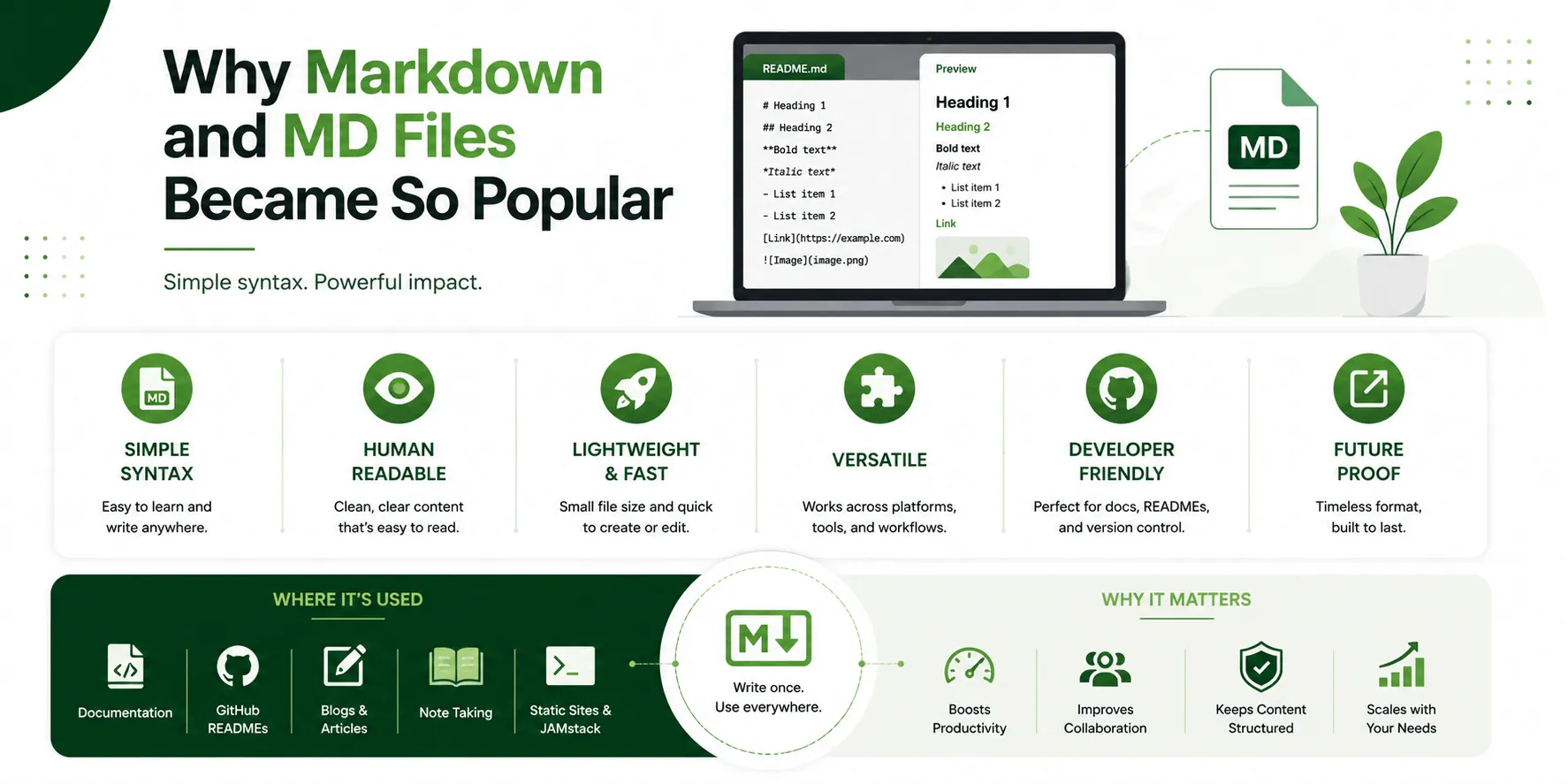
Why Markdown and MD Files Became So Popular
Markdown was designed with one goal in mind, to let people write using an easy to read and easy to write plain text format that could still be converted into clean HTML for the web. Over time, this simple idea spread far beyond its original purpose. Developers began using MD files for README documents, technical writers adopted it for internal documentation, and content teams started using it as a lightweight way to draft and structure blog posts before publishing.
Part of the appeal is portability. An MD file can move between a code editor, a note taking app, a content management system, and a version control system without losing its formatting. Another part of the appeal is speed. Once you learn a handful of symbols, you can format an entire article without ever touching a mouse. For teams producing a high volume of content, that speed adds up quickly.
Markdown itself dates back to 2004, when it was created to give writers a plain text way to produce content that could still convert cleanly into HTML. Since then, several extended versions of the language have emerged, including CommonMark and GitHub Flavored Markdown, which add extra features like tables and task lists while keeping the same basic, readable structure. This is why an MD file written for one platform will usually still open and read correctly almost anywhere else, even if a small formatting detail here or there varies slightly between flavors.
Common Uses of MD Files Today
MD files show up in more places than most people realize. Some of the most common uses include:
Technical documentation: Software teams write setup guides, API documentation, and README files in Markdown because it is easy to read directly in a repository.
Blog drafting: Many writers draft posts in Markdown before importing them into a content management system, since the format keeps structure intact without extra formatting clutter.
Note taking: Apps built for note taking often support Markdown natively, letting users create headings, checklists, and links quickly.
Static websites: Many websites are built by converting a folder of MD files into HTML pages, which keeps the content lightweight and fast to load.
Internal knowledge bases: Teams use MD files to document processes and policies in a format that is simple to update and search.
Basic Markdown Syntax You Should Know
Understanding what an MD file is becomes much easier once you see the syntax in action. Markdown uses a small set of symbols to represent common formatting choices, and most of them are intuitive once you have seen a few examples.
Formatting Goal | Markdown Syntax | Example Output |
Heading | # Heading | Heading (large text) |
Bold text | bold | bold |
Italic text | italic | italic |
Bullet list | - item | A bulleted list item |
Numbered list | 1. item | A numbered list item |
Link | A clickable link | |
Code snippet | code | Inline code formatting |
Once these basics feel familiar, writing an MD file becomes almost second nature. There is no need to memorize dozens of rules, since the format was intentionally kept small and readable.
It also helps to understand why this small set of symbols was chosen in the first place. Each character was picked because it already looked like the formatting it represents, an asterisk on either side of a word visually suggests emphasis, and a pound sign in front of a line naturally reads like a label or heading. This design choice is part of why an MD file remains readable even before it gets converted into a formatted page. A person can open the raw file, skim the symbols, and still understand the structure of the document without needing a preview at all.
How to Open an MD File
Because an MD file is plain text, opening one does not require any special software. On a Windows computer, the simplest option is a basic text editor, though the file will display as raw text with the symbols still visible rather than rendered formatting. On a Mac, the built in text editor works the same way, as long as it is set to plain text mode rather than rich text mode.
For a cleaner reading experience, most writers use an editor built with Markdown in mind. These tools render the file as it would look once published, with headings, bold text, and lists displayed properly instead of showing the raw symbols. Many code editors and note taking apps include this kind of preview mode built in, which makes it easy to check formatting before a file gets published or handed off to a content platform.
MD Files vs Other Common Document Formats
A frequent question from writers new to Markdown is how an MD file actually compares to more familiar formats like DOCX or plain HTML. Each format serves a different purpose, and understanding the differences helps explain why so many content teams still choose Markdown for drafting.
Feature | MD File | DOCX File | HTML File |
File size | Very small | Larger due to formatting data | Small to medium |
Readability as plain text | High | Low, requires software | Low, contains tags |
Best used for | Drafting, documentation, technical writing | Formal documents, printing, sharing with non-technical readers | Final web publishing |
Editing tools required | Any basic text editor | Word processing software | Code editor or CMS |
Portability across platforms | Excellent | Limited | Good, but less human readable |
As the table shows, an MD file trades some visual richness for speed, portability, and simplicity, which is exactly why it remains a favorite for drafting content that will later be published, edited, or converted into another format.
How MD Files Fit Into a Content and SEO Workflow
For anyone producing content at scale, the real value of an MD file is not just its simplicity, it is how well it fits into a repeatable workflow. Writing in Markdown keeps structure clean from the very first draft, which makes it easier to apply consistent headings, maintain keyword placement, and prepare a piece for optimization before it ever reaches a content management system.
This is where a platform like ContioReach becomes genuinely useful. ContioReach is built around the idea that clean, well structured content is easier to optimize and easier to rank. Writers who draft in a structured, Markdown-friendly way can move that content into ContioReach and take advantage of features such as the Keyword Planner to confirm strong keyword placement, Brand Voice to keep tone consistent across a growing content library, and SEO Score to check that the piece is genuinely ready for search before it goes live. For teams thinking about long term visibility, ContioReach also offers an AI Citability Score, which looks at how likely a piece of content is to be referenced by AI powered search tools, something that traditional SEO checklists often miss entirely.
Because so much web content still starts life as a plain text or MD file, having a workflow that respects that structure while adding real optimization on top of it is a significant advantage. Instead of reformatting content from scratch, teams can carry a clean MD file straight into ContioReach, run it through Internal Linking suggestions to strengthen topical authority, and use Auto-Publish to push the finished piece live without manual copy and paste steps that often introduce formatting errors.
Common Mistakes People Make With MD Files
Even though Markdown is simple, a few common mistakes show up again and again, especially for people new to the format.
Forgetting blank lines between elements: Markdown often needs a blank line between a heading and the paragraph that follows, or between list items and surrounding text, or the formatting will not render correctly.
Mixing formatting styles inconsistently: Using asterisks for bold in one section and underscores in another can work, but it makes a document harder to scan and edit later.
Overusing nested lists: Deeply nested bullet points can become difficult to read once converted, so it is often better to break complex lists into shorter sections with their own headings.
Assuming every platform renders Markdown identically: Small differences exist between Markdown flavors, so a file that looks perfect in one editor might render slightly differently in another.
Being aware of these small pitfalls early on saves a lot of cleanup time later, especially for teams producing a high volume of content on a consistent schedule.
It is also worth building a habit of previewing an MD file before sending it along to an editor or publishing tool. Most editors that support Markdown include a preview mode that renders the file as it will actually appear once converted, and a quick check before moving on to the next stage of the workflow catches small formatting issues while they are still easy to fix.
Why Understanding MD Files Matters for Content Creators
At first glance, an MD file might seem like a small technical detail that only developers need to worry about. In practice, understanding what an MD file is and how it works gives writers, marketers, and content teams a real advantage. It means drafting faster, keeping formatting consistent, and preparing content that moves smoothly into optimization tools instead of requiring extra cleanup at every stage.
As more publishing tools, documentation platforms, and even AI powered search systems continue to favor clean, well structured plain text, the humble MD file is likely to remain a foundational part of how content gets written before it becomes a polished, published page.
Frequently Asked Questions
What does MD stand for in a file name? MD stands for Markdown, a lightweight plain text formatting language.
Can I open an MD file without special software? Yes, an MD file can be opened in any basic text editor since it is plain text.
Do MD files work well for SEO content? Yes, their clean structure makes it easier to organize headings and keywords before optimizing the content further.
Is Markdown difficult to learn? No, most people learn the core syntax within a single sitting since it relies on just a handful of symbols.
Can an MD file be converted into a webpage? Yes, MD files are commonly converted into HTML for publishing on websites and blogs.
Ready to Turn Your MD Files Into Optimized Content?
Drafting in a clean, structured format is only the first step. If your team already writes in MD files, ContioReach helps you carry that structure the rest of the way, running each draft through the Keyword Planner to confirm placement, checking it against your SEO Score before it goes live, and pushing the finished piece out with Auto-Publish. Try ContioReach on your next MD draft and see the SEO Score before you hit publish.
Written by

Team Contioreach
Creates expert content on SEO, AI search, content strategy, and automation to help businesses grow their online visibility.