 ChatGPT
 Perplexity
 Claude
 Grok
GrokIf you have spent time optimizing a website for speed, you have likely run into the term AVIF and wondered what it means. An AVIF file is a modern image format built on the AV1 video codec, created to solve a problem that has slowed web pages for decades: images taking up more space than they need to.
This guide breaks down what an AVIF file is, how it compares to JPEG, PNG, and WebP, and how to start using it on your site. It also covers details many articles skip, including compatibility, conversion, and trade-offs worth knowing before you switch, leaving you with a complete, accurate picture.
What Is an AVIF File, Exactly?
An AVIF file is an image saved in the AV1 Image File Format. It was developed by the Alliance for Open Media, a nonprofit group formed by major technology companies including Google, Amazon, Microsoft, Netflix, Mozilla, Cisco, and Intel. Instead of building a brand new compression method from scratch, the group took the AV1 video codec, which was already known for shrinking video files without hurting quality, and applied that same compression logic to still images.
The result is a file format that stores images inside a HEIF container, meaning it borrows the structural rules of the High Efficiency Image File Format while using AV1 compression underneath. AVIF was first released in February 2019, and it has steadily gained support across browsers, operating systems, and design software since then.
The simplest way to think about it: an AVIF file does the same job as a JPEG or PNG, but it does that job using a newer, more efficient set of compression rules, so the resulting file is usually much smaller for the same visual quality.
Why Was AVIF Created?
JPEG has been the default photo format on the internet since the 1990s. PNG followed for images that needed transparency or sharp edges, like logos and icons. WebP arrived later as Google's attempt at a more efficient alternative, and it saw decent adoption, but it still had limitations in color depth and dynamic range.
The Alliance for Open Media wanted a format that could:
Deliver noticeably smaller file sizes than JPEG, PNG, and WebP
Support both lossy and lossless compression in the same format
Handle high dynamic range and wide color gamuts for richer, more accurate colors
Remain royalty free and open, so any company or developer could use it without licensing costs
Support transparency and animation, similar to PNG and GIF
AVIF checks all of these boxes, which is why it has become the format of choice for many performance focused websites.
How Does AVIF Compare to Other Formats?
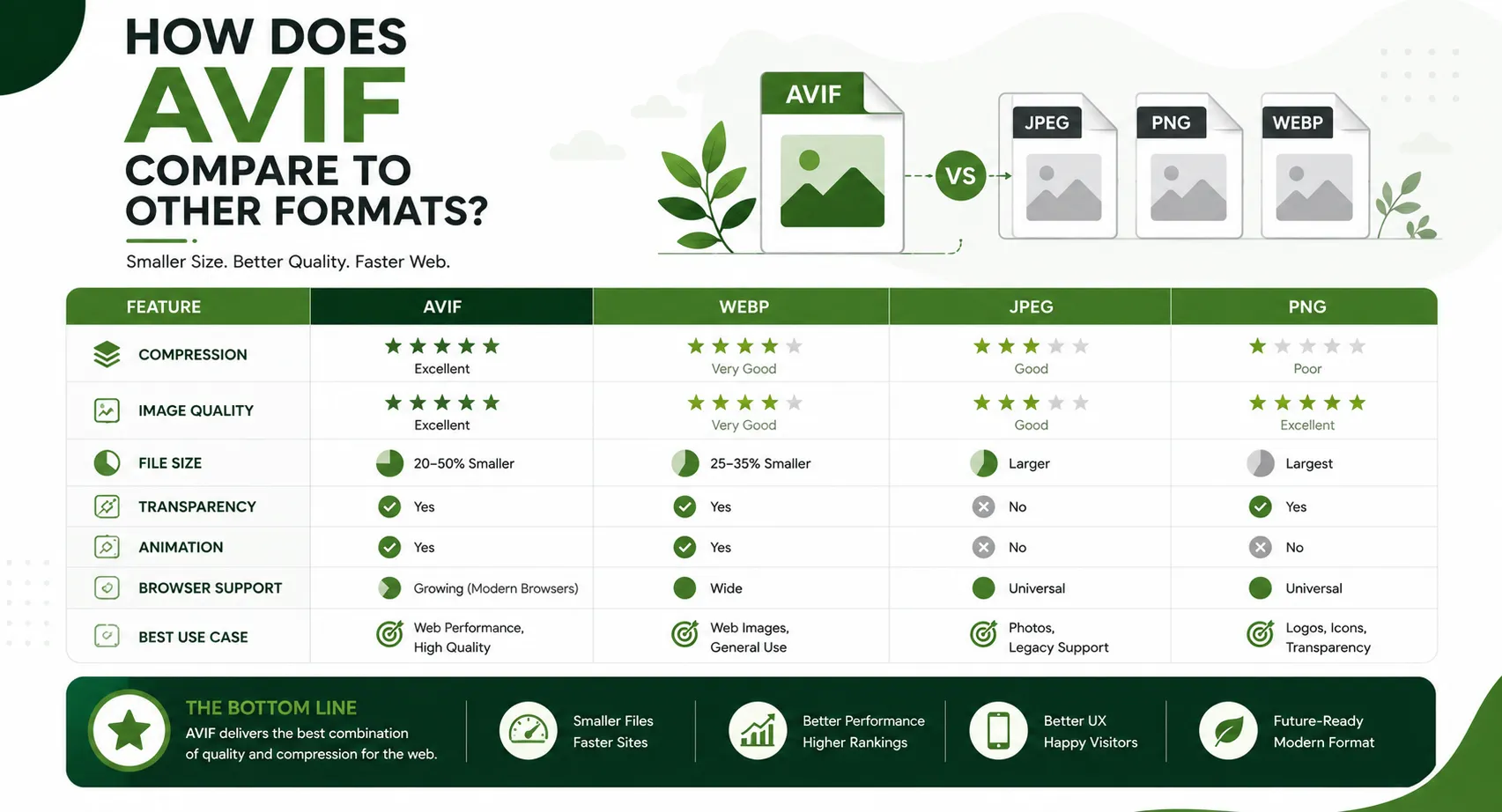
The easiest way to understand what an AVIF file offers is to see it next to the formats it is replacing. The table below breaks down the core differences.
Feature | AVIF | JPEG | PNG | WebP |
Compression type | Lossy and lossless | Lossy only | Lossless only | Lossy and lossless |
Typical file size vs JPEG | Up to 50% smaller | Baseline | Larger | About 25 to 30% smaller |
Transparency support | Yes | No | Yes | Yes |
HDR and wide color gamut | Yes | No | No | Limited |
Animation support | Yes | No | No | Yes |
Royalty free | Yes | Yes | Yes | Yes |
Browser support | Wide, growing | Universal | Universal | Wide |
Encoding speed | Slower | Fast | Fast | Moderate |
AVIF wins on nearly every metric here except one, encoding speed. Because the compression process is more complex, generating an AVIF file takes longer than generating a JPEG. That cost happens once, during image processing, and visitors never see it. What they do see is a page that loads faster once the file is published.
Key Benefits of Using AVIF Files
Smaller File Sizes Without Losing Quality
The single biggest reason people switch to AVIF is file size. Independent testing has consistently shown that AVIF images can be significantly smaller than JPEG files at a similar visual quality level, and noticeably smaller than WebP as well. Smaller files mean pages load faster, which matters both for user experience and for search visibility.
Better Page Speed and Core Web Vitals
Google uses page experience signals, including loading speed, as part of how it evaluates and ranks websites. Smaller image files reduce Largest Contentful Paint times and improve overall load performance, which can have a direct, positive impact on how a page performs in search results.
Support for Modern Color and Dynamic Range
Photographers and designers care about color accuracy, and AVIF supports high dynamic range and wide color gamuts, letting images display deeper shadows, brighter highlights, and a wider range of colors than JPEG ever could.
One Format for Multiple Use Cases
Because AVIF supports lossy compression, lossless compression, transparency, and animation, a single format can now replace what previously required JPEG, PNG, and GIF separately. That simplifies asset management for teams that publish a lot of visual content.
Open and Free to Use
AVIF is royalty free, so there are no licensing fees standing in the way of adoption. This has made it easier for browser makers, CMS platforms, and developers to add support without worrying about legal or financial complications.
Is AVIF Widely Supported?
This is one of the most common questions people have, and it is also one of the areas where a lot of existing guides fall short by giving outdated or incomplete answers. Here is a current snapshot of AVIF support across major platforms.
Platform or Software | AVIF Support |
Google Chrome | Fully supported |
Mozilla Firefox | Fully supported |
Apple Safari | Supported in recent versions |
Microsoft Edge | Fully supported (Chromium based) |
Android | Supported on modern versions |
iOS and macOS | Supported in recent system versions |
Adobe Photoshop | Supported in recent versions |
GIMP | Supported with plugin in some versions |
Windows Photos app | Supported with the AV1 and HEIF extensions installed |
Because support is now available across all major browsers, most websites can serve AVIF images to the large majority of visitors. The remaining gap involves older devices and legacy software, which is why fallback strategies still matter.
How to Use AVIF on Your Website
Simply having AVIF files is not enough. You need a way to serve them correctly so that visitors on older browsers still see an image instead of a broken page. The standard approach is the HTML picture element, which lets a browser choose the best format it supports from a list of options. A typical setup offers the AVIF version first, falls back to WebP next, and finally falls back to JPEG or PNG for the oldest browsers. This way, every visitor gets an image, and most visitors get the smallest, fastest version available.
Most modern content management systems and image processing tools, including many hosting platforms and image APIs, now offer automatic AVIF conversion, so you do not need to manually create multiple versions of every image yourself.
Read more: What Is an MD File? A Complete Guide to Markdown Basics
Converting Images to AVIF
If you already have a library of JPEG or PNG images, you do not need to start over. Several straightforward paths exist for converting existing images into AVIF format:
Design software: Recent versions of major photo editing tools now include AVIF as a native export option.
Command line tools: Open source encoders let developers batch convert large image libraries.
Online converters: Browser based tools allow quick, one-off conversions without installing anything.
Automated pipelines: Many hosting and CDN services automatically generate AVIF versions of uploaded images and serve them based on what the visitor's browser supports.
For most content teams, the automated pipeline approach is the most practical, since it removes the need to manually manage multiple file versions for every image on a site.
Potential Downsides of AVIF
No format is perfect, and a genuinely useful guide should not pretend otherwise. Here are the trade-offs worth knowing about before committing fully to AVIF:
Encoding is slower than older formats, which can add processing time for large image libraries.
Some older browsers and devices still lack support, so fallback images remain necessary.
Certain older editing and asset management tools may not yet handle AVIF natively.
Metadata handling can vary slightly between AVIF encoders, so it is worth testing before a full rollout.
Some older content management systems and print workflows still expect JPEG or PNG uploads, so teams working across both web and print may need to keep a non-AVIF master copy of each image.
None of these issues are significant enough to outweigh the benefits for most modern websites, but they are worth planning around rather than ignoring.
AVIF and SEO: Why It Matters for Content Teams
Page speed is a measurable ranking factor, and image weight is one of the biggest contributors to slow-loading pages. Switching to AVIF, alongside proper compression and lazy loading practices, is one of the more effective technical changes a site can make without touching a single word of the actual content.
Technical optimization only gets you halfway, though. The content itself still needs to be well researched, properly structured, and written around the keywords your audience is actually searching for. This is where a platform like ContioReach fits into the picture. ContioReach combines a built-in Keyword Planner with an SEO Score and AI Citability Score, so writers and teams can see, in real time, whether a piece of content is genuinely optimized before it ever gets published. Its Brand Voice feature keeps tone consistent across every article, while Internal Linking and Auto-Publish tools handle the technical publishing side that so many teams still do manually.
Whether you are writing about image formats, page speed, or any other technical topic, pairing solid on-page SEO practices with a platform built specifically for content optimization is what actually moves rankings, not just fast-loading images alone.
Final Thoughts
An AVIF file represents one of the more meaningful upgrades to web image technology in years. It delivers smaller file sizes, richer color support, and broad browser compatibility, all while remaining free and open for anyone to use. For website owners focused on speed and search performance, adopting AVIF is a practical, low-risk technical improvement.
Of course, a fast-loading page still needs strong, well-optimized content behind it. That is where ContioReach comes in, giving writers and teams the keyword research, SEO scoring, and publishing tools needed to turn technical improvements like AVIF adoption into real, measurable ranking gains. If you are ready to pair a faster site with sharper content, ContioReach is built to help you get there.
Frequently Asked Questions
How do I convert AVIF to JPG? Use a photo editor with AVIF support, an online converter, or a command line encoder, then export or save the file as JPG.
Is AVIF better than JPEG? Yes, for most cases. AVIF gives smaller file sizes at similar or better quality, plus transparency and HDR support that JPEG lacks.
What can open an AVIF file? Modern browsers, recent versions of Photoshop, and updated operating systems open AVIF files directly. Older systems may need a plugin or extension.
What is AVIF vs PNG? PNG only offers lossless compression, so file sizes stay large. AVIF supports lossless and lossy modes, plus HDR and animation, and typically produces a much smaller file while still supporting transparency like PNG does.
Written by

Team Contioreach
Creates expert content on SEO, AI search, content strategy, and automation to help businesses grow their online visibility.