 ChatGPT
 Perplexity
 Claude
 Grok
GrokMost blog posts get read once and forgotten. The ones that grow an email list or a customer base are built differently, and the difference is structure. Blog post templates that convert are not writing tricks. They are repeatable frameworks that guide a reader from curiosity to action, without the reader noticing they are being led toward a decision.
This guide breaks down seven proven blog post templates that convert readers into signups, plus exactly where to place your call to action inside each one. You will find a free downloadable template at the end, along with practical ways ContioReach helps you plan, write, and optimize posts like these faster.
Why Most Blog Posts Fail to Convert
A well written blog post can still fail to convert a single reader, and the reason is rarely the writing quality. It is usually one of these three problems: the structure buries the offer, the call to action shows up too late, or the post never builds enough trust before asking for anything.
Readers scan before they commit to reading. If a post opens with a slow introduction, wanders through unrelated background information, and only mentions a signup form in the final line, most readers have already left the page. High-converting blog structures solve this by front-loading value, building trust in the middle, and placing the ask exactly where interest peaks, not where the writer happens to finish typing.
The Anatomy of a High-Converting Blog Post
Before looking at specific templates, it helps to understand the building blocks that almost every high-converting post shares. The table below breaks these down.
Element | Purpose | Where It Belongs |
Hook | Grabs attention in the first two sentences | Opening line |
Promise | Tells the reader what they will gain | First paragraph |
Proof | Builds credibility with facts, data, or examples | Middle section |
Value block | Delivers the actual useful content | Body |
Soft CTA | Introduces the offer without pressure | Midpoint |
Strong CTA | Makes a direct, clear ask | Closing section |
Every template below uses this same skeleton. What changes is how the content in between is organized.
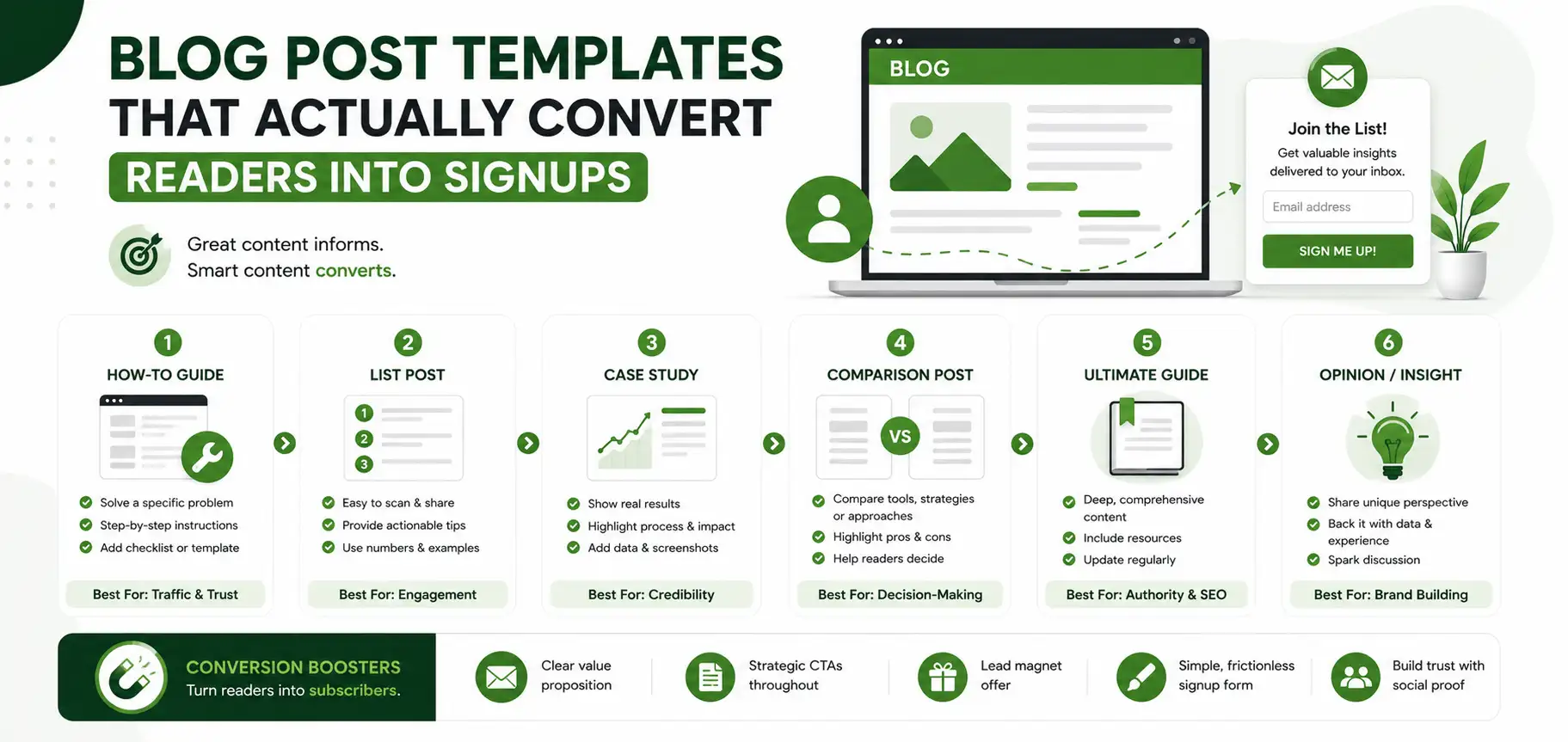
7 Blog Post Templates That Convert Readers Into Signups
1. The Problem-Agitate-Solution Template
This is one of the oldest and most reliable templates for driving signups, because it mirrors how people actually think about their own problems. Open by naming a specific pain point your reader is dealing with. Spend a short section agitating that pain, showing the reader the cost of not solving it. Then introduce your solution, and place your signup offer right where the relief begins. A post titled around a frustrating, everyday problem tends to perform especially well with this structure, since the reader recognizes themselves in the opening lines immediately.
2. The Ultimate Guide Template
Long, comprehensive guides work well for mid-funnel readers who already know they have a problem and are actively researching solutions. Break the guide into clear sections with descriptive subheadings, and place a content upgrade offer, such as a checklist or template, around the one-third mark, when the reader is invested but has not finished reading yet. A short summary box near the top, outlining what the guide covers, also helps readers commit to finishing the piece.
3. The Listicle Template
Numbered lists are easy to scan and easy to promise a specific outcome in the title, which is part of why they convert well. Each numbered item should deliver a complete, standalone piece of value, and the CTA should appear naturally after the strongest or most surprising item, not just tacked onto the end. Ordering items from good to best, rather than randomly, also keeps readers scrolling further before they reach your offer.
4. The Case Study Template
Case studies convert because they replace claims with proof. Structure the post around a before-and-after story, include specific numbers where possible, and end with an invitation for the reader to get similar results, linking that invitation directly to a signup or demo. Readers respond especially well when the story includes a specific obstacle that was overcome, not just a smooth, uneventful success.
5. The Comparison Framework Template
Readers comparing options are close to a decision, which makes this a strong mid-funnel template. Focus on helping the reader evaluate criteria that matter, rather than simply listing features. A clear framework for choosing builds trust and naturally leads into an offer that helps the reader apply that framework. Keep the framework focused on the reader's own goals and budget, not on any single named product, so the post stays useful regardless of what the reader eventually picks.
6. The FAQ-Style Template
Structuring a post as a series of direct questions and answers works especially well for topics with a lot of reader confusion. Keep each answer short and specific, and place your CTA after the questions that reveal the most hesitation, since that is where reassurance converts best. This format also tends to perform well in search results, since it mirrors how people phrase their actual questions.
7. The Checklist or Template Giveaway Post
This template exists specifically to generate signups. The entire post builds toward a single, clear offer: a downloadable checklist, worksheet, or template related to the topic. Because the value exchange is obvious, this template often has the highest conversion rate of the seven. The body content should still stand on its own, explaining enough of the why that the download feels like a natural next step rather than the only reason the post exists.
Which Template Should You Use
Different templates suit different goals and different points in the funnel. The table below can help you pick the right one quickly.
Template | Best For | Typical CTA Placement |
Problem-Agitate-Solution | Emotional, pain-point driven topics | After the agitation section |
Ultimate Guide | In-depth, research-heavy topics | One-third through the guide |
Listicle | Quick-win, scannable topics | After the strongest list item |
Case Study | Proof-driven, skeptical readers | End of the results section |
Comparison Framework | Readers close to a decision | After the framework is explained |
FAQ-Style | Topics with high reader confusion | After key objection questions |
Checklist Giveaway | Pure lead generation | Throughout, tied to the download |
How to Tell If Your Template Is Actually Working
Picking a template is only the first step. You also need a simple way to check whether it is converting readers, rather than just guessing based on how the post reads.
Three numbers matter most here. Scroll depth tells you whether readers are reaching the section where your CTA lives in the first place. Click-through rate on the CTA itself tells you whether the offer is compelling once readers see it. Signup rate on the linked page tells you whether the offer matches what the CTA promised. If scroll depth is low, the problem is usually pacing or length, not the offer. If click-through is low but scroll depth is high, the CTA itself likely needs a clearer, more specific promise.
Turning Any Template Into a Lead Magnet
You do not need a separate content strategy to generate signups. Almost any template above can be turned into a lead magnet with one small addition: a downloadable version of the post's core value.
If you write an ultimate guide, offer the summarized checklist version as a download. If you write a comparison framework post, offer a printable scorecard readers can use to evaluate their own options. The blog post delivers the argument, and the download delivers the tool, which is often what actually gets someone to hand over their email address.
How ContioReach Helps You Build These Templates Faster
Writing blog post templates that convert consistently takes more than a checklist, it takes the right workflow. ContioReach's Keyword Planner helps you identify which template style and topic combination has the best chance of ranking before you start writing, so you are not guessing at search intent.
Once a draft is ready, ContioReach's Brand Voice tool keeps every post, whatever template it follows, sounding consistent with your brand across every writer on your team. The SEO Score and AI Citability Score then help you tighten the post for both traditional search rankings and newer AI-driven search results, so the same post can convert traffic from multiple channels.
ContioReach's Internal Linking feature, trained on your own sitemap, automatically suggests relevant links to other posts and product pages, which keeps readers moving through your site instead of bouncing after one article. When the post is ready, Auto-Publish pushes it live on schedule, so a strong template does not sit unused in a drafts folder.
Common Mistakes That Reduce Conversions
Many blogs cover templates in theory but skip the mistakes that quietly kill conversion rates in practice. Here are the ones worth watching for.
Placing the CTA only at the very end, after most readers have already left the page, is one of the most common errors. Another is writing a generic call to action, such as "sign up now," instead of clearly stating what the reader gets by doing so. A third mistake is ignoring mobile readers, who often skim faster and need CTAs placed more frequently throughout a longer post, not just once at the bottom.
Finally, many posts offer a lead magnet that does not match the topic of the post itself, which confuses readers and lowers signup rates. The download should always feel like a natural next step from what the reader just read, not an unrelated bonus. When the topic and the offer match closely, readers convert because the download feels earned, not because they were simply asked at the right moment.
Get the Free Downloadable Template
To make this easier to apply, we have put together a free downloadable template that maps out all seven structures above, with placeholder CTA sections already built in. It is designed to be used directly inside ContioReach, so you can plan, draft, and optimize your next high-converting post without switching between separate tools.
Frequently Asked Questions
Is the downloadable template actually free?
Yes, the template linked in this post is completely free to use, with no signup fee attached.
What file formats is the template available in?
It is available as both a PDF and a Word document, so you can pick whichever is easier to edit.
Which template converts best if I only have time to try one?
The problem-agitate-solution and checklist giveaway templates tend to convert best, since both build directly toward a single clear ask.
How long should a blog post be before I add a CTA?
There is no fixed word count. Instead, place the first soft CTA once you have delivered enough value that the reader trusts you, usually by the one-third mark.
Can I use more than one template in the same post?
Yes, many high-performing posts blend two structures, such as opening with a problem-agitate hook and closing with a checklist giveaway.
Do these templates work for short posts, not just long guides?
Yes, the listicle and FAQ-style templates in particular work well for shorter, quick-read posts.
Ready to plan, write, and optimize blog posts like these without juggling separate tools? ContioReach brings keyword research, brand-consistent writing, SEO scoring, and publishing into one place, so every post you write has a real shot at converting readers into signups.
Written by

Team Contioreach
Creates expert content on SEO, AI search, content strategy, and automation to help businesses grow their online visibility.