 ChatGPT
 Perplexity
 Claude
 Grok
GrokChoosing a headless CMS for a blog is not about finding the platform with the longest feature list. The right choice depends on how your developers build the frontend, how your content team publishes articles, how SEO is managed, and how easily the system can grow with your website.
A useful headless CMS comparison guide should therefore look at more than APIs. You need to evaluate content modeling, editorial experience, SEO controls, frontend integration, publishing workflows, performance, scalability, and the amount of developer involvement required after launch.
This matters because a blog sits between two very different workflows. Developers need technical control over the website, while marketers and SEO teams need to create, optimize, update, and publish content without changing application code.
A good headless CMS connects those workflows without forcing either team to compromise.
What Is a Headless CMS?
A headless CMS separates content management from the frontend that displays the content. The CMS stores and organizes content, while an API delivers that content to a website or application built with a separate technology.
The basic architecture is:
CMS → API → Frontend → Website visitor
With this setup, developers can build a blog using Next.js, React, Astro, or another framework while content teams work inside a dedicated CMS.
A traditional CMS usually combines content management and presentation more closely. A headless architecture separates them, giving developers greater control over how content is rendered and delivered.
The distinction is becoming increasingly relevant as websites become more specialized. The latest HTTP Archive Web Almanac CMS report published in January 2026 analyzed more than 16 million websites and found that CMS-powered sites represented more than 54% of observed websites in its 2025 dataset. The report also describes a CMS landscape that is becoming more diverse rather than converging around a single platform.
For a blog, that means the question is no longer simply whether you need a CMS. It is whether your CMS architecture matches the way your team builds and operates the website.
Why Use a Headless CMS for a Blog?
A headless CMS makes sense when you want to separate editorial work from frontend development.
Developers can control the site's architecture, components, performance, and delivery while marketers manage articles through the CMS.
The main advantages are:
Frontend freedom: Developers can choose the framework and architecture that fit the website.
Structured content: Articles can be organized into fields such as titles, authors, categories, tags, images, and metadata.
API delivery: Content can be retrieved by the frontend instead of being tied to a specific presentation layer.
Publishing independence: Marketing and SEO teams can handle routine content updates without editing frontend code.
Reusable content: Structured content can be delivered to different experiences where the architecture supports it.
But headless does not automatically mean better SEO or better performance.
A poorly implemented headless website can still have slow pages, weak metadata, difficult publishing workflows, or unnecessary development complexity. The value comes from how the CMS, frontend, APIs, caching, and content operations work together.
That is why a headless CMS comparison should evaluate the entire publishing system rather than just the CMS interface.
Headless CMS vs WordPress for Blogs
The biggest difference between a traditional CMS and a headless CMS is the relationship between content and presentation.
Area | Traditional CMS | Headless CMS |
Content management | Closely connected to website | Separate from frontend |
Frontend | Usually tied to platform templates or themes | Built independently |
Content delivery | Often rendered by the CMS | Delivered through APIs |
Framework choice | More constrained | Greater flexibility |
Editorial workflow | Usually mature out of the box | Depends on the platform |
Developer control | Varies by platform | Generally high |
Initial setup | Usually simpler | Requires frontend integration |
Multi-experience delivery | Depends on implementation | Natural fit for API-driven architectures |
This does not mean a headless CMS is automatically better than WordPress.
WordPress remains one of the most widely used CMS platforms. The 2025 Web Almanac reports that WordPress accounted for roughly 64% of CMS market share in its dataset. Its enormous ecosystem also means teams can choose from a large range of themes, plugins, integrations, and development approaches.
The question is whether that ecosystem and architecture match your requirements.
If you want a more detailed architectural comparison, what changes when you move from WordPress to a headless CMS is worth examining before making the switch.
For a simple blog with a conventional website architecture, a traditional CMS may be enough. For a custom SaaS frontend where developers want control over rendering and content teams need an independent publishing workflow, headless architecture can be more suitable.
How to Choose a Headless CMS for a SaaS Blog
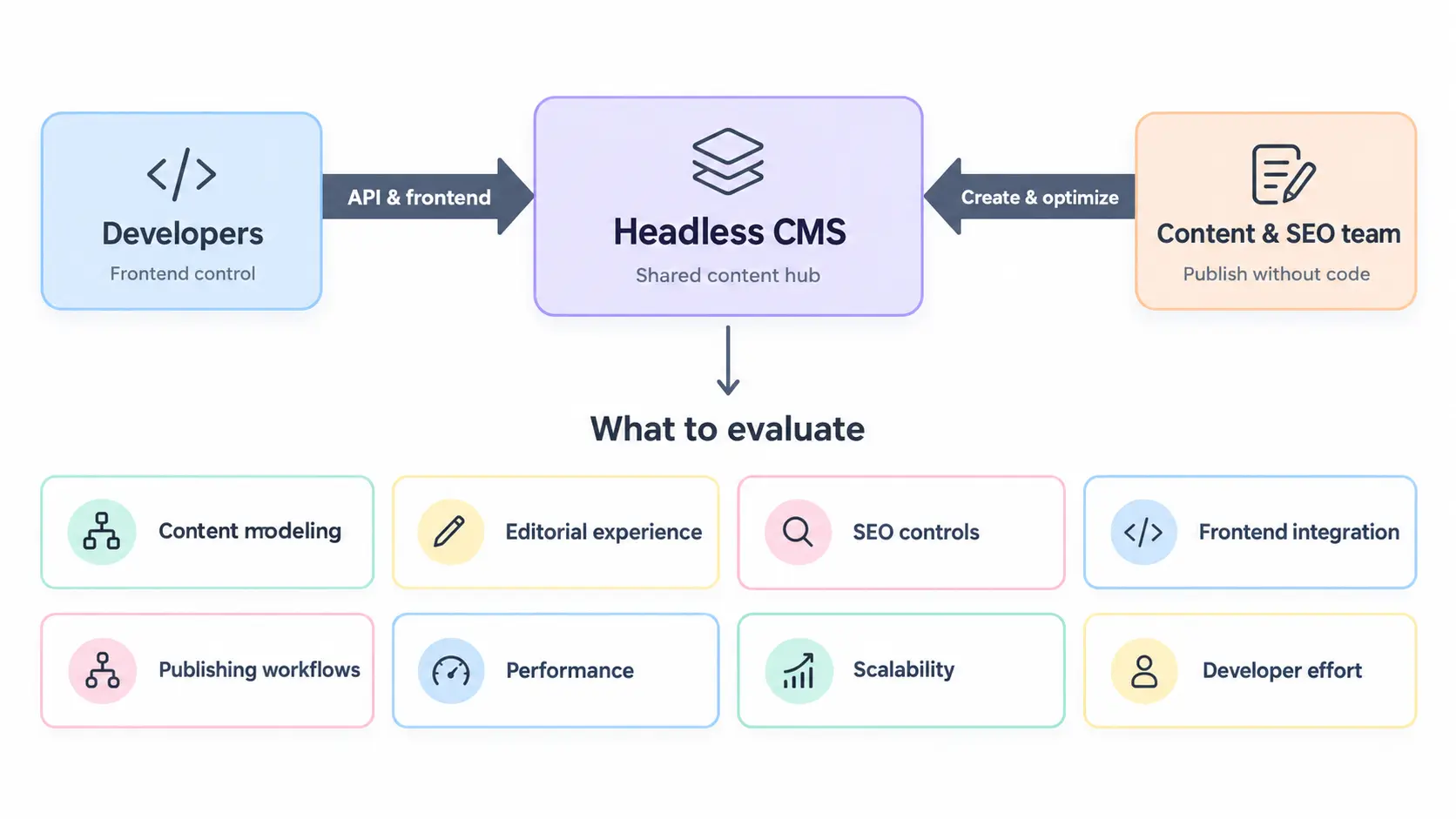
The best headless CMS for a SaaS blog should balance developer control with publishing independence.
Start with the needs of both sides of the workflow.
Developers typically need a reliable API, flexible content models, secure authentication, frontend compatibility, preview functionality, webhooks, and control over caching.
Marketing and SEO teams need an editor that makes it easy to create, optimize, organize, review, and publish articles.
A practical evaluation should therefore consider:
API and frontend integration: Can the CMS deliver the content your application actually needs?
Editorial experience: Can non-developers manage everyday publishing tasks?
SEO controls: Can teams manage important metadata and content structure?
Content modeling: Can the blog support authors, categories, tags, images, related content, and future content types?
Publishing workflow: Can content move from draft to review to publication without unnecessary engineering work?
Scalability: Can the system support a larger content library and team?
Total cost: What will development, maintenance, infrastructure, and content operations cost over time?
The strongest CMS is not necessarily the one with the most capabilities.
It is the one that fits your workflow with the least unnecessary complexity.
What Should Developers Compare When Choosing a Headless CMS?
Developers should compare how each CMS fits into the full content delivery architecture.
API capabilities
The API is the connection between the CMS and the website.
Look at the available API style, authentication, filtering, pagination, querying, response structure, rate limits, documentation, and SDK support.
The important question is not whether a CMS has an API. Almost every modern headless CMS does.
The important question is whether developers can retrieve the exact content they need efficiently and securely.
For a blog, this could mean retrieving a post by slug, getting related articles by category, filtering posts by tags, or retrieving authors and metadata alongside the article.
Content modeling
Content modeling determines how the blog's information is structured.
A basic blog post may need:
Field | Purpose |
Title | Main article heading |
Slug | URL structure |
Excerpt | Summaries and article listings |
Body | Main article content |
Author | Attribution |
Category | Primary content grouping |
Tags | Topic relationships |
Featured image | Visual presentation |
SEO title | Search-result title |
Meta description | Search snippet |
Published date | Publication context |
Updated date | Content freshness |
Related content | Internal discovery |
The advantage of structured content is that developers can control how each field is used on the frontend instead of treating the entire article as one unstructured block.
Next.js compatibility
If your site uses Next.js, evaluate how easily the CMS fits into your data-fetching and rendering architecture.
The current Next.js documentation describes Next.js as a React framework for building full-stack web applications, with features for routing, data fetching, caching, metadata, and other application concerns.
Your CMS should work with the way your team intends to render content.
For example, developers may choose different strategies for content that changes frequently versus articles that can be cached or regenerated after publication.
Webhooks and revalidation
Publishing an article should trigger the appropriate frontend update.
A CMS webhook can notify your application that content has changed. The frontend can then revalidate the affected route or invalidate relevant cached content.
Next.js provides mechanisms such as revalidatePath for invalidating cached routes. The official Next.js documentation on revalidation explains how applications can refresh cached content when underlying data changes.
When evaluating a CMS, ask whether it can send the events your frontend needs and whether those events can identify the relevant content.
Developer documentation
Good documentation can make a major difference during implementation.
Look for:
API references
Authentication guidance
Framework examples
Webhook documentation
Preview implementation
Content modeling guidance
Migration documentation
Error handling
Rate-limit information
A technically capable CMS can still become expensive if developers have to reverse-engineer basic integration behavior.
What Should Content Teams Look for When Evaluating a CMS?
Content teams should evaluate the CMS from a different perspective.
Their question is simple:
Can we create, optimize, update, and publish high-quality content without asking developers to handle routine tasks?
A useful editorial workflow should make it easy to:
Write and format articles.
Upload and manage media.
Assign categories and tags.
Manage authors.
Edit SEO fields.
Change article slugs where appropriate.
Preview unpublished content.
Update existing articles.
Review and publish content.
Maintain consistent article structures.
This is particularly important for SaaS companies.
If the frontend is built by developers but the blog is managed by SEO and marketing teams, the CMS should create a clean boundary between those responsibilities.
Developers should not have to modify a component every time an editor changes an article title. Marketers should not need access to frontend code simply to publish a new post.
SEO Features to Include in a Headless CMS Comparison
A headless CMS does not perform SEO automatically.
SEO depends on the CMS, frontend implementation, rendering approach, URL structure, metadata, internal linking, structured data, performance, and crawlability.
When evaluating a platform, check whether the content system provides the fields and workflows needed for those requirements.
SEO area | What to evaluate |
SEO title | Separate control from the article heading |
Meta description | Editable search snippet |
URL slug | Editable and predictable URL structure |
Canonical URL | Ability to implement canonicalization |
Structured data | Fields needed by frontend schema |
Images | Featured image and media metadata |
Internal links | Easy contextual linking within articles |
Redirects | Safe handling of changed URLs |
Sitemap | Correct inclusion of published pages |
Indexability | Frontend control over robots directives |
Google recommends structured data as a way to help its systems understand the content of pages. For article publishers, its Article structured data documentation specifically covers Article and BlogPosting markup.
The key point is that the CMS and frontend should work together.
For example, an editor can enter an article's author and publication date in the CMS, while the frontend uses those fields to generate appropriate page metadata and structured data.
How to Build a Next.js Blog With a Headless CMS
To build a Next.js blog with a headless CMS, define the blog's content model, connect the CMS API to the Next.js application, retrieve published content, and render it through dynamic article routes.
The architecture is straightforward:
CMS → API → Next.js data layer → Article route → Web page
The implementation normally needs:
A structured post model.
API authentication.
A data-fetching layer.
Dynamic routes based on article slugs.
Metadata generated from CMS fields.
Image handling.
Preview support if required.
Caching and revalidation.
A publishing update mechanism.
The exact implementation depends on the CMS and the architecture chosen by the development team.
A blog-focused CMS such as ContioReach is designed around this type of content workflow, where structured blog content is managed in the CMS and delivered to the frontend through an API.
The important distinction is that the CMS does not dictate how the frontend must look. Developers retain control over the presentation layer.
How to Connect a CMS API to Next.js
Connecting a CMS API to Next.js means creating a secure connection between the application and the CMS's content delivery layer.
At a high level, the process is:
Define content → authenticate API request → retrieve content → map fields → render page
Developers should keep private credentials on the server rather than exposing them in browser-side code.
The API should return only the content required by the application. For a blog, that could include the article body, title, slug, author, category, image, publication date, and SEO fields.
Next.js supports server-side access to backend resources, and its documentation notes that server-side data access can help keep sensitive credentials away from the client.
The frontend can then generate the article page and its metadata from the CMS data.
Caching should also be considered at this stage. A blog does not necessarily need every page to be generated from scratch for every request. Published content can often be cached and refreshed when the underlying article changes.
How Can Marketers Publish Next.js Blog Content Without Developer Help?
Marketers can publish Next.js blog content without developer help when the CMS provides all the fields they need and the frontend has already been programmed to use those fields.
The workflow becomes:
Create → Optimize → Preview → Publish → Refresh
The developer builds the content architecture once.
The content team then operates inside that architecture.
For example, a marketer can create a new article, add the featured image, enter the SEO title, assign a category, add internal links, and publish the post without editing React or Next.js code.
This does not mean developers become unnecessary.
If the team wants a new article component, a different page layout, a new content type, or a new frontend behavior, development work may still be required.
The purpose of a good headless setup is to prevent routine content operations from becoming development tickets.
Which CMS Is Best for a Next.js Blog?
There is no single best headless CMS for every Next.js blog.
The right choice depends on what the team needs from the CMS.
A developer-heavy publication may prioritize API flexibility and content modeling. A marketing-led SaaS company may put more weight on editorial usability and SEO workflows. An agency may need permissions, reusable structures, and predictable project management.
This is why a headless CMS comparison for developers should not use the same weighting as a comparison for marketing teams.
For a blog-focused company, the evaluation should begin with the content workflow rather than with the CMS's general market reputation.
If you are considering a broader content platform, it is useful to understand how Contentful compares for blog-focused teams before deciding whether a general-purpose CMS provides capabilities your blog actually needs.
Similarly, teams prioritizing developer flexibility can look at how Sanity compares for content teams when evaluating structured content, editorial workflows, and technical customization.
The point is not that one platform is universally superior. It is that the right CMS should solve the problems your team actually has.
Which Headless CMS Is Best for a Developer-Led Blog?
A developer-led blog should prioritize API quality, content modeling, frontend compatibility, documentation, security, caching, and long-term maintainability.
However, the editorial workflow still matters.
A technically sophisticated CMS can become a poor fit if content teams struggle to publish or developers have to maintain unnecessary editorial functionality.
This is where a blog-focused approach can be useful. Instead of adopting a broad content platform and configuring it around blogging, teams can evaluate whether the CMS already provides the content structures and publishing workflows a blog requires.
For teams comparing open-source and managed approaches, how Strapi compares for a blog can provide useful context around deployment, customization, maintenance, and editorial requirements.
How to Choose a Headless CMS for a SaaS Blog
For SaaS teams, the decision should come down to one central question:
Can the CMS give developers frontend freedom while allowing marketing and SEO teams to operate the blog independently?
A good fit should provide:
A dependable API for the frontend.
Structured blog content.
An editor that marketing teams can use without technical knowledge.
SEO fields and content organization.
Preview and publishing workflows.
A sensible approach to caching and updates.
Enough flexibility for future content needs.
A pricing model that fits the company's growth.
This is also where a blog-focused CMS can be differentiated from a general-purpose CMS without claiming that one category is universally better.
ContioReach, for example, is built specifically around blog publishing rather than trying to be a general content platform for every possible use case. That makes its most relevant comparison criteria the ones that matter to blog teams: content creation, SEO, structured blog content, publishing, organization, and API delivery.
The decision should still be based on your team's requirements.
Headless CMS Alternatives Worth Considering
The term headless CMS alternatives covers several different approaches.
You may encounter:
Traditional CMS platforms with API capabilities.
General-purpose headless CMS platforms.
Open-source headless CMSs.
Publishing-focused CMSs.
Blog-specific headless CMS products.
Custom content systems.
These approaches solve different problems.
A traditional CMS can be appropriate when the website architecture is straightforward and the editorial ecosystem is the priority.
A general-purpose headless CMS can work well when a company needs complex content models across multiple types of digital experiences.
An open-source option may appeal to teams that want greater infrastructure control.
A publishing-focused or blog-focused CMS can make sense when the primary requirement is operating a high-quality blog without adopting unnecessary content infrastructure.
The important question is not which category is most advanced. It is which category matches the team's actual needs.
What Should You Compare When Evaluating Headless CMS Platforms?
Once you have narrowed down your options, compare them using the same criteria.
Category | Questions to ask |
API | Can developers retrieve the required content efficiently? |
Content modeling | Can the blog structure evolve over time? |
Editorial UX | Can marketers publish without developer assistance? |
SEO | Can teams manage the fields required for search optimization? |
Next.js integration | Does it fit the frontend architecture? |
Preview | Can editors review unpublished content? |
Webhooks | Can content changes trigger frontend updates? |
Media | Can images and other assets be managed effectively? |
Permissions | Can different team members have appropriate access? |
Scalability | Can the system handle a larger content library? |
Portability | Can content be exported if the team changes platforms? |
Cost | What will the complete operating cost look like? |
Do not give every category equal weight.
For example, a developer-led SaaS company may assign more importance to API capabilities and content modeling. A marketing-led organization may put greater weight on editorial experience and SEO workflows.
The scoring model should reflect how your team actually works.
Best Headless CMS for Blogs: What Should You Prioritize?
The best headless CMS for blogs is the one that creates the right balance between development control and publishing independence.
For developers, that means a predictable API, flexible content structure, secure access, frontend compatibility, and manageable maintenance.
For SEO teams, it means control over the information that affects search presentation and content organization.
For marketers, it means being able to create and publish content without waiting for engineering.
For agencies, it means a workflow that can support different projects, permissions, content structures, and client requirements.
A blog should also remain easy to operate after launch.
The initial development experience matters, but so does what happens six months later when the team has hundreds of articles, multiple content managers, and a growing SEO program.
How Much Does a Headless CMS Really Cost?
The subscription price is only one part of the calculation.
Consider the full cost of operating the system:
Cost area | What to consider |
CMS | Users, content limits, API usage, environments |
Development | Initial integration and customization |
Hosting | Frontend and infrastructure |
Maintenance | Updates, integrations, technical support |
Content operations | Time required to create and publish content |
Migration | Existing content, URLs, redirects, and assets |
Media | Storage and delivery |
Scaling | Additional usage and team requirements |
A CMS with a lower subscription price may still cost more if every editorial change requires engineering work.
Likewise, a large enterprise platform may introduce costs and complexity that a focused SaaS blog does not need.
The right comparison therefore looks at total operating effort, not just the monthly CMS bill.
A Practical Headless CMS Comparison Checklist
Before choosing a platform, test the actual workflows your team will use.
For developers:
Can we retrieve posts by slug?
Can we filter and paginate content?
Can we retrieve related content?
Can we securely authenticate API requests?
Can content changes trigger frontend updates?
Can we preview unpublished content?
Can the content model evolve?
Can we migrate content later if necessary?
For SEO and marketing teams:
Can we create and update articles independently?
Can we manage SEO titles and descriptions?
Can we control slugs?
Can we organize categories and tags?
Can we manage authors and featured images?
Can we preview content?
Can we update old articles without developer assistance?
Can we maintain internal links naturally?
For agencies:
Can permissions be managed between clients and internal teams?
Can content structures be reused where appropriate?
Can developers control each frontend independently?
Can clients manage publishing without touching code?
Is the pricing predictable as projects grow?
The Right Headless CMS Depends on Your Blog
A good headless CMS comparison should ultimately answer a practical question: which platform fits the way your team creates, manages, delivers, and grows content?
Developers need control over architecture and delivery.
SEO teams need control over content structure and search-related fields.
Marketing teams need an efficient publishing workflow.
Agencies need flexibility across projects and clients.
SaaS companies need all of these capabilities to work together without turning routine publishing into an engineering dependency.
That is why the best headless CMS for blogs is not necessarily the largest, most popular, or most technically complex platform.
It is the one that gives developers the control they need while giving content teams the independence they need.
For a blog-first organization, that can mean evaluating a purpose-built platform alongside broader headless CMS platforms rather than assuming that a general-purpose system is automatically the better choice.
ContioReach takes this blog-focused approach by combining structured blog content management, SEO-oriented workflows, content organization, and API delivery in one system. Whether it is the right choice depends on your architecture and team requirements, but those are the capabilities worth comparing when choosing a CMS for a modern blog.
The strongest decision comes from evaluating real workflows rather than comparing feature counts.
Written by

Hira Fayyaz
Hira Fayyaz is a SaaS content strategist and writer specializing in SEO, product-led content, and AI search visibility. She works around SaaS growth and product marketing, developing content strategies that help technology brands build authority and reach high-intent audiences.