 ChatGPT
 Perplexity
 Claude
 Grok
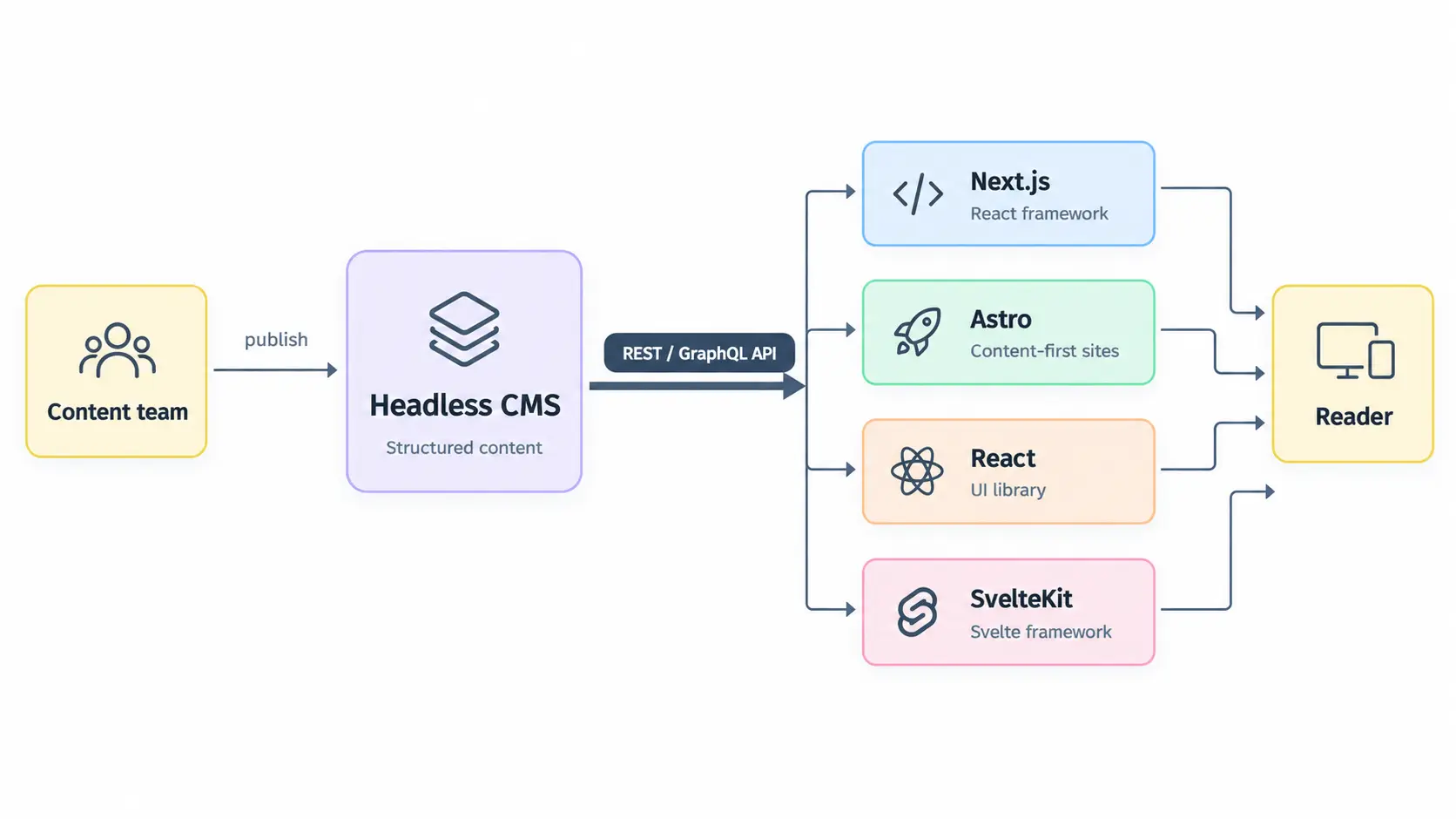
GrokA headless CMS for modern web frameworks separates your content from the frontend that displays it. Your CMS stores and manages structured content, while frameworks such as Next.js, Astro, React, Nuxt, and SvelteKit fetch that content through an API and decide how it is rendered.
This architecture gives development teams control over routing, components, rendering, hosting, performance, and deployment without forcing content teams to work inside the frontend codebase.
For developers, the main benefit is architectural freedom. For SEO and marketing teams, it means the blog can support the technical stack they need without giving up editorial workflows.
The model is increasingly relevant as modern web development moves toward composable, API-driven architectures. The 2025 State of JavaScript survey recorded 12,130 respondents who had used React and 11,845 who had used Next.js, illustrating the scale of these technologies within its respondent base.
What is a headless CMS for modern web frameworks?
A headless CMS for modern web frameworks is a content management system that provides structured content through an API instead of controlling how that content appears on a website.
The basic architecture looks like this:
Layer | Responsibility |
Headless CMS | Stores articles, authors, categories, media, metadata, and other content |
API | Delivers structured content to the application |
Frontend framework | Fetches and renders that content |
Hosting platform | Serves the finished application |
Search engines | Crawl and index the rendered pages |
In a traditional CMS, the content system and presentation layer are closely connected. A headless approach removes that dependency.
For example, a blog post might exist in the CMS as structured data containing a title, slug, body, author, category, cover image, and SEO metadata. Your Next.js, Astro, React, Nuxt, or SvelteKit application then decides what to do with that data.
That makes the CMS a content layer rather than the website itself.
How does a headless CMS work with frontend frameworks?
A headless CMS works with a frontend framework by exposing content through an API that the framework can request and render.
The flow is straightforward:
A writer creates and publishes an article in the CMS.
The CMS stores the article as structured content.
The frontend requests the published content through an API.
The framework maps that content to a page or component.
The application renders the page using its own routing, templates, styling, and rendering strategy.
A webhook or revalidation mechanism can notify the frontend when content changes.
The important point is that the CMS does not need to understand your frontend components. It only needs to provide reliable, structured content.
That is why an API-first CMS can work across multiple frontend architectures.
Why use a headless CMS with modern web frameworks?
The main reason to use a headless CMS with a modern framework is to separate content operations from application development.
A development team can build the frontend using the framework and infrastructure it prefers while writers, editors, marketers, and SEO specialists manage content separately.
This separation is particularly useful when:
The website needs a custom frontend rather than a CMS theme.
Developers want control over rendering and deployment.
Content needs to appear across multiple applications or properties.
Marketing teams need to publish without opening development tickets.
Agencies manage several websites or content operations.
SEO teams need structured metadata and publishing controls.
A company expects its frontend architecture to change over time.
Modern frameworks also give teams different rendering options. Depending on the framework, a page can be statically generated, rendered on the server, generated on demand, or enhanced on the client.
The CMS supplies the content. The frontend decides how and when to present it.
How do developers connect a CMS to a modern frontend framework?
Developers generally connect a headless CMS to a frontend framework through REST, GraphQL, an SDK, or another API interface.
For a REST-based CMS, the integration can be as simple as an HTTP request:
Frontend application → HTTP request → CMS API → Structured JSON → Frontend component → Web page
The exact implementation depends on the framework and CMS, but the underlying concept remains the same.
A developer typically needs to configure:
Integration requirement | What it controls |
API endpoint | Where content is requested |
Authentication | Who can access protected content |
Content query | Which articles or records are retrieved |
Routing | How CMS slugs map to frontend URLs |
Rendering | How content becomes HTML or interactive UI |
Revalidation | When updated content reaches the live site |
Metadata | How titles, descriptions, canonical URLs, and sharing data are generated |
Preview | How unpublished content is reviewed before release |
An API-first architecture also avoids forcing developers to install a framework-specific runtime merely to consume content. For example, ContioReach exposes structured blog content through REST and JSON and describes its API as framework-agnostic.
Headless CMS for Next.js
Next.js is a React framework for building full-stack web applications. It supports multiple rendering and routing capabilities, including the App Router and Pages Router.
A headless CMS works particularly well with Next.js because the framework can fetch CMS content and determine how that content should be rendered.
For a blog, the architecture can look like:
Headless CMS → REST / GraphQL API → Next.js data layer → Blog route → Article component → Rendered HTML
Next.js can fetch an article based on its slug and pass the resulting data into the page component. The CMS remains responsible for content, while Next.js controls the website experience.
What should developers consider when connecting a CMS to Next.js?
Developers should evaluate:
Server-side and static data fetching options
ISR or on-demand revalidation
Webhook support
Draft and preview workflows
Image delivery
Metadata handling
API authentication
Caching behavior
Type safety
Content modeling requirements
Next.js documentation also demonstrates data fetching through Server Components, which makes the framework suitable for content-driven applications where data is retrieved before or during rendering.
For a detailed implementation, see Next.js blog integration to cover the complete setup from API connection to routing and publishing.
Headless CMS for Astro
Astro is designed for content-focused websites and supports multiple frontend technologies through its component and integration model. Its official documentation includes a dedicated blog tutorial, content collections, and guidance for connecting a headless CMS.
This makes Astro particularly relevant to teams building blogs, documentation sites, marketing websites, and other content-heavy properties.
A typical architecture is:
CMS → API → Astro data fetching → Content page → HTML + interactive islands
Astro's architecture allows teams to keep much of a content-heavy website lightweight while adding interactive components where they provide value.
For a blog, developers can retrieve article data from the CMS, map each slug to an Astro route, and render the structured fields into the page template.
See Astro blog integration for the framework-specific implementation and routing approach.
Headless CMS for React
React is a UI library rather than a complete full-stack framework. The official React documentation currently lists React 19.3 as the latest version, released in September 2026.
A headless CMS can provide React with structured content through an API, but the overall architecture depends on the application framework surrounding React.
For example:
CMS API → Data fetching layer → React application → Article component → Rendered interface
The CMS can provide the article data while React components control how headings, images, authors, related posts, calls to action, and other elements are presented.
For SEO-sensitive blogs, however, teams should consider the rendering architecture carefully. A CMS alone does not determine whether a React website produces crawlable, performant pages. The application architecture, rendering method, metadata implementation, internal linking, and technical SEO configuration all matter.
Read React API-driven blog setup for a deeper implementation guide.
Headless CMS for Nuxt
Nuxt is a Vue-based framework that supports content-driven applications and multiple rendering strategies.
Developers can connect an external headless CMS to Nuxt through APIs and use Nuxt's routing and rendering capabilities to create article pages.
Nuxt also has its own Nuxt Content option, which demonstrates another model: content can be managed within the project itself using Markdown, YAML, JSON, or CSV. The current Nuxt Content documentation describes typed collections, queries, and a content layer designed specifically for Nuxt applications.
An external headless CMS becomes more useful when content needs to be managed separately from the codebase or by non-developer teams.
See Nuxt blog integration for the differences between an external API-driven CMS and Nuxt's own content tooling.
Headless CMS for SvelteKit
SvelteKit can also consume structured content from an external CMS through HTTP APIs.
The basic model remains the same:
CMS → REST / GraphQL → SvelteKit server or data layer → Route → Svelte component
The advantage of this approach is that the content source does not need to dictate the frontend technology.
For teams already using SvelteKit, the CMS becomes a backend content service while SvelteKit controls the application experience.
For implementation details, see SvelteKit CMS integration.
Headless CMS frameworks compared
Different frameworks solve different frontend problems. The right CMS should therefore work with the framework your team already uses rather than forcing the website into a specific presentation model.
Framework | Common content use | Rendering considerations | CMS integration |
Next.js | SaaS blogs, marketing sites, applications | Server, static, cached, dynamic | REST, GraphQL, SDKs |
Astro | Blogs, content sites, documentation | Static-first with interactive islands | REST, GraphQL, integrations |
React | Custom applications and interfaces | Depends on surrounding architecture | REST, GraphQL, SDKs |
Nuxt | Vue-based content and applications | SSR, static, hybrid approaches | REST, GraphQL, modules |
SvelteKit | Content sites and web applications | Server, static, hybrid approaches | REST, GraphQL, custom APIs |
The framework is responsible for the presentation layer. The CMS is responsible for the content layer.
That distinction is important when evaluating a headless CMS for developers.
What should developers look for in a framework-friendly CMS?
A framework-friendly CMS should provide a predictable API, structured content, reliable publishing, and mechanisms for getting content changes into the frontend.
The most important capabilities include:
API-first delivery: Content should be accessible programmatically without locking the frontend to the CMS.
Structured content: Articles, authors, categories, media, and metadata should have predictable relationships.
Webhooks: Content changes should be able to trigger downstream actions.
Revalidation support: Published updates should reach cached or statically generated pages without unnecessary full rebuilds.
Authentication controls: API credentials should be manageable and appropriately scoped.
Preview workflows: Developers and content teams should be able to inspect unpublished content.
Clear documentation: Integration should not depend on reverse-engineering undocumented behavior.
ContioReach, for example, documents REST/JSON delivery, webhooks, on-demand revalidation, and scoped API tokens as part of its headless architecture.
How to add a blog to a custom frontend
To add a blog to a custom frontend, connect the frontend to a CMS API, create a route that accepts the article slug, retrieve the matching content, and render the structured fields through your own components.
A typical implementation has five parts:
1. Create the content model
At minimum, a blog article commonly needs:
Title
Slug
Body
Author
Publication date
Category
Tags
Featured image
Meta title
Meta description
Canonical URL
Related content
A blog-focused CMS can provide these structures without requiring the development team to build every field and relationship from scratch.
2. Fetch the content
The frontend sends an API request for the required article.
For example:
GET /articles/{slug}
curl "https://cms-api.contioreach.com/v1/blogs?limit=10&minimal=true" \
  -H "X-API-Key: YOUR_API_KEY"
The API returns structured data that the frontend can map to its article component.
3. Create the article route
The frontend maps the CMS slug to a URL such as:
/blog/how-to-use-a-headless-cms
The route then retrieves the corresponding article.
4. Render the content
The frontend controls the HTML structure, typography, navigation, related articles, calls to action, and other page elements.
5. Handle publication changes
A webhook can notify the frontend or hosting platform when an article is published or updated.
This is important for blogs because content teams should not need to wait for a developer to manually redeploy a website after every article.
Headless CMS frontend architecture and SEO
A headless CMS does not automatically make a website SEO-friendly.
SEO depends on how the frontend consumes and renders the content.
A strong headless CMS frontend should support:
SEO requirement | Frontend responsibility |
Crawlable content | Render meaningful page content |
Metadata | Generate title and description from CMS fields |
Canonicals | Output the correct canonical URL |
Internal links | Render contextual links between relevant pages |
Structured data | Generate appropriate schema markup |
XML sitemap | Include published URLs |
Robots directives | Control crawl behavior where required |
Performance | Optimize images, scripts, fonts, and rendering |
Responsive design | Provide usable pages across devices |
Google recommends creating helpful, reliable, people-first content and considers page titles and headings part of the main content that helps users understand a page.
This means the CMS and frontend should work together. The CMS can store the information, but the frontend must expose it correctly to users and search engines.
Headless CMS integration for SEO and marketing teams
Developers are not the only users affected by the architecture.
SEO and marketing teams need to be able to create, optimize, update, and publish content without turning every change into an engineering task.
A practical workflow looks like this:
Keyword research → Content planning → Writing → SEO review → Internal linking → Editorial review → Publish → Index → Measure → Update
The CMS should make the content available to the frontend while keeping these operational steps accessible to the people responsible for content performance.
This is especially relevant for blog-focused platforms. ContioReach, for example, combines its headless content layer with SEO and GEO guidance, semantic internal linking, publishing, and Google Search Console workflows.
How should agencies use a headless CMS for multiple blogs?
Agencies can use a headless CMS to keep content operations separate from each client's frontend architecture.
A multi-client setup can look like:
Agency need | Headless CMS capability |
Multiple clients | Separate workspaces |
Different websites | Independent frontend connections |
Different permissions | Role-based access |
Shared content processes | Repeatable editorial workflows |
Developer flexibility | API-based delivery |
Client-specific branding | Frontend-controlled presentation |
Multiple publishing schedules | Per-project publishing workflows |
This lets an agency manage content centrally without requiring every client website to use the same frontend framework.
For example, one client could use Next.js while another uses Astro or Nuxt. The content workflow can remain similar even though the presentation layers are different.
What makes a headless CMS suitable for blog-focused teams?
A general-purpose headless CMS gives developers flexibility, but flexibility can also create additional setup work.
For a blog, the development team may otherwise need to define article models, author relationships, taxonomy, metadata fields, publishing workflows, and other structures before the content team can work efficiently.
A blog-focused CMS approaches the problem differently.
ContioReach describes its content model around articles, authors, categories, tags, media, and SEO metadata, while delivering those structures through its REST API.
The distinction can be summarized like this:
Generic headless approach | Blog-focused headless approach |
Start with flexible content models | Start with blog structures |
Define article schema | Article structure already exists |
Configure relationships | Blog relationships are predefined |
Build publishing workflows | Publishing is part of the workflow |
Add SEO fields | SEO is integrated into content operations |
Connect external tools | More blog workflows can live in the CMS |
This does not make one architecture universally appropriate. Teams with highly diverse content requirements may need the flexibility of a broader content platform. Teams primarily managing blogs may value a more focused system.
How to choose the best headless CMS for web frameworks
The best headless CMS for web frameworks depends on your technical architecture, content operation, and level of control required.
Instead of choosing based only on the number of integrations, evaluate the CMS across these areas:
Developer requirements
Check whether the CMS provides:
REST or GraphQL APIs
Clear documentation
Predictable response structures
Authentication
Webhooks
Revalidation support
Preview functionality
Environment separation
Reliable uptime
Appropriate caching controls
SEO and marketing requirements
Check whether content teams can manage:
Metadata
Slugs
Authors
Categories
Internal links
Images
Publishing schedules
Redirects or canonical information
Search performance workflows
Agency requirements
Look for:
Multiple workspaces
Role-based permissions
Client separation
Reusable workflows
Multiple frontend connections
Centralized administration
The important question is not simply "Does this CMS support Next.js?"
Most API-driven CMS platforms can send content to a modern framework.
The more useful question is whether the CMS gives developers the control they need while giving content teams the operational tools they need.
Headless CMS for modern web frameworks: what changes in 2026?
Modern web development is increasingly centered around flexible rendering, component-based interfaces, APIs, and independent deployment systems.
The ecosystem is also moving quickly. React 19.3 was released in September 2026, while Next.js 16.3 introduced further improvements around navigation, caching, and rendering.
That makes framework independence increasingly useful for content systems.
A CMS should not assume that your frontend will remain unchanged for years. A company may move from React to Next.js, migrate from one hosting platform to another, introduce a new frontend application, or serve the same content to additional properties.
The content layer can remain stable while the presentation layer evolves.
The scale of the modern web also makes performance and architecture important considerations. The 2025 Web Almanac analyzed a July 2025 dataset covering more than 16.2 million websites and 244 TB of processed data, illustrating the scale of the web infrastructure being measured today.
Frequently asked questions about headless CMS frameworks
Which headless CMS works with Next.js and Astro?
Any headless CMS that provides an accessible API can generally work with Next.js and Astro. The key requirements are API access, structured content, authentication where needed, and a suitable publishing or revalidation workflow.
For example, ContioReach provides REST/JSON content delivery and explicitly lists Next.js, Astro, Nuxt, SvelteKit, React, Vue, Gatsby, and Remix among supported frontend stacks.
How do developers connect a CMS to a modern frontend framework?
Developers typically connect a CMS by calling its REST or GraphQL API from the framework's data layer. The returned structured content is then mapped to frontend routes and components.
Webhooks can be added so publishing events trigger revalidation or another frontend update process.
How do I add a blog to a custom frontend?
Connect the custom frontend to a headless CMS API, create a blog route based on the article slug, fetch the corresponding structured content, render it through your own components, and configure metadata, internal links, sitemap handling, and publishing updates.
A webhook can then trigger revalidation whenever an article changes.
Is a headless CMS better for developers?
A headless CMS can give developers greater control because the CMS does not dictate the frontend technology or presentation layer. The trade-off is that developers may need to implement more of the frontend integration themselves.
The right choice depends on how much control the project requires and how much infrastructure the team wants the CMS to provide.
Is a headless CMS good for SEO?
A headless CMS can support strong SEO, but the CMS itself does not determine search performance. The frontend must correctly render content, metadata, internal links, structured data, canonical URLs, sitemaps, and other technical SEO elements.
The strongest setup treats the CMS and frontend as two connected parts of the same publishing system.
The practical model for modern content teams
A modern blog does not need to choose between developer freedom and an efficient content workflow.
A headless architecture can give developers ownership of the frontend while giving writers, editors, SEO specialists, marketers, and agencies a dedicated content system.
The division of responsibility is simple:
The CMS manages content and publishing.
The API connects the content layer to applications.
The frontend framework controls presentation and rendering.
The hosting platform serves the application.
SEO teams improve discoverability and content structure.
Marketing teams turn the content into a broader acquisition channel.
Developers control the architecture and technical implementation.
That separation is what makes a headless CMS useful across modern frameworks.
Whether the frontend uses Next.js, Astro, React, Nuxt, SvelteKit, or another framework, the fundamental architecture remains the same: structured content on one side, a flexible presentation layer on the other, and an API connecting them.
For teams building content-heavy websites in 2026, the important question is therefore not which framework the CMS was designed around. It is whether the CMS can deliver the structured content, publishing workflow, and operational control your team needs while allowing your frontend to remain yours.
Written by

Hira Fayyaz
Hira Fayyaz is a SaaS content strategist and writer specializing in SEO, product-led content, and AI search visibility. She works around SaaS growth and product marketing, developing content strategies that help technology brands build authority and reach high-intent audiences.