 ChatGPT
 Perplexity
 Claude
 Grok
GrokQuick Answer: To use an API, I get an API key, read the documentation to find the right endpoint, send a request using a method like GET or POST, and then handle the response my application receives. That basic flow is really all you need to get started.
If you work with websites, apps, or digital content, you have probably heard the term API more than once. I remember finding it confusing at first, especially when I was trying to understand how to use an API for real projects. The good news is that once I understood the basics, working with an API became much easier than it sounds.
In this guide, I will break down how to use API in simple steps, without technical jargon. I will also cover the questions I get asked most often, including how this works for complete beginners with no coding background at all. By the end, you will have the same clear picture I now have.
What Is an API and Why Does It Matter
API stands for Application Programming Interface. In simple words, it is a bridge that allows two software systems to talk to each other. When I check the weather on my phone, an API is fetching that data from a weather service and showing it on my screen.
I have found that APIs matter because they save time. Instead of building everything from scratch, I can connect to existing systems and pull or send data instantly. This is especially useful in content management, where businesses need to move content between platforms, apps, and devices without extra manual work.
Understanding How an API Works
Before I explain the process step by step, it helps to understand the basic flow I follow every time. An API works through requests and responses. My application sends a request to a server, and the server sends back a response with the information I asked for.
This process usually happens through a set of rules called endpoints. Each endpoint represents a specific action, such as fetching content, updating a record, or deleting an item. Once I understood endpoints, using any API became a repeatable process for me.
Every request I send also carries a few important parts. There is usually a web address that points to the exact information I want, an action that tells the server what to do, and sometimes extra details that carry the actual data. Learning to recognize these three parts is what made everything click for me.
Most modern APIs also return data in a simple format made up of labels and values, similar to filling out a form. Once I got used to reading these responses, working with any API started to feel familiar, even when I switched between different platforms.
Types of APIs You Should Know About
Not all APIs work the same way, and knowing the different types has helped me choose the right one for each project. The three most common types are REST, GraphQL, and SOAP.
REST APIs are the ones I use most often because they are simple and flexible. GraphQL APIs let me request exactly the data I need, which can reduce extra data transfer. SOAP APIs are older and more rigid, but they are still used in certain industries that require strict data rules.
For most content platforms, including headless CMS tools, I stick with REST style APIs as the standard choice, since it keeps things simple whether you are a beginner or an experienced developer.
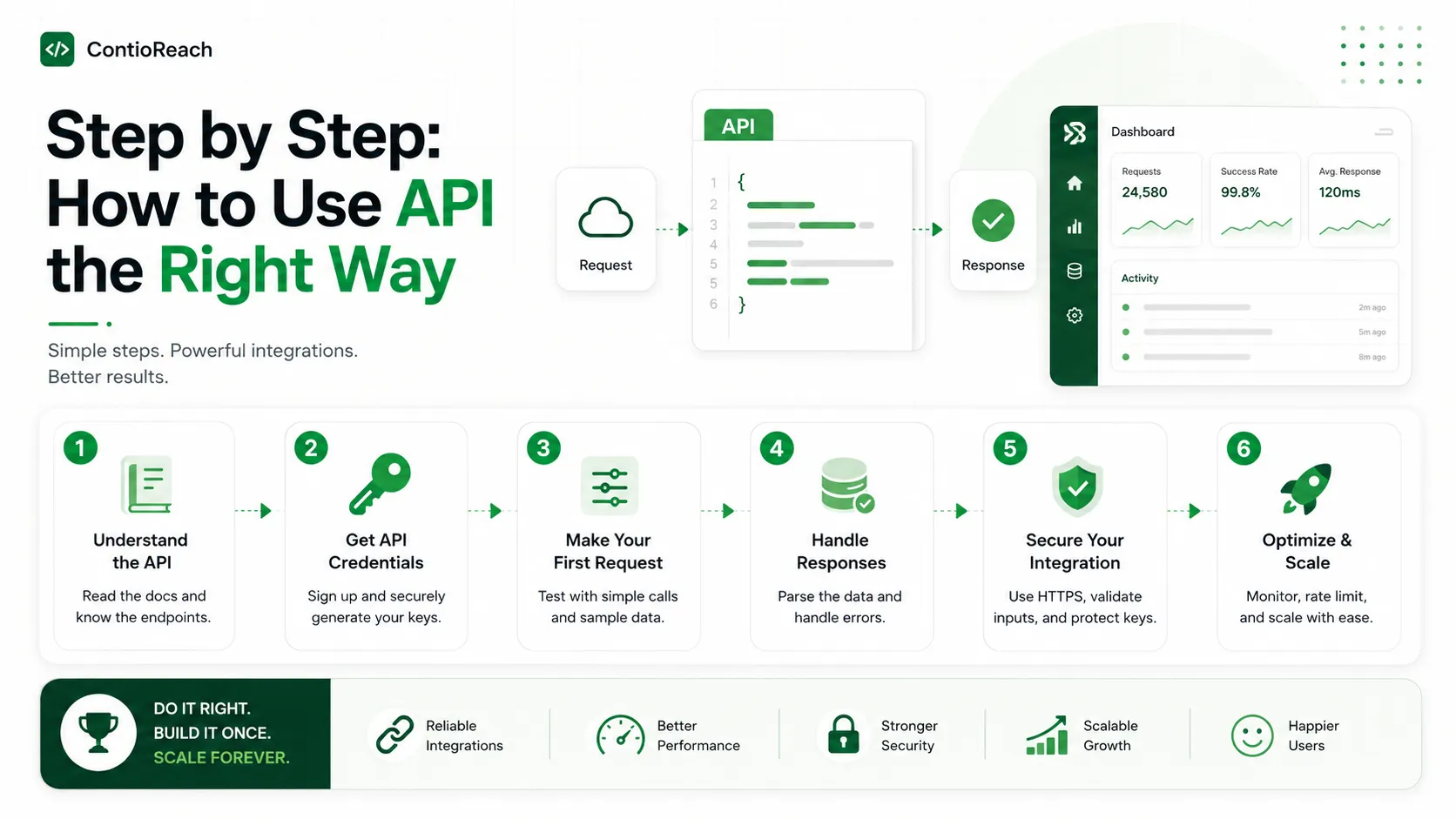
Step by Step: How to Use API the Right Way
I do not think this needs to be complicated. Here is the same step by step approach I use for most platforms.
Get your API key or access token.
This is like a password that proves you are allowed to use the API.
Read the API documentation.
Good documentation tells you what endpoints are available and what data they need.
Choose the right endpoint.
Pick the one that matches the action you want, such as fetching blog posts or updating a page.
Send a test request.
I always send a small request first and check if the response looks correct.
Handle the response properly.
Make sure your application reads and displays the returned data correctly.
Add error handling.
I always plan for cases where the request fails, so my app does not break.
Following these steps consistently is the easiest way I have found to avoid confusion when you are just getting started.
Common Methods You Will Use
Most APIs rely on a few standard methods. Knowing these has made the entire process much simpler for me.
Method | Purpose | Common Use Case |
GET | Retrieve data | Fetching blog posts or product listings |
POST | Create new data | Adding a new content entry |
PUT | Update existing data | Editing a published article |
DELETE | Remove data | Deleting an outdated page |
PATCH | Partially update data | Changing just the title of a post |
Once I got comfortable with these five methods, I was able to handle almost any task involving APIs across different platforms.
Tools That Help You Test an API
I do not think you need to write full code just to test an API. Several beginner friendly tools make this process simple, letting you send requests and view responses without writing anything yourself.
I personally rely on one of these tools to test API calls before building anything further. It lets me send requests and view responses in a simple visual layout. Another option is using browser based tools that let you test directly from your web browser.
Once I got comfortable sending test requests, I moved on to connecting my application to the API for real. This step by step approach reduced my mistakes and built my confidence along the way.
Why Headless CMS Platforms Rely Heavily on APIs
A headless CMS separates the content from the design. This means the content lives in one place, and the API delivers it wherever it is needed, whether that is a website, mobile app, or smart device.
This is exactly why understanding APIs is so important for anyone working with modern content platforms. Without a proper understanding of API calls, teams cannot fully take advantage of the flexibility a headless CMS offers.
ContioReach is built around this idea. It gives teams a clean, reliable API layer so content can be published once and delivered anywhere, without duplicate work or messy manual updates.
Real World Example of Using an API
Let me walk you through an example I have seen play out often. A company wants to show its latest blog posts on both its website and mobile app, so their content team publishes each article once inside the CMS.
From there, both the website and the app ask the same source for the latest articles. The API sends back the titles, links, and publish dates for each one.
The website displays the five newest posts in a grid. The mobile app shows the same articles in a scrolling list. Nobody had to copy or re-enter the content twice, since one request fed both surfaces.
Best Practices When Working With APIs
Getting this right also means following a few best practices I stick to every time. These small habits have prevented major issues for me later on.
I always keep my API keys private and never share them publicly.
I use clear naming conventions when setting up custom endpoints.
I test every request in a safe environment before using it live.
I monitor my API usage to avoid hitting request limits.
I keep my documentation updated as my content structure grows.
I check whether a platform supports different versions of its API, so older setups do not break when new features are added.
These practices apply whether you are a beginner or an experienced developer, and they become even easier to follow when using a well structured platform.
Common Mistakes Beginners Make
I struggled with this myself at first simply because I skipped a few important steps. Here are the common mistakes I now warn other beginners about.
One mistake I made early on was not reading the documentation carefully. Skipping this step often leads to sending incorrect requests. Another common issue is ignoring error messages instead of using them to fix the problem.
Some users also forget to handle failed requests, which can cause an app to crash unexpectedly. Taking a slow, careful approach in the beginning prevented most of these issues for me later.
Comparing API Approaches Across Content Platforms
Different platforms handle API access in different ways. Some require heavy setup, while others are designed to be simple from day one. The table below shows how I generally compare what to expect.
Feature | Traditional CMS APIs | ContioReach API |
Setup Time | Often slow and complex | Fast and beginner friendly |
Documentation | Sometimes limited or outdated | Clear and regularly updated |
Content Delivery | Usually tied to one platform | Delivers content to any platform |
Scalability | Limited without extra tools | Built to scale with growing needs |
Support | Varies by provider | Dedicated support for API users |
This comparison shows why I have seen more teams shift toward platforms that are built with API access as a core feature rather than an afterthought.
How to Choose the Right API Platform
Not every platform offers the same level of API support. When I choose a platform, I look for a few key things before making a decision.
First, I check if the documentation is clear and easy to follow. Confusing documentation makes everything harder. Second, I look at how reliable the platform is, since downtime can affect your entire content delivery process.
Third, I consider how well the platform scales as needs grow. A good API should support small projects today and larger, more complex projects in the future without major changes. This is the kind of standard I hold every platform to before committing to it.
For teams working together, I also recommend keeping a shared document that lists every endpoint you use regularly. It becomes a quick reference guide and saves everyone from digging through long documentation every time a question comes up.
Troubleshooting Common API Errors
Even with careful planning, errors happen from time to time. Knowing how to read them has made fixing issues much faster for me.
A permission error usually means my request is missing proper authorization, such as an invalid or expired API key. A not found error means the endpoint I am trying to reach does not exist, often due to a small typing mistake in the web address.
A server error points to a problem on the platform's side rather than my own request. In this case, checking the platform status page or reaching out to support is usually the fastest solution.
Learning to recognize these common errors early has made the entire process far less frustrating for me, especially when I was still figuring out how to use API responses correctly.
Frequently Asked Questions
How do I use an API as a complete beginner?
I started by getting an API key, reading the documentation, and sending a simple test request with a beginner friendly tool. Once that worked, I moved on to sending different types of requests.
How do I use an API in Python?
In Python, there are simple libraries built for sending requests and reading the response, so you do not need to write everything from scratch.
How do I use an API in JavaScript?
In JavaScript, there is a built-in function made for this exact purpose, and it handles sending the request and reading the response for you.
Is there a simple, beginner friendly guide I can follow?
Yes, there are plenty of free step by step tutorials online, and this guide covers the same fundamentals in plain language.
Do I need a PDF or downloadable guide to learn this?
Not really. Most free online guides cover everything you need, and practicing with a live API teaches you faster than reading alone.
Is it safe to use APIs for content management?
Yes, as long as you follow good security practices such as keeping keys private and using a trusted platform.
Can APIs work across different devices and platforms?
Yes, this is one of the main benefits of using an API, especially with a headless CMS that delivers content anywhere it is needed.
Final Thoughts
Understanding how to use API tools is one of the most valuable skills I have picked up while working with modern digital content. It opens the door to faster workflows, better integrations, and more flexible content delivery across multiple platforms.
If you are ready to put this knowledge into action, I recommend giving ContioReach a try. It offers a simple, reliable, and beginner friendly API built specifically for modern content needs, and it is a great place to start.
Written by

Team Contioreach
Creates expert content on SEO, AI search, content strategy, and automation to help businesses grow their online visibility.