Headless Content Management System: The Complete Guide

You've heard the term, but what does a headless content management system actually do, and is it right for your stack? Here's the definitive breakdown, from architecture to real-world use cases.

Team ContioreachTeam Contioreach·July 17, 2026·18 min read
Headless Content Management System: The Complete Guide

What Is a Headless Content Management System?

A headless content management system is a backend-only content repository that delivers content via APIs to any frontend, device, or channel, with no built-in presentation layer. Editors create and organize content in a central interface. Developers retrieve that content through REST or GraphQL endpoints and render it however they choose, on whatever platform they choose.

What Is a Headless Content Management System?

The CMS stores content. Something else displays it.

The core characteristics that define a headless CMS:

  • API delivery (REST or GraphQL) replaces built-in page templates as the sole method for getting content out of the system

  • Frontend-agnostic architecture means developers pick their own stack (Next.js, Astro, React, Vue, a custom iOS app) without constraints from the CMS

  • Multi-channel publishing from a single content source to websites, mobile apps, digital signage, chatbots, and AI agents simultaneously

  • A fully decoupled backend that has zero opinion about how or where content appears

  • A content-as-a-service model where structured content is reusable across channels rather than duplicated per destination

Why does this matter right now? Development teams building on frameworks like Next.js and Astro treat API-first content delivery as a baseline requirement, not a premium feature. Multi-channel publishing has gone from aspirational to expected.

But here is the part most vendors skip over: content production velocity has not kept pace with delivery infrastructure. Teams can push content to ten channels in seconds, yet still take days to produce each piece.

One common frustration drives adoption more than any architectural diagram. Teams locked into a traditional CMS watch their content trapped inside a single theme's templates, unable to reuse it without copy-pasting across platforms. That pain is real and specific.

⚠️ But headless architecture is not universally better. It solves structural problems around multi-channel delivery and frontend freedom. For a solo blogger who only publishes to one website, a traditional CMS with built-in templates is faster and cheaper to operate.

Key Takeaways

📌 Key Takeaways

  1. A headless content management system stores content in a backend repository completely separated from any frontend presentation layer.

  2. Content reaches websites, apps, digital signage, and AI agents through APIs (REST or GraphQL), not through built-in templates.

  3. This architecture makes true omnichannel publishing possible: create once, deliver everywhere.

  4. Teams that adopt headless without dedicated developer resources for frontend setup almost always stall within the first month, because there is no default "website" out of the box.

  5. A headless CMS is not the right fit for every organization, and any guide that skips that fact is selling you something.

How a Headless Content Management System Works

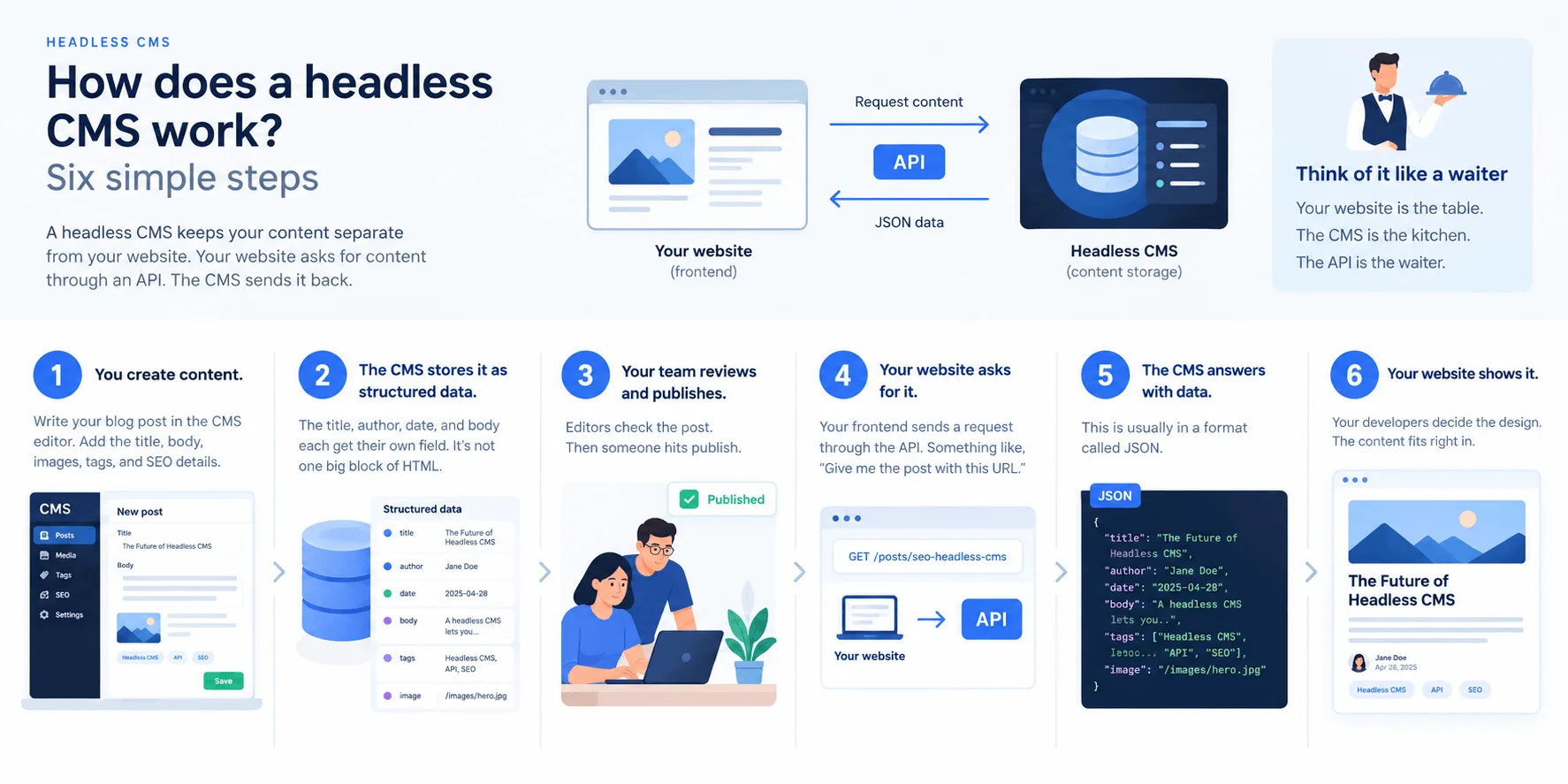
A headless CMS works by separating content storage from content presentation, then connecting the two through API calls that deliver raw, structured data to any frontend. Think of it like a commercial kitchen. The kitchen (your backend content repository) prepares and stores all the ingredients.

A delivery service (the API layer) picks up those ingredients and transports them. Any restaurant, food truck, or catering tent (your frontends) can receive the same ingredients and plate them however they want. The kitchen never dictates how the food looks on the plate.

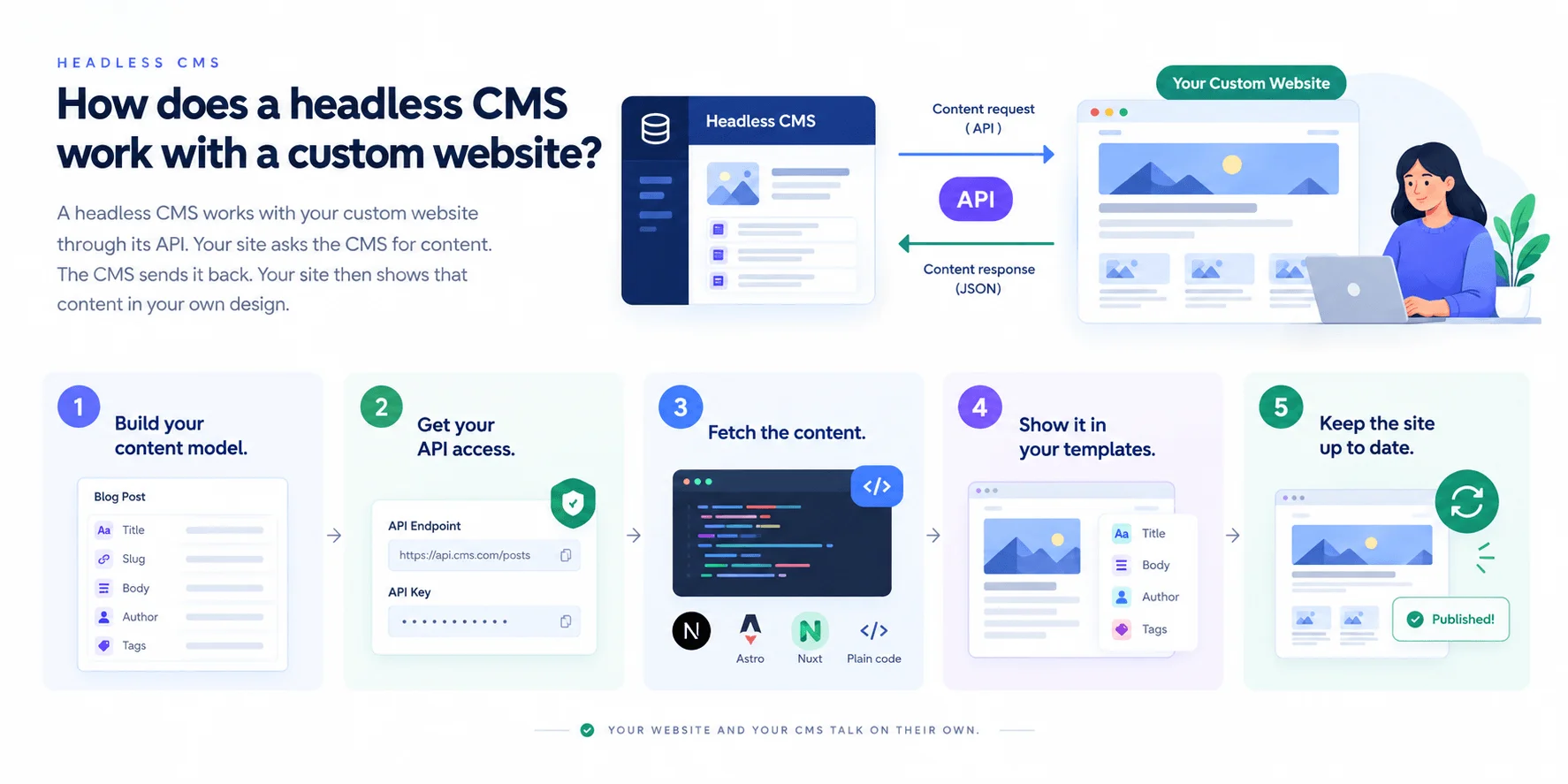
Here is the actual sequence. An editor creates structured content in the CMS dashboard, defining fields like title, body text, author, and featured image. That content gets stored in the backend repository.

When a visitor loads a page, the frontend sends a request to the CMS through a REST API (a standardized set of rules for requesting and receiving data over HTTP, as Cloudflare defines it) or GraphQL (a query language that lets the frontend request only the specific fields it needs, reducing payload size). The API returns content as JSON, a lightweight data format. The frontend then renders that JSON inside its own templates and components.

Frameworks like Next.js and Astro are popular choices for building that frontend layer. Contentful describes this as API-first architecture, where every piece of content is born to be delivered programmatically, not locked inside a theme file.

💡 The step most teams underestimate is content modeling. Defining how content types relate to each other (a blog post references an author, which references a bio page) determines whether the system scales cleanly or turns into a mess at 500 entries. Getting the model wrong early means painful restructuring later.

Developers often describe an "aha moment" when they realize content is no longer trapped inside a single template engine. But honesty matters here: this architecture requires real frontend development skills. Unlike WordPress, where you install a theme and publish, a headless setup demands someone who can build and maintain the presentation layer from scratch.

Understanding how a headless CMS works internally makes the comparison with traditional systems much clearer.

Headless CMS vs. Traditional CMS: A Side-by-Side Comparison

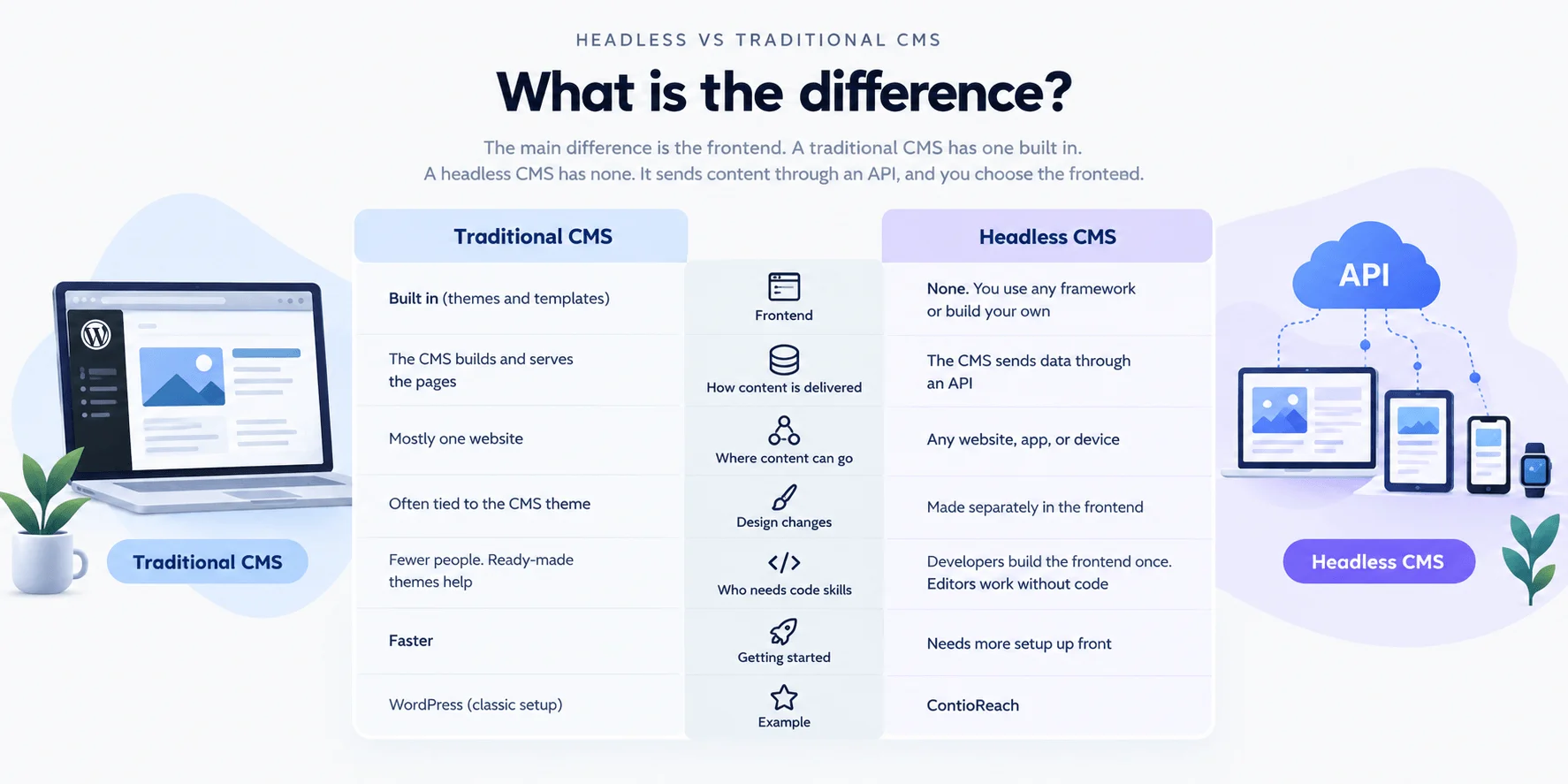
A traditional CMS bundles content management and frontend presentation into a single system. WordPress, the most widely used traditional CMS, stores your content in a database and renders it through PHP templates tied to a specific theme. That architecture works well for a single website, but it becomes a constraint the moment you need to deliver content to a second channel.

Headless CMS vs. Traditional CMS: A Side-by-Side Comparison

Feature

Traditional CMS

Headless CMS

Content delivery method

Server-rendered HTML pages via built-in templates

Raw structured data via REST or GraphQL APIs

Frontend flexibility

Limited to the CMS's templating engine (e.g., PHP themes)

Any framework: Next.js, Astro, React, Vue, custom builds

Multi-channel publishing

Single-channel (website only without heavy customization)

Native multi-channel: web, mobile apps, digital signage, IoT, AI agents

Technical complexity

Low; non-developers can manage most tasks

Higher; requires frontend development resources

Scalability

Vertical scaling, often limited by hosting and plugins

Horizontal scaling via CDN-backed APIs and static generation

Best for

Small teams, simple blogs, brochure sites

Multi-channel brands, developer-led teams, content-heavy operations

One nuance that most comparison guides skip: WordPress itself can run in headless mode. Its built-in REST API lets developers pull content from a WordPress backend and render it with any frontend framework they choose. WP Engine documents this approach extensively and even offers hosting optimized for it. So the line between "traditional" and "headless" is blurrier than vendor marketing suggests.

A traditional CMS is genuinely the better choice for teams without dedicated developers, for straightforward blogs that publish to a single website, and for organizations operating on tight budgets where custom frontend work is not realistic. The mistake most teams make is jumping to headless architecture before they actually need multi-channel delivery. Plenty of teams start on WordPress, run it successfully for years, and only outgrow it when a mobile app or third-party integration demands API-driven content. That migration point is when headless earns its complexity cost.

Beyond the traditional-versus-headless question, there is a closely related distinction worth understanding before choosing a platform.

Headless CMS vs. Decoupled CMS: What Is the Difference?

A headless CMS has no built-in frontend whatsoever; it stores content and exposes it through APIs, leaving every presentation decision to the development team. A decoupled CMS also delivers content via API, but it ships with a default frontend rendering layer that teams can use, bypass, or replace. Sanity's architecture documentation draws this line clearly: decoupled means detachable, headless means absent.

The practical difference shows up on day one of a project. A decoupled system gives a marketing team a fallback: if the custom React app isn't ready, content still renders through the built-in layer. A fully headless CMS offers no such safety net. Every screen, every channel, every template must be built from scratch.

Here is the part that trips up most evaluations: teams frequently say "headless" when their platform is actually decoupled. The distinction matters because it determines staffing. A five-person content team with one part-time developer can survive on a decoupled system.

That same team on a purely headless CMS will stall the moment the developer is unavailable. Check whether the platform you're evaluating includes any rendering capability before you commit.

With those architectural distinctions in place, the benefits of going fully headless become easier to evaluate on their own terms.

Benefits of a Headless CMS

The benefits of a headless content management system land differently depending on whether you write code, publish content, or sign the checks. A developer and a marketing director will champion the same architecture for entirely different reasons.

Benefits of a Headless CMS

For Developers

Frontend freedom is the single biggest reason developers push for headless adoption. A headless CMS imposes zero opinions about your presentation layer. Pick Next.js, Astro, React, Svelte, or a custom stack built on web components. The CMS does not care. Contentful's documentation on API-first architecture frames this well: when your content is available as structured JSON over REST or GraphQL, any framework that can make an HTTP request becomes a valid frontend.

That separation of concerns accelerates deployment cycles in ways that surprise even experienced teams. Instead of coordinating CMS theme updates, plugin conflicts, and monolithic release windows, frontend engineers ship independently. Teams migrating off monolithic setups commonly cut deployment timelines from weeks to days because the backend content repository never blocks a frontend release.

Here is the counterintuitive part: this freedom creates more work upfront. There is no pre-built theme to fall back on. Every page template, every component, every routing decision belongs to the development team. The payoff compounds over time, but sprint one on a headless project almost always takes longer than sprint one on a traditional CMS.

For Marketers and Business Owners

Content reuse across channels is the benefit marketers feel most directly. Write a product description once, and it flows to the website, the mobile app, an in-store kiosk, and a third-party marketplace through the same API. Storyblok highlights multi-channel publishing as a primary driver behind organizations adopting headless architectures, and the operational savings are real: teams stop maintaining duplicate content across disconnected systems.

Business owners care about scalability and cost efficiency. A headless CMS scales horizontally without requiring a platform migration. Adding a new regional site or a new sales channel means connecting another frontend to the same backend, not licensing a second CMS instance.

One frustration headless reduces but does not eliminate: waiting on developer sprints for content updates. Marketers can update text, images, and structured content independently through the CMS interface. But template changes, new page layouts, and component additions still require developer involvement. Headless does not make you developer-independent; it makes content publishing independent.

An emerging benefit worth watching is generative engine optimization (GEO). Structured content delivered via API is inherently easier for AI agents and large language models to consume, index, and cite. As AI-powered search grows, organizations with clean, API-accessible content structures are better positioned for discovery through those channels. Semrush's SEO research increasingly frames headless architectures as an advantage for structured data and crawlability, and this applies to AI retrieval systems too.

Where most headless platforms stop at the delivery layer, ContioReach addresses the production gap that teams hit once delivery is solved. As an AI-native headless CMS, ContioReach automates content generation, formatting, and publishing from keyword input alone, delivering significantly faster content output for teams whose bottleneck has shifted from "how do we deliver content" to "how do we produce enough of it."

These benefits are real, but they come with trade-offs:

  • Upfront developer dependency

  • Integration complexity

  • A learning curve for non-technical team members

Those trade-offs deserve honest examination before committing.

Knowing the benefits and trade-offs makes it easier to recognize which real-world scenarios headless architecture actually fits.

Common Use Cases for a Headless CMS

A headless content management system fits any scenario where content needs to reach more than one channel or where frontend flexibility matters more than out-of-the-box templates. Here are the use cases that drive most adoption decisions.

  • E-commerce product content. Retailers push product descriptions, pricing, and promotions to web storefronts, mobile apps, and in-store kiosks from a single content hub. IBM runs headless content infrastructure at enterprise scale for exactly this kind of omnichannel retail delivery. Contentful is a common pick here for large product catalogs.

  • Mobile app backends. Teams building native iOS or Android apps need structured content delivered via API, not rendered HTML. Sanity works well for developer-centric mobile projects because its GROQ query language lets frontend engineers request precisely the data shape they need.

  • Multi-site publishing for agencies. Agencies managing five, ten, or twenty client sites benefit most from centralized content operations. Storyblok gives non-technical editors visual editing across multiple properties. For content production specifically, platforms like ContioReach let agencies manage multi-site content generation from a single dashboard.

  • Digital signage and IoT. Airport departure boards, restaurant menu screens, smart mirrors. The content is the same structured data; the display hardware just consumes a different API endpoint. Not every use case here requires an enterprise-grade platform. Strapi, an open-source headless CMS, handles simpler signage setups without licensing costs.

  • Documentation portals. Engineering teams store docs as structured content and render them through static site generators like Astro or Next.js. Contentstack positions its composable architecture for enterprises that need documentation, marketing pages, and help centers all fed from one backend.

  • AI agent content delivery. This is the use case most guides skip. AI assistants, chatbots, and generative search engines increasingly pull structured content directly via API. A headless CMS that stores content as clean, schema-defined objects becomes a data source for AI agents, not just human readers.

A pattern repeats across these scenarios: teams almost always start with a single website, then realize the same content repository can feed a mobile app or a chatbot without rebuilding anything. That expansion moment is where headless architecture pays for itself.

Recognizing your use case is one thing; confirming your team is actually ready for headless is another.

Who Should Use a Headless CMS (and Who Should Not)

A headless content management system is a strong fit for teams that have frontend development capacity and need to publish content across more than one channel. It is a poor fit for anyone who lacks developer resources or simply needs a basic website.

Who Should Use a Headless CMS (and Who Should Not)

Good fit:

  • Organizations delivering content to a website, a mobile app, and at least one other channel (digital signage, an AI chatbot, a kiosk). The architecture earns its complexity only when you actually use the multi-channel capability.

  • Teams with at least one developer comfortable with API integration, a frontend framework like Next.js or Astro, and content modeling. These three skills are non-negotiable.

  • Companies scaling beyond a single website, especially agencies managing five or more client properties from a centralized backend.

Poor fit:

  • Solo bloggers or small businesses that need a simple site with minimal technical overhead. A traditional CMS with a drag-and-drop builder will get you publishing in an afternoon; a headless setup will not.

  • Teams with no budget for frontend development. The CMS itself may offer a free tier (both Contentful and Sanity do), but production-grade usage typically requires paid plans, and the real cost is hiring or contracting developers to build and maintain the frontend.

  • Beginners who need visual page editing out of the box. Headless platforms do not ship with one.

⚠️ The most common mistake teams make is adopting headless because the architecture sounds modern, without honestly evaluating whether anyone on the team can wire up a REST or GraphQL endpoint to a React component. A 15-person marketing team with zero API-literate developers will spend more time fighting the tooling than publishing content. That budget is better spent on a traditional or decoupled CMS until the technical capacity actually exists.

How to Choose the Right Headless CMS

The right headless content management system depends on five evaluation criteria matched to your team's technical maturity, size, and primary use case. No single platform wins across all five.

  • API type. Does your team prefer REST or GraphQL? Contentful offers a mature REST and GraphQL API infrastructure built for enterprise-scale traffic. Smaller teams often find REST simpler to debug and prototype with.

  • Content modeling flexibility. Sanity stands out here, letting developers define deeply nested, custom content structures without predefined schemas getting in the way. Rigid modeling will cost you months of workarounds later.

  • Frontend framework compatibility. Confirm that the CMS integrates cleanly with your stack (Next.js, Astro, or whatever you ship with). Strapi, the most popular open-source option, pairs well with self-hosted setups where teams want full control over both ends.

  • Pricing model. Free tiers from platforms like Contentful and Sanity cover early projects. Usage-based pricing can spike unpredictably once API calls scale, so model your projected traffic before committing to an enterprise license.

  • Editorial experience. Storyblok provides a visual editing layer that lets marketers preview content in context. Purely code-driven CMS platforms leave non-technical editors working blind.

The evaluation mistake teams make most often: choosing based on a feature comparison spreadsheet without having an actual editor publish three test articles through the workflow. A platform that looks perfect on paper can feel miserable in daily use.

Think of this decision within a composable architecture mindset. A headless CMS is one component in a broader stack (payment gateway, search service, analytics, frontend framework). Evaluate how it connects to the other pieces, not just what it does alone. A four-person marketing team and a 200-developer engineering org will land on different answers, and both can be right.

Frequently Asked Questions About Headless CMS

What is a headless CMS in simple terms?

A headless CMS is a content storage system that has no built-in website attached to it. Editors write and organize content in a backend dashboard, and that content gets delivered to any screen or app through an API. The system handles what the content says but has zero control over how it looks. This separation means the same content can feed a website, a mobile app, a digital kiosk, and an AI chatbot all at the same time, without duplicating work.

What is the difference between a headless CMS and a traditional CMS?

A traditional CMS like WordPress bundles content storage and frontend rendering into one system, delivering pages through built-in templates. A headless CMS removes the frontend entirely, delivering content exclusively through REST or GraphQL APIs. The practical result is that a traditional CMS controls how content looks, while a headless CMS only controls what the content says. Traditional systems suit single-website teams; headless suits teams publishing to multiple channels simultaneously.

What are some headless CMS examples?

Commonly used headless CMS platforms include Contentful, which offers enterprise-grade REST and GraphQL APIs; Sanity, known for flexible content modeling and a GROQ query language; Storyblok, which adds a visual editing layer for non-technical editors; Strapi, the most popular open-source self-hosted option; and Contentstack, built for enterprise composable architectures. ContioReach is an AI-native headless CMS designed to automate content generation and publishing for teams whose bottleneck has shifted from delivery to production volume.

Is a headless CMS good for beginners?

A headless CMS is not a strong fit for beginners without developer support. The platform ships without a frontend, so someone on the team must build and maintain all presentation layers from scratch. Solo founders or small marketing teams running a single blog will find traditional CMS options faster and cheaper to operate. Headless architecture starts paying off once a project requires multi-channel delivery or custom frontend work that a traditional CMS cannot support without heavy customization.

What are the drawbacks of a headless CMS?

Four drawbacks appear consistently. First, developer dependency: non-technical editors cannot change layouts or add pages without engineering help. Second, higher initial setup costs compared to installing a theme on a traditional CMS. Third, no built-in content preview, so editors cannot see how content will render without a separately built preview environment. Fourth, a steeper learning curve for marketing teams accustomed to visual drag-and-drop page builders. These trade-offs are manageable for teams with technical resources but real obstacles for those without.

Conclusion: Is a Headless CMS Right for You?

A headless content management system is the right architecture when content needs to reach more than one destination and the team has the technical ability to build its own frontend. That single sentence should guide the entire decision. Organizations publishing across websites, mobile apps, and third-party platforms will find that the API-first model eliminates the duplication and rigidity that traditional systems impose. Teams that only maintain a single website with standard templates will spend more time and money on headless infrastructure than it saves them.

The choice is not really "headless vs. traditional" in the abstract. It is about whether the content workflow already strains under multi-channel demands, and whether at least one person on the team can connect an API endpoint to a frontend component. If both conditions are true, headless architecture pays for itself quickly. If neither is true, a monolithic CMS remains the practical pick.

For teams ready to make the shift, ContioReach offers an API-first headless CMS with AI-powered content generation that automates content output across every connected frontend. Start for free and test the workflow with real content before committing to a full migration.

About the author

Team Contioreach

Team Contioreach

Team Contioreach publishes expert content on SEO, AI search, content strategy, and automation, helping businesses grow their organic visibility and stay ahead of evolving search trends.

Score every post for Google & AI

ContioReach writes, scores, and publishes SEO + AEO-ready content on autopilot.

Start Free Trial

No credit card required

Start publishing content that ranks and gets cited

Set up your keywords, brand voice, and schedule in minutes. ContioReach handles the writing, scoring, and publishing from there.

Get ranked & cited by

Google
Google
ChatGPT
ChatGPT
Gemini
Gemini
Perplexity
Perplexity
Claude
Claude
Copilot
Copilot

No credit card required · Cancel anytime· Setup in under 5 minutes