 ChatGPT
 Perplexity
 Claude
 Grok
GrokEvery content team knows the drill: research a keyword, brief a writer, wait on a draft, then edit, format, and optimize it before it finally goes live. Multiply that across the dozens of posts a growing brand needs each month, and the process itself becomes the real bottleneck, not the people running it.
An automated blog publishing workflow solves this by connecting every stage, from keyword input to a live, SEO-ready post, into one continuous system. This deep-dive breaks down how that process actually works, why it matters for teams scaling content without scaling headcount, and how a single target keyword becomes a fully published, search-optimized article, start to finish.
What Is an Automated Blog Publishing Workflow?
At its core, an automated blog publishing workflow is a system that takes a piece of input, usually a target keyword or topic, and carries it through every stage of content production automatically: research, drafting, on-page SEO, formatting, and publishing to your live site or CMS.
The goal isn't to remove human oversight entirely. It's to remove the repetitive, low-value manual work that slows teams down: copying text between tools, manually inserting meta tags, formatting headers, resizing images, or logging into a CMS to schedule a post one at a time.
A well-designed workflow typically includes:
Keyword or topic intake: where the process begins
Content generation: drafting based on search intent and structure
On-page SEO optimization: meta titles, descriptions, slugs, and keyword placement
Formatting and internal linking: turning raw text into a publish-ready post
Direct publishing: pushing the finished post live without manual export/import steps
When these stages are connected instead of siloed, what used to take days can happen in a fraction of the time.
Why Manual Publishing Workflows Break Down
Before looking at how automation fixes this, it's worth understanding where traditional workflows fail.
Most content teams juggle a keyword research tool, a writing tool (or a freelancer), a separate SEO plugin, and a CMS, often with a spreadsheet tracking it all. Each handoff introduces friction: keywords get misapplied, meta descriptions get forgotten, formatting breaks when content is copied over, and publishing gets delayed because someone is waiting on someone else.
This isn't just a common assumption. According to Ahrefs' 2023 survey, creating content was the biggest challenge for content marketers, even more than promoting content or measuring results. When different people handle different parts of the publishing process, delays quickly add up. The workflow itself becomes the biggest obstacle, no matter how skilled the team is.
An automated blog publishing workflow removes that constraint by treating publishing as a single continuous process rather than a series of separate tasks owned by separate tools.
Task | Manual Workflow | Automated Blog Publishing Workflow |
Keyword research | Separate tool, manually copied into a brief | Entered once as workflow input |
Drafting | Written or outsourced, then edited | Generated from keyword and intent data |
Meta title/description/slug | Added manually before publishing | Generated alongside the draft |
Formatting | Done by hand in the CMS | Applied automatically |
Publishing | Manual export/import or scheduling | One-click, direct to CMS |
Turnaround time | Days | Minutes to hours |
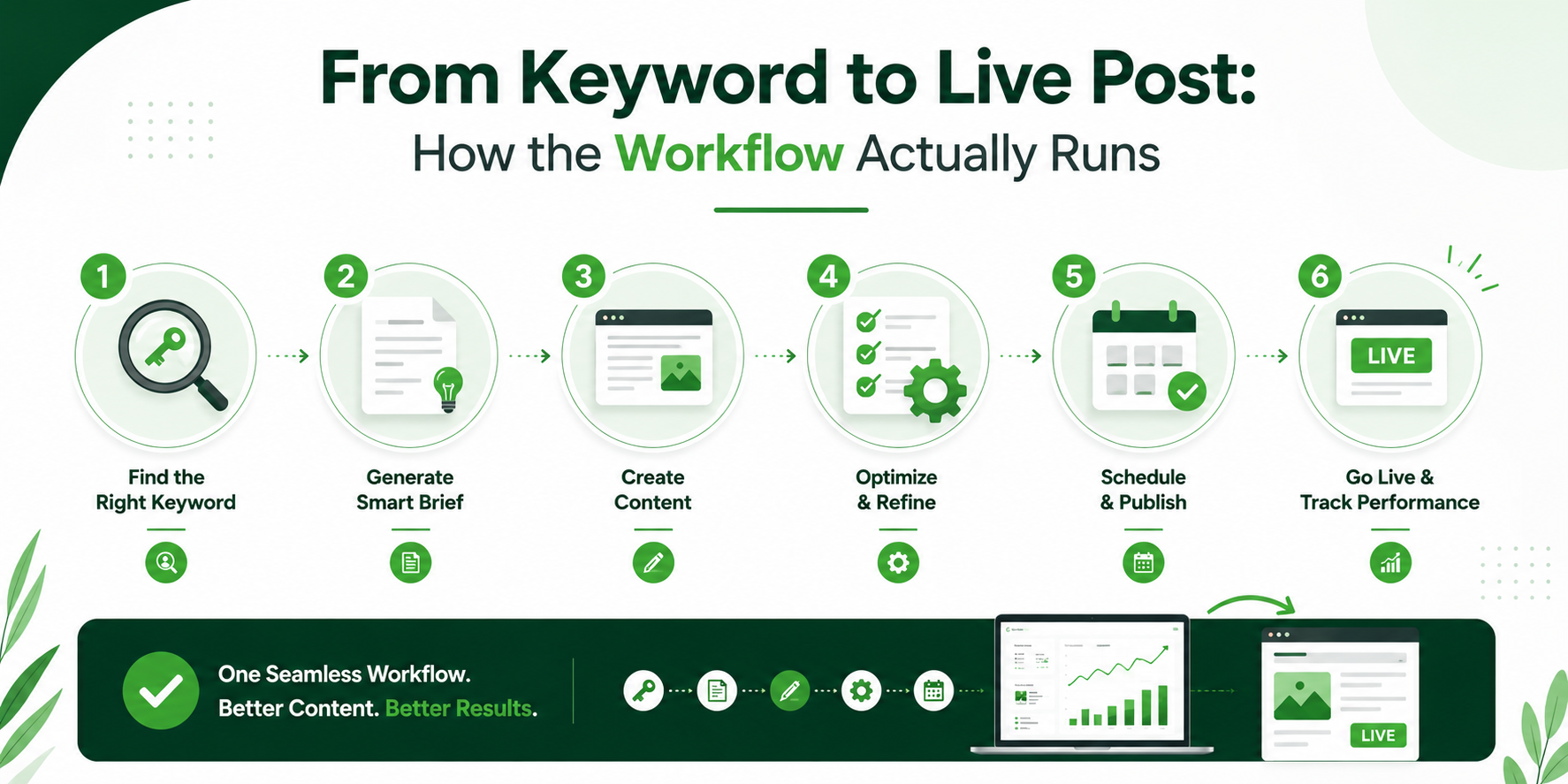
From Keyword to Live Post: How the Workflow Actually Runs
Here's what this looks like step by step.
Step 1: Keyword and Intent Input
The workflow starts with a target keyword, for example, "automated blog publishing workflow", along with basic context: search intent (informational, transactional, navigational), funnel stage, and content type. This tells the system not just what to write about, but how to frame it and who it's for.
Bottom-funnel, feature-focused content needs a different structure than a broad, top-of-funnel explainer. Feeding that context in up front means the output doesn't need to be reworked later.
Step 2: Structured Content Generation
From there, the system generates a draft structured around the keyword and intent captured in Step 1, headers, subheaders, and body content organized the way both readers and search engines expect. This is where the keyword gets worked in naturally throughout the piece, rather than stuffed awkwardly into a single paragraph.
Step 3: On-Page SEO, Applied Automatically
This is often the step manual workflows skip or rush. A proper workflow generates the meta title, meta description, and URL slug alongside the content itself, pulling from that same brief. SEO isn't an afterthought bolted on right before publishing; it's built in from the first step.
Step 4: Formatting and Visual Review
Before anything goes live, the draft is formatted for the web: proper heading hierarchy, scannable paragraphs, and space for supporting visuals. Many teams pause here to review the draft inside a dashboard, checking the layout exactly as it will appear once published, catching anything that needs a tweak before it's public.
Step 5: One-Click Publish
Once approved, the final step is publishing, pushing the post directly to the live site or CMS without exporting, reformatting, or re-entering metadata. What began as a single keyword is now a fully published, search-optimized article.
Step | What Happens | Output |
1. Keyword & Intent Input | Target keyword, search intent, and funnel stage are entered | Content brief |
2. Content Generation | Draft written around the brief | Structured blog draft |
3. On-Page SEO | Meta title, description, and slug generated | SEO-ready metadata |
4. Formatting & Review | Headers, paragraphs, and visuals arranged for the web | Publish-ready post |
5. Publish | Post pushed directly to the live site or CMS | Live blog post |
The Real Advantage: Consistency at Scale
The biggest benefit of an automated blog publishing workflow isn't speed alone, it's consistency. When every post moves through the same structured process, quality and SEO fundamentals stop depending on whoever happens to be handling that particular article that week.
This matters most for teams publishing regularly. A single well-optimized post is nice. Fifty well-optimized posts, published on schedule, month after month, is what actually moves organic traffic. Automation is what makes that repeatable.
It also frees up time for the work automation can't do: original research, proprietary data, and editorial judgment about what to cover next.
What This Looks Like in Practice
Picture a mid-sized SaaS company publishing three blog posts a week to support its organic search strategy. Under a manual process, each post moves through five people: a strategist who picks the keyword, a writer who drafts it, an editor who reviews it, someone who handles SEO tagging, and whoever has CMS access to schedule it live. Even when everyone responds quickly, that's two to three days per post, and any single delay in the chain pushes the whole publish date back.
Run the same three posts a week through an automated workflow instead. The strategist still picks the keyword and sets the intent, that judgment call doesn't disappear. But instead of five more handoffs, the system generates the draft, builds the metadata from the same input, formats the post, and pushes it live inside one dashboard. The strategist reviews the finished draft once, makes any final edits, and approves it. What used to take two to three days now takes under an hour of actual human attention.
The time saved doesn't just mean faster publishing, it means the team can either publish more consistently at the same headcount, or redirect the hours they used to spend on formatting and metadata toward the research and strategy that actually differentiates their content.
Where Teams Get This Wrong
Automation doesn't eliminate the failure modes of publishing, it just moves them. Two mistakes come up often enough to flag:
Treating the brief as optional. Weak keyword and intent input produces weak output, no matter how good the drafting or SEO engine downstream is. The system amplifies whatever direction it's given; it doesn't correct for a vague one.
Skipping the human review step. Teams that stop reviewing drafts before publishing tend to see tone and accuracy drift over time, especially on technical or niche topics the system hasn't been given enough context on. The review step in Step 4 isn't a formality, it's the point where brand judgment gets applied.
Common Objections to Automated Publishing
"It produces generic content." This is a fair concern if the input is generic. Output quality tracks the specificity of the brief, an automated draft built from a detailed, well-researched keyword and intent input will read very differently from one built on a bare keyword with no context.
"It's overkill unless you're publishing at high volume." The bigger time cost in most workflows isn't writing, it's the handoffs around formatting and metadata. Those exist whether a team publishes one post a month or thirty, which is why even lean teams tend to see time savings.
"A human has to fix the SEO afterward anyway." When meta titles, descriptions, and slugs are generated from the same brief driving the content, they're at least consistent across every post, something that's genuinely hard to guarantee when SEO tagging is handled ad hoc by different people on different days.
Building One Yourself vs. Using a Platform
There are two real paths here, and the right one depends on the team.
DIY with tools like contioreach or open-source scripts. Contioreach is a popular choice for connecting a keyword input, an AI content generation step, and a CMS publishing action into a single flow. GitHub also has open-source projects that stitch together similar pieces via API. Both are genuinely flexible and cost nothing to start. The tradeoff is maintenance: you own every node in the chain, and updates to any connected API (CMS, SEO tool, AI provider) can break the flow until someone fixes it. This is a strong option for technical teams with the bandwidth to own that upkeep.
A dedicated platform. Tools built specifically for this (ContioReach is one example) trade some of that flexibility for less setup and no ongoing maintenance burden. This tends to make more sense for teams that want the workflow running without dedicating engineering time to keeping it running.
Neither path is objectively better, it's a build-vs-buy tradeoff like any other.
Final Thoughts
An automated blog publishing workflow isn't about replacing writers or skipping quality control, it's about closing the gap between "we have an idea" and "it's live and optimized." Whether you piece one together with tools like Contioreach and open-source scripts, or use a platform built to handle the whole process end to end, the underlying goal is the same: fewer manual handoffs, more consistent SEO, and content that actually ships on schedule.
FAQs
Is there an automated blog publishing workflow template I can use?
Most teams start with a simple template mapping out each stage: keyword/intent input, drafting, on-page SEO, formatting, and publishing. The template matters less than making sure each stage feeds directly into the next, rather than requiring content to be manually copied between tools.
Is there an automated blog publishing workflow on GitHub?
Yes, there are open-source projects and scripts that stitch together APIs for content generation, SEO tagging, and CMS publishing. These work well for technical teams comfortable maintaining custom code, with the caveat that they require ongoing setup and upkeep as connected APIs change.
Can I build an automated blog publishing workflow in contioreach?
Yes. contioreach can connect a keyword input, an AI content generation step, and a CMS publishing action into a single flow. It's flexible, and you're responsible for building, testing, and maintaining every node in the chain.
Can you automate blog posts with AI?
Yes, AI can handle drafting, structuring content around search intent, and generating on-page SEO elements like meta titles and descriptions. Most teams still review AI-generated drafts before publishing to check tone, accuracy, and brand voice.
What does it mean to automate blog posting?
It means removing the manual steps between having a topic and having it live, generating the draft, applying SEO metadata, formatting it, and publishing it automatically rather than doing each step by hand.
What is blog automation, exactly?
The broader term for using software to handle repetitive parts of content production, research, writing, SEO tagging, formatting, or publishing, so a team can produce more content without a proportional increase in manual effort.
Final CTA
If your current process still involves copying content between four or five different tools, it's worth asking how much of that could be automated, and whether your team would rather own that automation or hand it off. ContioReach is built for the latter, handling drafting, metadata, formatting, and publishing from one dashboard, but the Contioreach and open-source paths above are worth a serious look if your team has the engineering bandwidth to maintain them.
Written by

Team Contioreach
Creates expert content on SEO, AI search, content strategy, and automation to help businesses grow their online visibility.