 ChatGPT
 Perplexity
 Claude
 Grok
GrokMost website owners know internal linking matters, but very few actually do it well. Manually connecting pages is slow, easy to get wrong, and almost impossible to keep updated as a site grows past a few dozen articles. That is exactly the gap this kind of automation is built to close, and it is why more content teams are moving away from spreadsheets and gut feeling.
ContioReach takes a different approach. Instead of asking you to guess which pages should link to each other, it reads your content, understands what each page is actually about, and recommends links based on real relevance rather than assumption. Internal linking is one part of a broader platform, ContioReach also handles AI content generation, keyword planning, and auto-scheduling, but it's the part we're focused on in this post. Below, we'll walk through exactly how the linking system works from start to finish, what the relevance score means, and why this kind of automation tends to convert visitors into trial users so consistently.
Why Internal Linking Still Trips Up Most Websites
Search engines rely on internal links to understand how pages on a site relate to one another. A well linked site helps search engines crawl content faster, spreads authority from strong pages to newer ones, and keeps visitors reading longer instead of bouncing after one page. That much is well understood.
The problem shows up in execution. Teams either under-link their content out of caution, over-link it by stuffing in random anchors, or link based on outdated assumptions about what a page covers. As a site scales into hundreds or thousands of pages, tracking which pages are thin on internal links, which ones are orphaned entirely, and which anchor text actually makes sense becomes a job nobody has time for.
This is the exact problem ContioReach's linking system was designed to solve.
How It Works, Step by Step
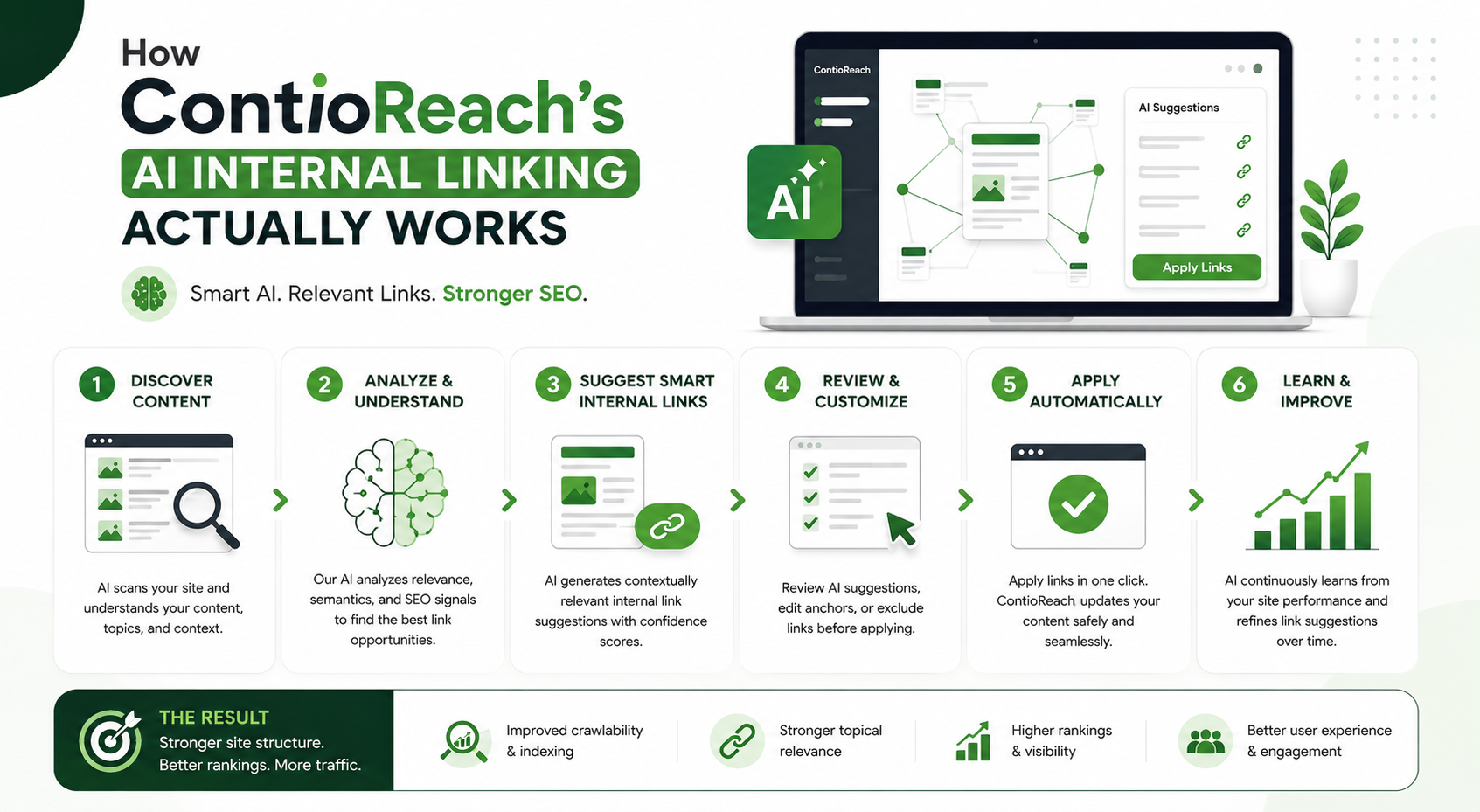
ContioReach breaks the process into a few clear stages. Each stage is automated, but the logic behind it is transparent, so you always know why a link is being suggested.
1. Content indexing and understanding ContioReach first crawls your site and reads every published page, not just the title and headers. It builds a semantic understanding of each page, meaning it identifies the actual topics, subtopics, and intent behind the content rather than just matching keywords on the surface.
2. Relevance scoring between pages Once every page is indexed, ContioReach compares pages against each other and assigns a relevance score. This score reflects how closely related two pieces of content are in terms of topic, context, and search intent. A high score means a link between those two pages will genuinely help a reader, not just pad out a word count.
3. Link opportunity mapping With scores calculated across the entire site, ContioReach maps out where links are missing, where they are weak, and where an existing link might be pointing at a page that is no longer the best match. Orphaned pages and thin sections get flagged automatically.
4. Anchor text suggestions Rather than leaving anchor text to guesswork, the system suggests natural, contextually accurate phrases pulled from the surrounding sentence, so links read the way a human editor would write them.
5. Visual relevance reporting Every recommendation comes with a visible score, shown directly in the dashboard as an easy-to-scan report. You can see, at a glance, which links score high enough to add immediately and which fall into a gray area worth reviewing manually.
6. Ongoing monitoring As you publish content, ContioReach keeps scanning and rescoring. Older posts that suddenly become relevant to a new article get flagged for a fresh link, and pages that lose relevance over time get reviewed rather than left with a stale connection.
Manual Internal Linking vs. ContioReach
Factor | Manual Internal Linking | ContioReach |
Time required per 100 pages | Several hours of manual review | Minutes, fully automated scan |
Relevance accuracy | Based on memory and guesswork | Based on calculated relevance scores |
Anchor text quality | Inconsistent across writers | Context-aware and consistent |
Orphaned page detection | Rarely checked | Flagged automatically |
Scalability | Breaks down past a few hundred pages | Scales with sites of any size |
Ongoing maintenance | Manual re-audits needed | Continuous background rescoring |
What the Relevance Score Actually Means
The relevance score is the core of how this system makes decisions, so it's worth explaining in plain terms. Instead of relying on shared keywords alone, ContioReach evaluates the underlying topic overlap, the surrounding context of each mention, and how closely the search intent of both pages aligns.
A higher score signals a link that a search engine and a reader would both consider natural. A lower score doesn't mean the pages are unrelated, it simply means the connection is weaker and might work better with a small content adjustment before linking. This scoring system is visible directly in the dashboard, where every suggested link is shown alongside its score, giving your team a clear way to prioritize which links to add first.
This transparency is a big part of why teams that try it tend to stick with it. You're never asked to trust a black-box recommendation; you can see the reasoning behind every suggested link before you approve it.
Core Features and What They Solve
Feature | What It Does | Problem It Solves |
Relevance scoring | Assigns a numeric score to every potential link | Removes guesswork from linking decisions |
Orphan page detection | Finds pages with no incoming internal links | Prevents valuable content from being ignored by search engines |
Contextual anchor suggestions | Recommends natural anchor phrases | Avoids repetitive or spammy anchor text |
Automated rescanning | Rechecks the site as new content is published | Keeps link structure current without manual audits |
Visual scoring dashboard | Displays relevance scores in an easy-to-read report | Makes review and approval faster for content teams |
Bulk link suggestions | Surfaces multiple opportunities across the site at once | Saves time on large or fast-growing websites |
Why This Matters for SEO and for Readers
Search engines still use internal links as a signal of site structure and topical authority. Connecting pages based on genuine relevance rather than convenience helps distribute ranking signals more evenly across a site, which can support stronger visibility for newer or less-established pages.
Readers benefit just as directly. A visitor who lands on one article and finds a well-placed, genuinely related link to another page is far more likely to keep exploring the site instead of leaving after a single page view. That extra engagement often translates into lower bounce rates and longer session times, both of which search engines tend to reward indirectly through improved crawl behavior and indexing.
Where Manual Approaches (and Basic Tools) Fall Short
Many teams either rely on basic keyword matching, which misses context entirely, or spend so much time on manual configuration that the effort gets abandoned halfway through. Others work from suggestions with no visible reasoning, leaving reviewers to accept or reject recommendations without understanding why they were made. And most manual processes simply stop scaling once a site passes a certain page count, because the review effort grows faster than the team can keep up with it.
ContioReach was built specifically to close these gaps: scoring is visible rather than hidden, anchor text suggestions read naturally instead of sounding automated, orphaned pages are caught automatically instead of requiring a separate audit, and the system continues to rescan and update itself as new content goes live. None of this requires a developer, a spreadsheet, or a recurring manual audit.
Getting Started with ContioReach
Setting up ContioReach does not require a rebuild of your site or a change to your content workflow. You connect your site, let the initial scan run, and review the first batch of scored link suggestions in the dashboard. Most teams see their first set of actionable recommendations within the same day they sign up. As you explore the platform, you'll also find it can generate and schedule new content around your keyword targets, so linking is just one piece of a larger workflow if you want to use it that way.
If you've been relying on manual internal linking, or on a process that never quite explains why it suggests what it suggests, this is a good moment to see the difference.
Final Thoughts
Internal linking is one of those SEO fundamentals that everyone agrees matters, yet almost no one keeps up with consistently once a site grows past a handful of pages. The manual approach simply can't scale, and guesswork around relevance tends to create weak or awkward connections instead of genuinely useful ones. ContioReach replaces that assumption with an actual relevance score, and makes the process visible, explainable, and easy to act on rather than something you have to trust blindly.
If your site's internal links haven't been reviewed in a while, or you've never had a clear way to see which pages should be connected, this is a straightforward place to start improving both your site structure and your reader experience at the same time.
Frequently Asked Questions
What is the most effective approach to internal linking for SEO purposes? Link pages based on genuine topical relevance, not convenience. Use natural anchor text and make sure important pages get enough internal links to show their value. This is the process ContioReach automates using a calculated relevance score.
What type of internal linking should be avoided? Avoid linking pages just because they exist on the same site, repeating identical anchor text everywhere, or stuffing too many links onto one page. Linking built only for search engines, with no benefit to the reader, tends to backfire.
How do internal and external linking improve your content's SEO? Internal links help search engines understand your site structure and spread authority across pages. External links to credible sources add context and trust. Together, they signal well-researched, well-connected content, which supports stronger SEO performance.
What's the difference between anchor text and an internal link? An internal link is the actual connection between two pages on your site. Anchor text is the clickable wording attached to that link. The link moves the reader; the anchor text tells them what to expect on the other end.
Try ContioReach Today
Internal linking shouldn't be a guessing game, and it shouldn't eat up hours of your team's time every month. ContioReach handles the analysis, the scoring, and the ongoing maintenance, so your team can focus on writing rather than auditing link structures by hand.
Start your free trial of ContioReach today and see your site's scored link opportunities within minutes.
Written by

Team Contioreach
Creates expert content on SEO, AI search, content strategy, and automation to help businesses grow their online visibility.