 ChatGPT
 Perplexity
 Claude
 Grok
GrokMost SaaS companies invest heavily in content, but far fewer invest in connecting that content together. Blog posts get published, sit in isolation, and slowly lose visibility as new articles push them further down the archive. This is one of the most common, and most fixable, gaps in SaaS content marketing.
An internal linking strategy for SaaS blogs is not a technical afterthought. It is a core part of how search engines understand your site, how readers move through your funnel, and how your older content stays relevant instead of quietly disappearing. This guide walks through what a solid internal linking strategy actually looks like for a SaaS blog, why it matters more than most teams realize, and how to build one that holds up as your content library grows.
What Internal Linking Actually Means for SaaS Content
Internal linking is the practice of connecting one page on your website to another using hyperlinks. For a SaaS blog, this usually means linking a blog post to another blog post, a blog post to a product or feature page, or a product page back to supporting educational content.
The goal is twofold. First, internal links help search engines crawl and understand the structure of your site, which pages are most important, and how topics relate to one another. Second, internal links guide human readers toward the next logical step, whether that is another article, a comparison page, or a signup form.
For SaaS businesses specifically, this matters because the buyer journey is rarely linear. A reader might land on a beginner's guide, then need a deeper technical explanation, then want to see how the product actually solves the problem they just read about. Without deliberate internal links, that reader has to search for the next step themselves. Most will not bother.
Why Internal Linking Strategy Matters More for SaaS Than for Other Industries
SaaS content tends to be layered by nature. A single topic, such as customer onboarding or API integrations, might have a beginner overview, a technical deep dive, a use case article, and a product page all addressing different angles of the same subject. Without an internal linking strategy tying these together, readers only ever see one piece of the puzzle.
There are three specific reasons internal linking deserves dedicated attention for SaaS blogs.
First, SaaS sales cycles are long. A reader researching a problem today might not be ready to buy for weeks or months. Internal links keep them engaged with your brand across multiple visits instead of losing them after a single session.
Second, SaaS content libraries grow quickly. Teams that publish two to four articles a week can accumulate hundreds of posts within a year. Without a linking system, older posts become orphaned pages that search engines and readers rarely find.
Third, SaaS products are often complex enough that education is part of the sales process. Internal links let you build a guided path from awareness content to product understanding without relying entirely on paid promotion or email nurturing.
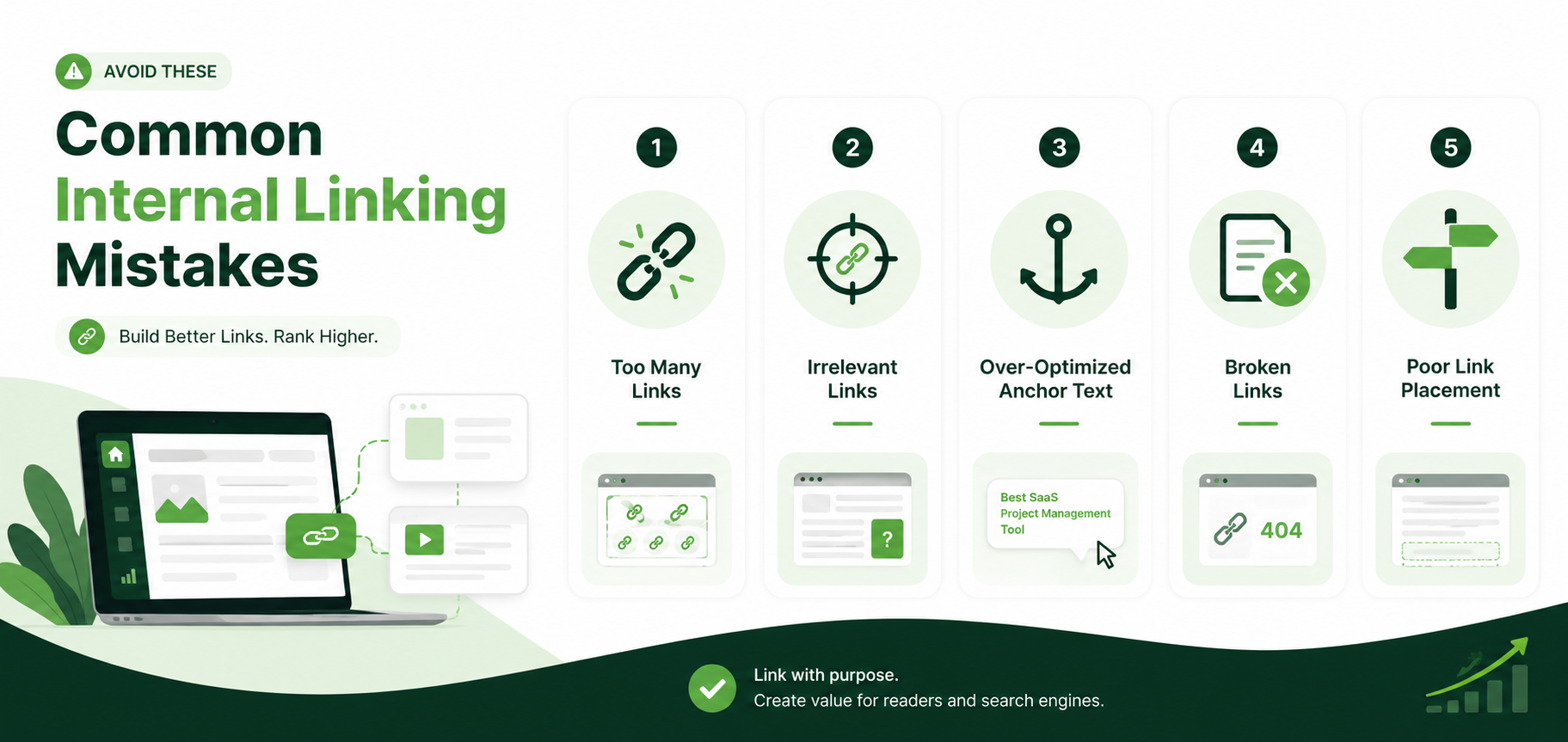
Common Internal Linking Mistakes in SaaS Blogs
Before outlining what to do, it helps to understand where most SaaS blogs go wrong. These mistakes are common even among teams that publish consistently and produce strong content.
The first mistake is linking without a plan. Writers add a link here and there because it feels helpful in the moment, not because it fits into a broader structure. This produces inconsistent linking patterns across the blog.
The second mistake is over relying on generic anchor text. Phrases like "click here" or "read more" tell search engines almost nothing about the linked page and offer little value to readers deciding whether to click.
The third mistake is ignoring older content. New posts get plenty of internal links pointing to recent articles, while posts published a year or two ago rarely receive new links pointing back to them, even when they remain relevant.
The fourth mistake is failing to link blog content to product pages at appropriate points. Some SaaS teams treat the blog and the product pages as separate systems, which weakens the connection between education and conversion.
The fifth mistake is not auditing links over time. Internal linking is not a one time task. Pages get updated, renamed, or removed, and links that once worked can quietly break or point to outdated content.
Building an Internal Linking Strategy for SaaS Blogs: A Step by Step Approach
Step 1: Map Your Content by Topic and Funnel Stage
Before adding a single link, organize your existing content by topic cluster and by funnel stage. Group articles that cover related subjects, then note whether each piece is meant for someone just learning about a problem, someone comparing solutions, or someone close to a purchase decision.
This mapping exercise reveals natural linking opportunities. A top funnel guide on a broad topic should link down to more specific articles on subtopics, and those specific articles should eventually link toward product focused content.
Step 2: Identify Pillar Content
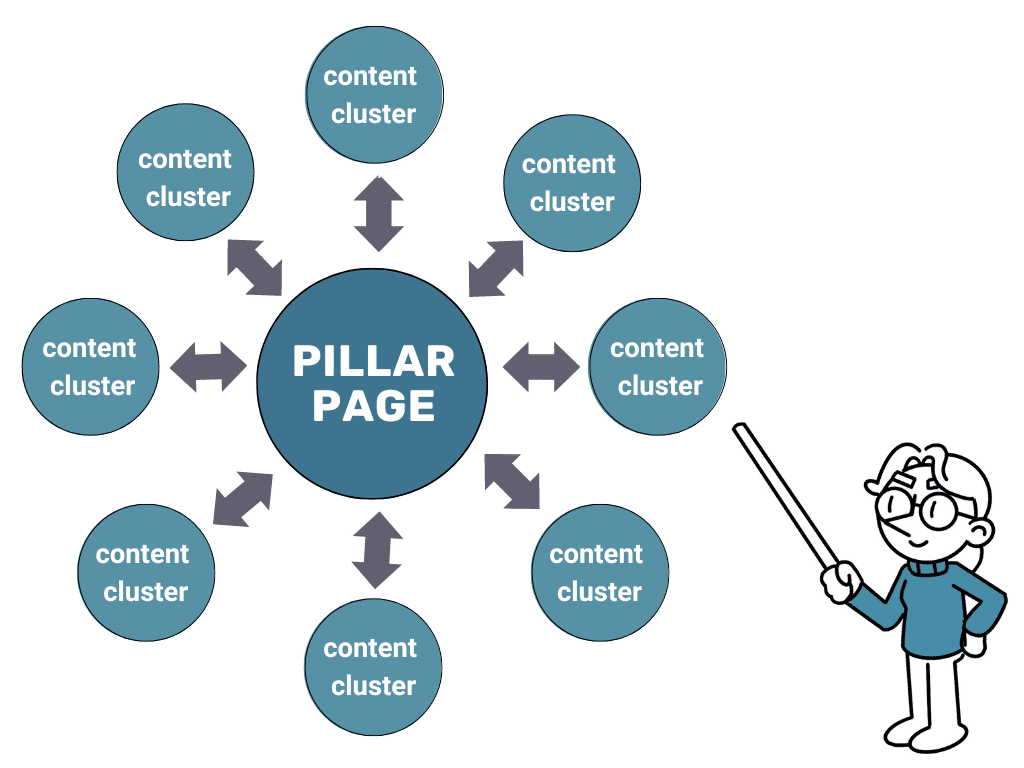
Every strong internal linking strategy for SaaS blogs relies on pillar pages. A pillar page is a comprehensive resource on a broad topic that acts as a hub, linking out to more specific supporting articles and receiving links back from them in return.
For example, a pillar page on customer retention might link out to supporting articles on churn analysis, onboarding best practices, and customer success workflows. Each of those supporting articles should link back to the pillar page, reinforcing its authority.
Step 3: Use Descriptive, Keyword Relevant Anchor Text
Anchor text should describe what the linked page is actually about. Instead of linking the phrase "this article," link a phrase like "reducing SaaS churn through onboarding" if that reflects the destination page's content. This helps both readers and search engines understand context before clicking.
Avoid keyword stuffing in anchor text as well. The goal is natural, descriptive language, not repeating the same exact phrase across every link on the site.
Step 4: Link Blog Content to Product and Feature Pages Where Relevant
Educational content should occasionally point toward product pages, but only where the connection is genuine. If an article discusses a workflow that your product directly supports, a natural link to the relevant feature page helps readers see the practical application without feeling like a forced sales pitch.
Step 5: Revisit and Update Older Posts
Set a recurring schedule, such as quarterly, to review older blog posts and add links to newer, relevant content. This keeps your archive active and ensures that older articles continue contributing to your site's overall structure rather than sitting untouched.
Step 6: Monitor for Broken or Outdated Links
As your blog grows, some internal links will inevitably break due to URL changes, content removal, or restructuring. Regular audits help catch these issues before they affect user experience or search visibility.
Internal Linking Framework at a Glance
The table below summarizes the core components of an internal linking strategy for SaaS blogs and how each one functions within the overall system.
Component | Purpose | Example |
Pillar Pages | Serve as topic hubs that organize related content | A comprehensive guide on customer onboarding |
Supporting Articles | Cover specific subtopics and link back to the pillar | An article on onboarding email sequences |
Descriptive Anchor Text | Clarifies destination page content for readers and search engines | Linking the phrase "SaaS churn reduction tactics" |
Product Page Links | Connects education content to relevant features | Linking a workflow article to a feature page |
Link Audits | Identifies broken or outdated links | Quarterly review of top performing posts |
Anchor Text Practices to Follow and Avoid
Anchor text choices have a direct impact on both user experience and how clearly a page's topic is communicated internally. The table below outlines practices worth following alongside habits worth avoiding.
Practice to Follow | Habit to Avoid |
Use descriptive phrases that reflect the destination page | Using vague phrases like "click here" or "learn more" |
Vary anchor text naturally across different links | Repeating the exact same anchor text for every link to a page |
Match anchor text to the actual content on the linked page | Linking anchor text that misrepresents the destination |
Keep anchor text concise and readable | Cramming multiple keywords into a single anchor phrase |
Link only where it adds genuine value for the reader | Adding links purely to increase link count |
Where Manual Internal Linking Falls Short
Manually managing an internal linking strategy works reasonably well for a blog with a few dozen posts. It becomes far harder to sustain once a SaaS blog grows past a hundred articles, especially when multiple writers are contributing content on overlapping topics.
At that scale, it becomes difficult to remember which older posts exist, which ones are relevant to a new article, and where broken links might be hiding across the archive. Spreadsheets and manual audits can help temporarily, but they tend to fall out of date quickly as publishing volume increases.
This is the exact problem ContioReach was built to address. ContioReach helps SaaS content teams manage internal linking at scale by surfacing relevant linking opportunities across an existing content library, flagging orphaned pages that lack sufficient internal links, and identifying broken or outdated links before they affect readers or search visibility.
Rather than relying on memory or manual spreadsheets, teams using ContioReach can see their entire content structure in one place, including which pillar pages need more supporting links and which older posts have gone unlinked for months. For SaaS blogs publishing consistently, this kind of visibility turns internal linking from a task that gets skipped under deadline pressure into a maintained, ongoing part of the content workflow.
Building Internal Linking Into Your Editorial Process
An internal linking strategy for SaaS blogs works best when it becomes part of the standard editorial process rather than a separate task handled occasionally. Consider building the following checkpoints into your content workflow.
When outlining a new article, identify at least two to three existing posts it should link to based on topic relevance. When publishing a new pillar page, revisit related supporting articles and add links back to the new pillar. When conducting quarterly content audits, review top performing pages to ensure they link out to newer, relevant content. When retiring or merging old content, redirect and update any internal links that previously pointed to the removed page.
Embedding these checkpoints into your existing editorial calendar prevents internal linking from becoming a backlog item that never gets addressed. Tools like ContioReach can support this process by making it easy to see linking gaps directly within your existing content management workflow, so these checkpoints take minutes rather than hours.
Measuring the Impact of Your Internal Linking Strategy
Once an internal linking strategy is in place, it is worth tracking whether it is having the intended effect. A few metrics are particularly useful for SaaS blogs.
Organic traffic to older posts is one useful signal. If internal linking is working, older articles that receive fresh links from newer content should see stable or increasing organic traffic rather than a steady decline. Average session duration and pages per session are also worth watching, since effective internal linking typically increases how many pages a reader visits during a single session. Finally, tracking which blog posts drive traffic to product pages can reveal whether educational content is successfully guiding readers toward conversion points.
Final Thoughts
An internal linking strategy for SaaS blogs is not a one time project. It is an ongoing discipline that requires planning, consistent execution, and periodic review as your content library expands. Teams that treat internal linking as a core part of their editorial process, rather than an afterthought, tend to see stronger organic performance across their entire blog, not just their newest posts.
As content volume grows, manual tracking becomes increasingly difficult to sustain. Platforms like ContioReach exist specifically to help SaaS content teams maintain a healthy internal linking structure without needing to manually audit every page. Whether your blog has fifty posts or five hundred, a deliberate internal linking approach helps ensure that every piece of content you publish continues working for you long after its publish date.
Frequently Asked Questions
What is a practical internal linking strategy for SaaS blogs?
Organize content into topic clusters, build pillar pages, and link supporting articles back to them with descriptive anchor text. Review and update links on a recurring schedule as new content is published.
What are the best internal linking practices to follow?
Use descriptive anchor text, link only where it adds real value, and connect both older and newer posts within the same topic cluster rather than just the latest ones.
What happens if a page has too few internal links?
It can become an orphaned page that search engines struggle to discover and readers have no path to reach. This often leads to a slow decline in organic visibility.
How can I audit internal links across my SaaS blog?
Review your site to find orphaned pages, broken links, and gaps between related content. ContioReach surfaces these issues directly within your content workflow instead of requiring a separate manual review.
Can a blog post have too many internal links?
Yes. Too many links can dilute their value and distract the reader. Link only where it genuinely helps the reader explore a related topic.
What is internal linking and why does it matter for SEO?
Internal linking connects pages within the same site. It helps search engines understand page importance and topic relationships, and it guides readers toward relevant next steps.
What is an internal page link?
An internal page link is a hyperlink connecting one page on a website to another page on the same site, as opposed to an external link pointing to a different domain.
How do I check internal links on my site?
Identify pages with few internal links, find broken links, and confirm anchor text is descriptive. ContioReach is built to make this visible without a separate technical crawl.
Written by

Team Contioreach
Creates expert content on SEO, AI search, content strategy, and automation to help businesses grow their online visibility.