 ChatGPT
 Perplexity
 Claude
 Grok
GrokAn API, or Application Programming Interface, is a defined way for software systems to communicate and exchange data. APIs let one application request information or actions from another application without needing access to its internal code.
Modern websites rely on APIs to connect frontends, databases, content platforms, payment systems, analytics tools, authentication services, and other applications. In a headless CMS, an API is what allows content managed in the CMS to reach a separate frontend built with a framework such as Next.js, Astro, React, or Vue.
APIs have also become a major part of modern software architecture. Postman’s 2025 State of the API report found that 82% of surveyed organizations have adopted some level of an API-first approach, while 69% of respondents spend at least 10 hours per week on API-related work.
This guide explains API basics from the ground up, including how APIs work, REST APIs, requests and responses, authentication, and how CMS APIs connect content management with modern frontends.
What Is an API?
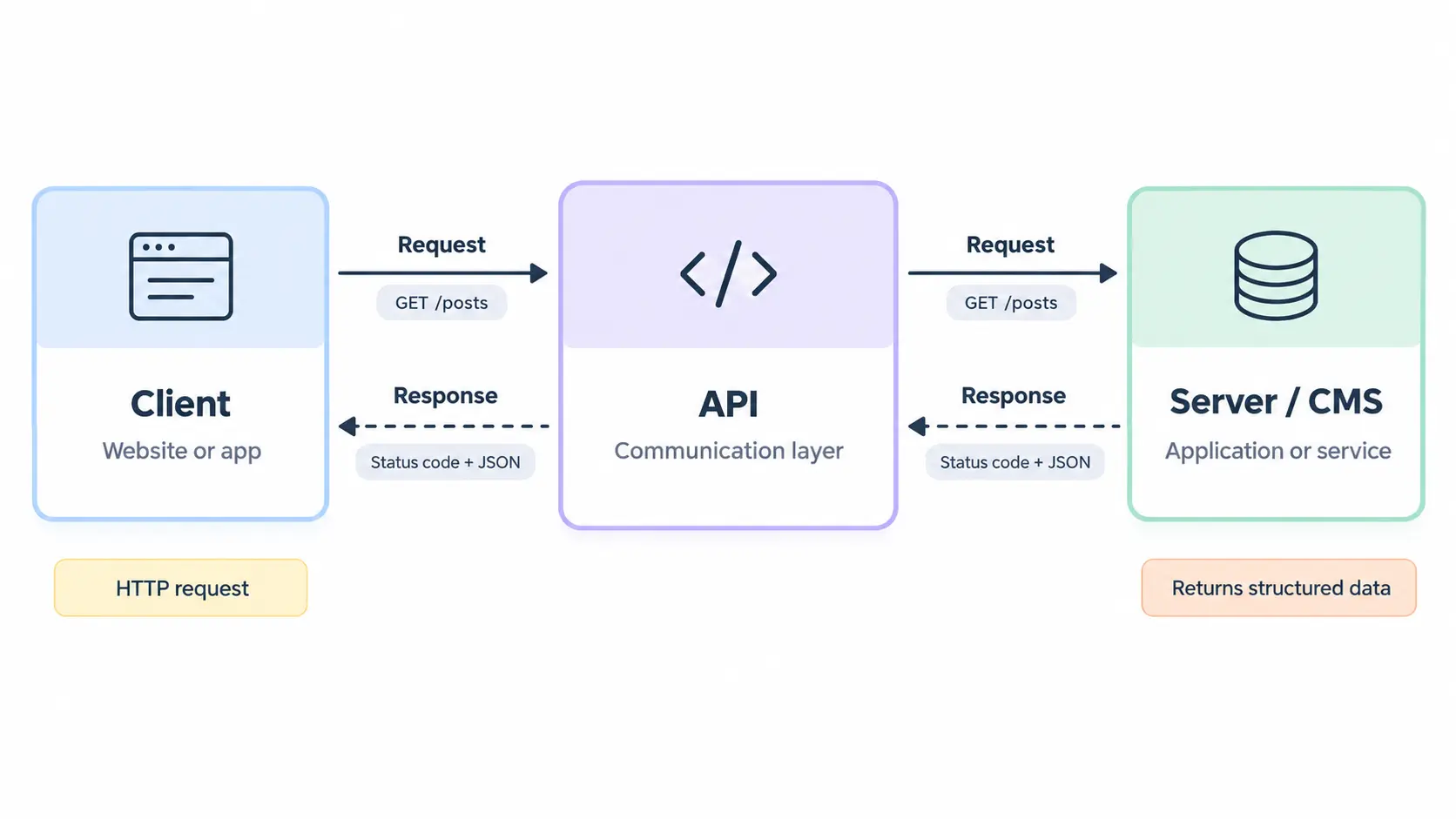
An API is a defined interface that allows one piece of software to communicate with another. It specifies how a client can request data or perform an action and what the server will return.
In simple terms, an API acts as a communication layer between applications. The client sends a request, the API processes it through the relevant application or service, and the server returns a response.
For example, a website might request a published blog post from a CMS through an API. The CMS receives the request, retrieves the requested content, and returns structured data that the website can render.
API basics can be summarized as: client → request → API → server/application → response → client.
HTTP is commonly used as the communication protocol for web APIs. In HTTP, a client sends a request to a server, and the server returns a response containing a status code, headers, and, when applicable, a response body.
For a deeper introduction, see this guide to what an API is and how APIs work.
Why do developers use APIs?
Developers use APIs because they provide a controlled and reusable way for applications to communicate without tightly coupling their internal implementations.
Common uses include:
Fetching content from a CMS
Sending payment requests to a payment provider
Retrieving data from a database or external service
Connecting a frontend to a backend
Authenticating users
Sending information between internal services
Integrating third-party applications
Connecting applications to AI and other machine-driven services
APIs can therefore support both simple website features and complex application architectures.
How Do APIs Work?
APIs work by defining a predictable communication process between a client and a server. The client makes a request using the API's rules, and the server validates, processes, and answers that request.
A typical API interaction follows these steps:
The client identifies the resource or action it needs.
It sends an HTTP request to an API endpoint.
The API receives and validates the request.
The server retrieves data or performs the requested operation.
The API sends an HTTP response.
The client processes the returned data.
For example, a frontend might request a blog article with:
GET /v1/blogs?slug=api-guide
The API could return structured JSON such as:
{
  "title": "APIs Explained for Developers",
  "slug": "api-guide",
  "author": "Jane Smith",
  "category": "Development"
}
The frontend then uses that response to construct the page.
HTTP provides the underlying request-and-response mechanism. Request methods such as GET and POST communicate the intended operation, while response status codes indicate whether the request succeeded or failed.
How does an API connect two applications?
An API connects two applications by giving one application a defined interface for requesting or sending data to another application.
The applications do not need to share the same programming language, framework, database, or internal architecture. They only need to understand the API's contract.
Component | Role |
|---|---|
Client | Requests data or an action |
API endpoint | Defines where and how the request is made |
Server | Processes the request |
Authentication | Determines whether the client is authorized |
Response | Returns data, status, or an error |
Data format | Defines how information is structured, commonly JSON |
This separation is one reason APIs are so useful for modern web development.
What Is an API Endpoint?
An API endpoint is a specific URL or route through which a client can access a particular API resource or operation.
For example:
https://example.com/api/posts
could represent a collection of blog posts, while:
https://example.com/api/posts/123
could represent a specific post.
An endpoint normally works together with an HTTP method. A GET request might retrieve information, while POST might create a resource.
Developers should distinguish between a route and an endpoint. A route identifies a URI pattern, while an endpoint generally refers to the combination of a route and an HTTP method that handles a request. WordPress, for example, documents routes and endpoints as separate concepts within its REST API.
For a more detailed explanation, see API endpoints, URLs, requests, and responses.
Common HTTP methods used with APIs
Method | Typical purpose | Example |
|---|---|---|
GET | Retrieve data | Get published posts |
POST | Create data or trigger an operation | Create a post |
PUT | Replace an existing resource | Replace a profile |
PATCH | Partially update a resource | Update a title |
DELETE | Remove a resource | Delete a post |
The exact behavior depends on the API, but these methods form the foundation of many HTTP-based APIs.
What Is an API Request and Response?
An API request is the message a client sends to an API. An API response is the server's answer to that request.
A request can contain several components:
URL or endpoint
HTTP method
Headers
Query parameters
Request body
Authentication information
A response normally contains:
HTTP status code
Response headers
Response body
Structured data or an error message
For example:
GET /v1/posts?category=seo
Authorization: Bearer TOKEN
Accept: application/json
The server might return:
HTTP/1.1 200 OK
Content-Type: application/json
followed by the requested JSON data.
A 200 response generally indicates success. Other status codes communicate different outcomes, such as 401 Unauthorized, 403 Forbidden, 404 Not Found, or 500 Internal Server Error.
Understanding this request-response structure is one of the most important parts of API basics.
What Is a REST API?
A REST API is an API designed around the principles of Representational State Transfer, or REST. REST is an architectural style introduced by Roy Fielding in his doctoral dissertation on network-based software architectures. It emphasizes scalable interactions, uniform interfaces, independent deployment, and separation between components.
A REST API typically represents data as resources and exposes those resources through URLs. HTTP methods are then used to interact with them.
For example:
GET /posts
GET /posts/123
POST /posts
PATCH /posts/123
DELETE /posts/123
The exact design varies by API, but the resource-oriented approach makes REST APIs relatively predictable for developers.
WordPress's REST API is a real-world example. Its API exposes resources such as posts, pages, categories, tags, media, and users through predictable routes and uses JSON for request and response data.
For a more in-depth explanation, see how REST APIs work.
REST API vs other API styles
REST is not the only way to build an API. GraphQL, SOAP, RPC-style APIs, and other approaches are also used.
API approach | Main characteristic | Common use |
|---|---|---|
REST | Resource-oriented HTTP endpoints | Websites, apps, SaaS integrations |
GraphQL | Clients specify the data they need | Applications with complex data requirements |
SOAP | XML-based messaging protocol | Enterprise and legacy integrations |
RPC | Calls operations or procedures | Internal services and specialized systems |
The right approach depends on the application's requirements, data model, tooling, performance needs, and development environment.
GraphQL is particularly different from REST because a client can specify which fields it wants through a query rather than relying on predefined resource responses. GitHub's documentation, for example, notes that its REST API typically returns more information than the client needs, whereas its GraphQL API lets the client specify the information it wants.
See REST API vs GraphQL for a more detailed comparison.
How Are APIs Used in Headless CMS?
A headless CMS uses APIs to separate content management from content presentation.
In a traditional CMS, the content management system and the website frontend are closely connected. Editors create content in the CMS, while the same platform generally controls how that content is rendered.
A headless CMS removes that presentation layer from the CMS. Content is stored and managed centrally, then delivered through an API to whatever frontend or application needs it.
This means the same content can potentially be delivered to:
A website
A mobile application
A web application
A digital product
An internal application
Another publishing channel
Contentful describes its Content Delivery API as a read-only API that delivers content to websites, applications, and other media as JSON data.
Sanity similarly provides HTTP APIs that give applications direct access to content stored in its Content Lake, including query and delivery capabilities.
How does a CMS API deliver content to a website?
A CMS API delivers content by exposing published content through an API endpoint. The website's frontend requests that content, receives structured data, and renders it into the page.
The flow looks like this:
Content editor → Headless CMS → Content API → Frontend application → Rendered webpage → Website visitor
For example, a developer might configure a Next.js website to request a blog post from a CMS using its slug. The API returns the article title, body, author, category, metadata, images, and other structured fields. The frontend then maps those fields to the appropriate components.
This means the CMS does not need to know whether the frontend uses Next.js, Astro, React, Vue, or another technology.
How do developers use APIs to connect a CMS and frontend?
Developers connect a CMS and frontend by configuring the frontend to make authenticated or public requests to the CMS's content API.
A typical implementation involves:
Creating the content model in the CMS.
Publishing content through the CMS.
Obtaining API credentials when authentication is required.
Configuring the frontend to access the API.
Requesting content through an endpoint.
Mapping returned fields to frontend components.
Adding caching, revalidation, or webhooks where appropriate.
Deploying the frontend independently from the CMS.
For example, ContioReach provides a Content API that can retrieve published posts, fetch posts by slug, filter by category, tag, or author, search posts, paginate collections, and return structured authors, categories, and tags. It also provides publishing webhooks so a frontend can respond when content changes.
This is the practical connection between a headless CMS and a modern frontend.
How Does an API Help Separate Frontend and Content Management?
An API creates a boundary between the system responsible for managing content and the system responsible for presenting it.
The CMS manages content. The frontend manages the presentation.
That separation allows developers to change the frontend without rebuilding the content management layer. It also lets content teams work in a centralized CMS while developers build the public-facing experience using their preferred framework.
For SEO and marketing teams, the separation can also make content reusable. A single article can be delivered to multiple experiences without editors manually recreating the content for every destination.
Traditional CMS | Headless CMS |
|---|---|
CMS manages content and presentation | CMS focuses on content management |
Frontend closely tied to CMS | Frontend separated through APIs |
Templates usually controlled inside CMS | Frontend built independently |
Content primarily designed for one presentation layer | Structured content can support multiple channels |
Developers work within CMS constraints | Developers choose the frontend architecture |
The benefit is not that headless architecture automatically makes a website faster or better. Performance depends on how the frontend, API, caching, rendering strategy, hosting, and assets are implemented.
What Does API-First Mean for a CMS?
An API-first CMS treats its API as a primary way to access and work with content rather than making the website presentation layer the center of the platform.
In an API-first architecture, content is structured so applications can consume it programmatically. Developers can therefore build different frontends and integrations around the same content source.
API-first also extends beyond headless CMS architecture. Postman's 2025 research found that 82% of surveyed organizations have adopted some level of API-first development, including 25% that described themselves as fully API-first.
For a CMS, API-first can mean:
Content is available through documented APIs.
Content structures are designed for programmatic access.
Frontends are not dependent on the CMS's presentation layer.
Developers can integrate content into different applications.
Content operations can be automated through APIs.
Teams can build custom experiences around the same content source.
API-first therefore describes an architectural and product approach, not simply the presence of an API.
How Do Developers Fetch Content From an API?
Developers can fetch API data using HTTP clients, language-specific libraries, SDKs, or browser APIs such as JavaScript's Fetch API.
A simple JavaScript request might look like:
const response = await fetch(
  "https://example.com/api/posts?slug=api-guide"
);

const data = await response.json();

console.log(data);
The exact implementation depends on the API and application architecture.
For server-rendered or statically generated websites, developers often fetch content during the build or server-rendering process rather than exposing private API credentials directly in browser code.
For a practical walkthrough, see how to fetch data from a REST API.
What should developers consider when fetching CMS content?
The API connection is only one part of a production content architecture. Developers should also consider:
Authentication and credential storage
Caching
Rate limits
Pagination
Error handling
API versioning
Response size
Content freshness
Webhooks or revalidation
Preview and draft content
Monitoring and logging
For example, Sanity versions its APIs using dated API versions so applications can keep predictable behavior as the platform evolves.
API Authentication and Security
API authentication determines whether a client is allowed to access a resource or perform an operation.
Common authentication mechanisms include API keys, bearer tokens, OAuth, and signed requests. The correct approach depends on the API and the sensitivity of the data.
API keys are often used to identify an application or workspace. Bearer tokens can represent an authenticated identity or authorization grant.
For example:
Authorization: Bearer YOUR_TOKENor:
X-API-Key: YOUR_API_KEYDevelopers should never assume that an API endpoint is safe simply because it is hidden behind a frontend. Credentials that need to remain private should generally be kept in a trusted server-side environment rather than exposed in client-side JavaScript.
A headless CMS may use different credentials for public content, private content, content management, and preview environments.
For more detail, see API authentication, keys, tokens, and headers.
API Versioning, Errors, and Reliability
A production API needs predictable behavior as both the API and its consumers evolve.
Versioning allows an API provider to introduce changes without unexpectedly breaking applications that depend on older behavior.
Errors are equally important. A useful API should return meaningful HTTP status codes and structured error information so developers can understand what went wrong.
For example:
Status | Meaning | Typical cause |
|---|---|---|
200 | Success | Request completed |
201 | Created | New resource created |
400 | Bad Request | Invalid request |
401 | Unauthorized | Missing or invalid authentication |
403 | Forbidden | Insufficient permissions |
404 | Not Found | Resource does not exist |
429 | Too Many Requests | Rate limit exceeded |
500 | Server Error | Server-side failure |
Good API documentation should explain endpoints, parameters, authentication, response formats, errors, limits, and versioning.
This matters because API consumers are often distributed across different teams and applications. Postman's 2025 report found that testing, development, and documentation were among the most common API-related activities, with 81% of respondents reporting API testing, 73% development, and 58% documentation.
Why APIs Matter for SEO and Content Teams
APIs are primarily a technical interface, but their architecture affects how SEO and marketing teams operate.
With a headless CMS, SEO teams can manage structured content while developers control how that content is rendered and delivered.
A well-designed content API can expose fields such as:
Title
Slug
Meta title
Meta description
Author
Category
Tags
Featured image
Publication date
Article body
Canonical URL
Structured content fields
The frontend can then use these fields to generate pages, metadata, internal links, structured data, feeds, or other search-related elements.
However, an API itself does not improve rankings. Search performance still depends on the rendered website, content quality, crawlability, indexability, structured data where appropriate, performance, internal linking, and many other factors.
Google explains that structured data can help its systems understand page content and can make pages eligible for certain search features, but it does not guarantee that a rich result will appear.
This distinction is important for teams evaluating headless CMS architecture for SEO.
What Should You Look for in a CMS API?
A useful CMS API should make content easy to retrieve, filter, understand, and integrate into different applications.
For developers, important capabilities include:
Clear endpoint structure
Reliable authentication
Structured JSON responses
Filtering and search
Pagination
Content relationships
API documentation
Versioning
Webhooks
Caching or CDN options
Predictable errors
Appropriate access controls
For SEO and content teams, the API should also expose the structured fields required to publish complete, search-friendly pages.
For agencies, reusable APIs can simplify the architecture of projects that use different frontend frameworks while maintaining a consistent content workflow.
A CMS API should therefore be evaluated as part of the complete content delivery architecture, not as an isolated feature.
Real-World Examples of APIs in Modern Websites
APIs are not limited to headless CMS platforms.
WordPress exposes posts, pages, categories, tags, media, users, and other resources through its REST API. Its documentation provides endpoints such as /wp/v2/posts and /wp/v2/categories.
Contentful provides REST and GraphQL APIs for different content operations, including content delivery, content management, previews, images, and GraphQL queries.
Sanity provides HTTP APIs for querying and managing structured content, with API and CDN endpoints designed for different delivery scenarios.
GitHub also exposes a REST API for programmatic access to resources such as repositories and issues, with JSON commonly used for response bodies.
These examples show how APIs provide a common integration layer across very different types of software.
API Best Practices for Developers
A reliable API should be designed for the developers and applications that consume it, not only for the system that produces it.
Key practices include:
Design predictable endpoints and response structures.
Document authentication, parameters, responses, and errors.
Validate incoming requests.
Use appropriate authorization controls.
Keep private credentials out of client-side code.
Version APIs when breaking changes are necessary.
Support pagination for large collections.
Monitor errors, latency, and usage.
Test API contracts before deploying changes.
Keep documentation synchronized with the actual API behavior.
API design also increasingly needs to consider machine consumers. Postman's 2025 research found that 89% of surveyed developers use AI, but only 24% actively design APIs with AI agents in mind.
That makes clear schemas, predictable responses, documentation, authentication, and consistent behavior increasingly valuable beyond traditional application integrations.
API vs CMS API vs Headless CMS
These terms are related but describe different things.
Term | What it means |
|---|---|
API | A defined interface for software communication |
REST API | An API following REST-oriented architectural principles, commonly using HTTP |
CMS API | An API that exposes CMS content or CMS operations |
Headless CMS | A CMS that separates content management from the presentation layer |
API-first CMS | A CMS designed around programmatic access as a primary part of its architecture |
A headless CMS usually needs an API to deliver content to an independent frontend, but not every API is a CMS API, and not every API follows REST.
Understanding that distinction makes it easier to evaluate a CMS based on the architecture you actually need.
FAQs About APIs
What is an API in simple terms?
An API is a set of rules that lets one software application communicate with another. It allows a client to request data or an action without needing access to the other application's internal code.
How do developers connect a CMS and frontend?
Developers connect a CMS and frontend by configuring the frontend to request content from the CMS API. The frontend maps the returned structured data to its components and can use caching, rendering, and revalidation strategies to deliver the final page.
Are APIs only used by developers?
Developers build and integrate APIs, but APIs affect many other teams. SEO professionals, marketers, content teams, and agencies may depend on APIs when content is delivered through a headless CMS or integrated with other platforms.
What is the difference between a public API and a private API?
A public API is made available for external developers or applications to use, subject to the provider's access rules. A private API is intended for use within an organization or a restricted environment. Public APIs may require authentication, while private APIs typically use access controls to limit who can connect.
How do APIs support AI-powered applications?
APIs allow AI-powered applications to exchange data with external services, retrieve information, and trigger actions. For example, an AI application can use a content API to retrieve blog articles or connect to another service to process information. The API defines how the application accesses the data, while the AI model handles tasks such as generating responses or analyzing content.
Final Takeaway
An API is the communication layer that allows software systems to exchange data and perform actions through defined interfaces. REST APIs are one of the most common approaches for web-based integrations, using HTTP requests, endpoints, methods, status codes, and structured responses.
For modern websites, APIs make it possible to separate content management from presentation. A headless CMS can manage structured content while an independent frontend retrieves that content through an API and renders the experience for visitors.
For developers, this architecture provides greater control over frontend technology and integrations. For SEO and marketing teams, it creates a structured content layer that can support different digital experiences. For agencies, it can provide a reusable content architecture across projects.
The key is to look beyond the word “API.” A strong implementation depends on the quality of the API design, documentation, authentication, content model, caching, versioning, frontend architecture, and delivery strategy working together.
Written by

Hira Fayyaz
Hira Fayyaz is a SaaS content strategist and writer specializing in SEO, product-led content, and AI search visibility. She works around SaaS growth and product marketing, developing content strategies that help technology brands build authority and reach high-intent audiences.